6
elna 9900
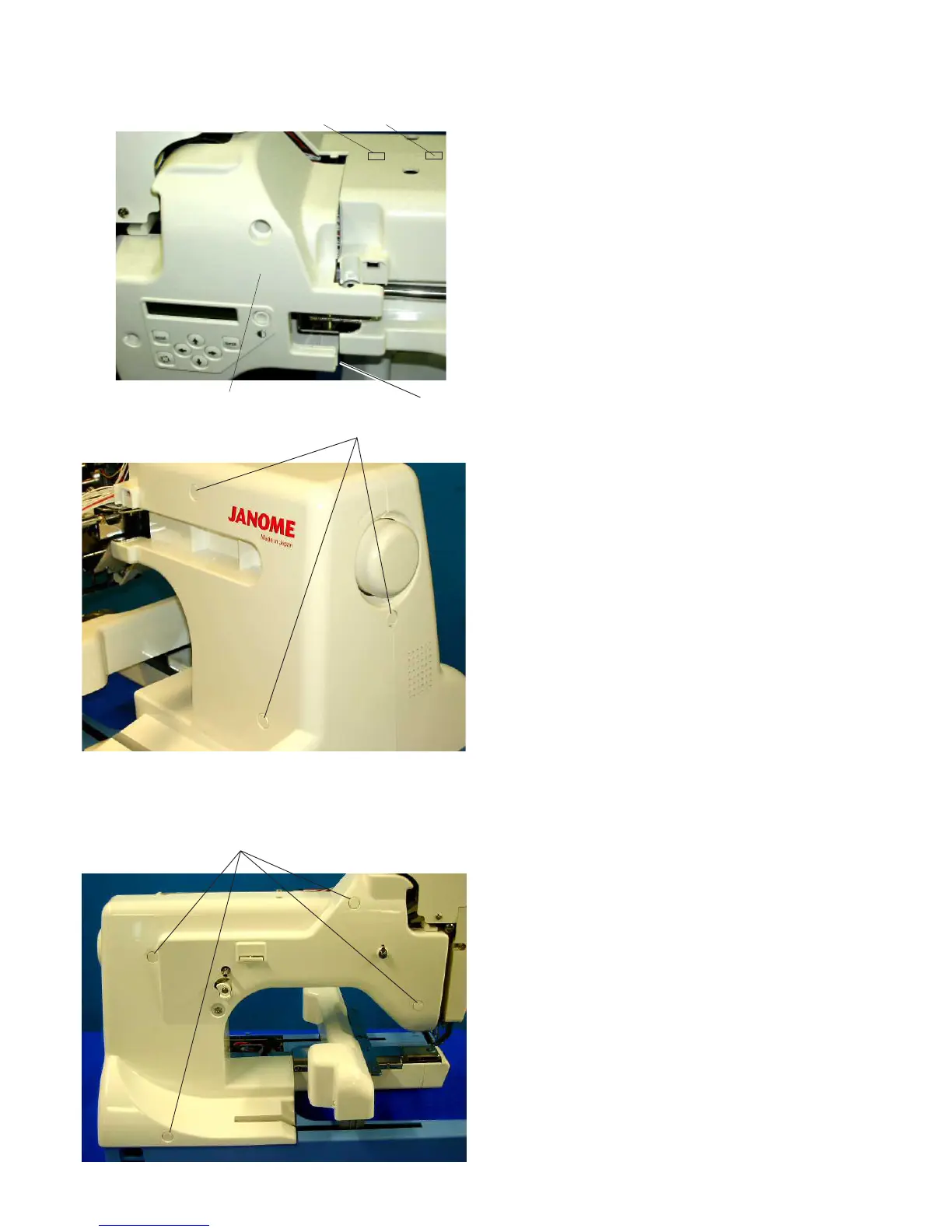
Hook
Upper hook 1
Static head cover (right)
Right Cover
To remove:
1. Remove the static head cover (right).
Unhook the right cover from the right hook.
• To remove the static head cover (right), Unhook
the cover from upper hook 1, upper hook 2 and
the hook on handwheel side.
2. Remove 3 caps and 3 setscrews A.
Remove the right cover while pulling the right
bottom part toward you and lift.
To attach:
3. Attach the right cover with 3 setscrews A and 3 caps.
4. Attach the static head cover (right).
• Do not get cords caught when attaching the
static head cover (right).
Left Cover
To remove:
1. Remove 4 caps and 4 setscrews B.
Remove the left cover.
Disconnect the connectors.
To attach:
2. Connect the connectors.
Attach the left cover with 4 setscrews B and 4
caps.
Caps, Setscrews A
Caps, Setscrews B
To Replace Right Cover and Left Cover
Upper hook 2



 To Next Page