44
elna 9900
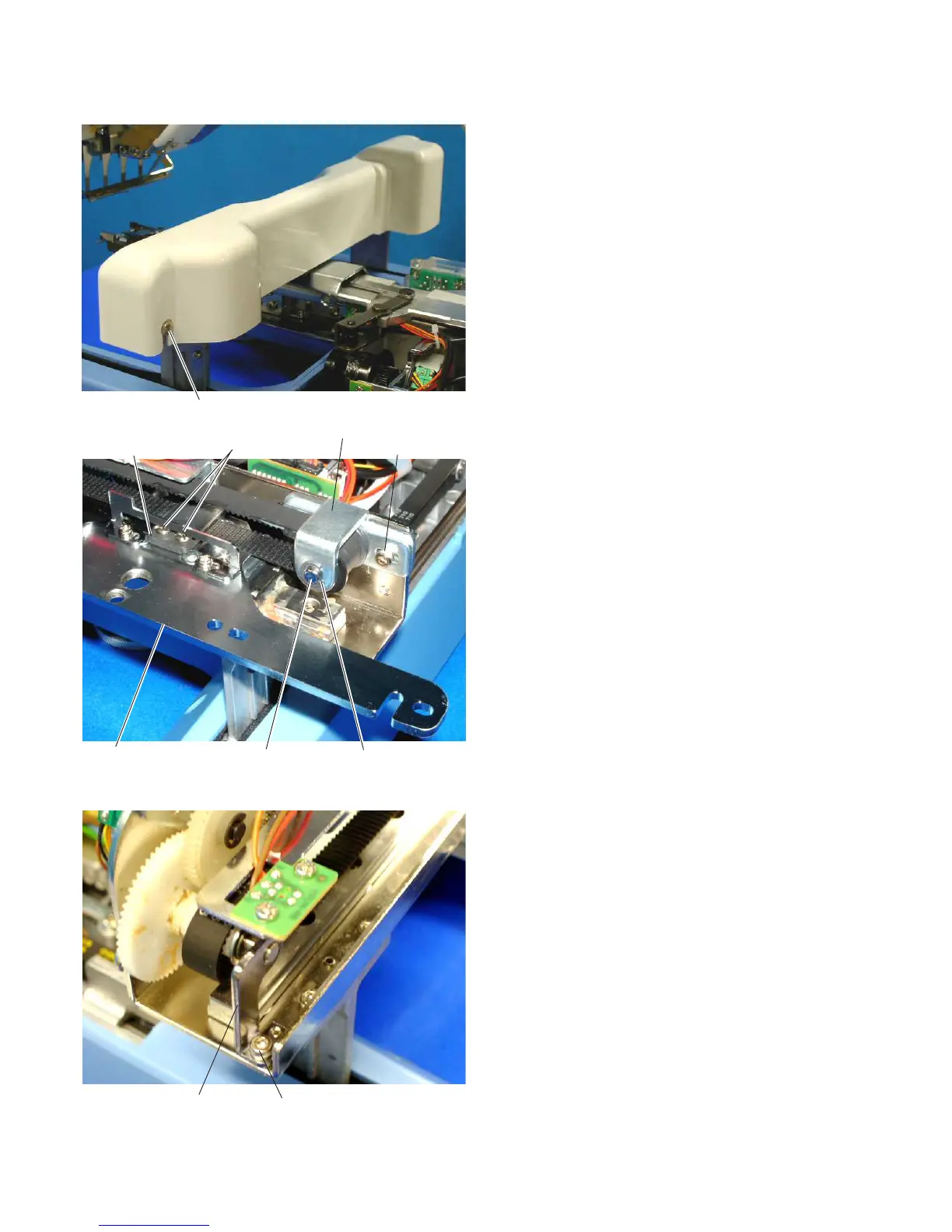
Replacing the X-carriage Belt
1. Remove the spool stand, static head right cover, right
cover and left cover (see pages 4 – 6).
2. Loosen the 2 setscrews (A) and remove the
X-carriage cover.
3. Shift the hoop supporter to the extreme right end.
Remove the 2 setscrews (C) and the X-belt holder.
4. Loosen the 2 setscrews (B) and shift the X-belt
pulley to the left.
5. Remove the E-ring and pull the X-belt pulley shaft to
remove the X-belt pulley.
6. Remove the setscrew (D) and drive pulley shaft unit.
7. Replace the X-carriage belt.
8. Attach the parts removed in steps 3 – 6.
9. Adjust the X-carriage belt tension (see the previous
page).
10.Attach the parts removed in steps 1 – 2.
Setscrews (A)
X-belt holder
Setscrews (C)
X-belt pulley
Setscrew (B)
Hoop supporter
E-ring
X-belt pulley shaft
Drive pulley shaft unit
Setscrews (D)



 To Next Page