Notes:
1. The handset can change group affiliations at any time.
2. The base station is not responsible for group assignments.
Consequently, it cannot de-subscribe a handset from a group.
3. When an intercom caller enters a group ID, all handsets subscribed to
this group will ring. The first handset to answer will establish a link
with the caller. Afterward, it is a one-to-one call, not a one-to-many
call.
While a telephone call is in progress, you can transfer it between different
handsets.
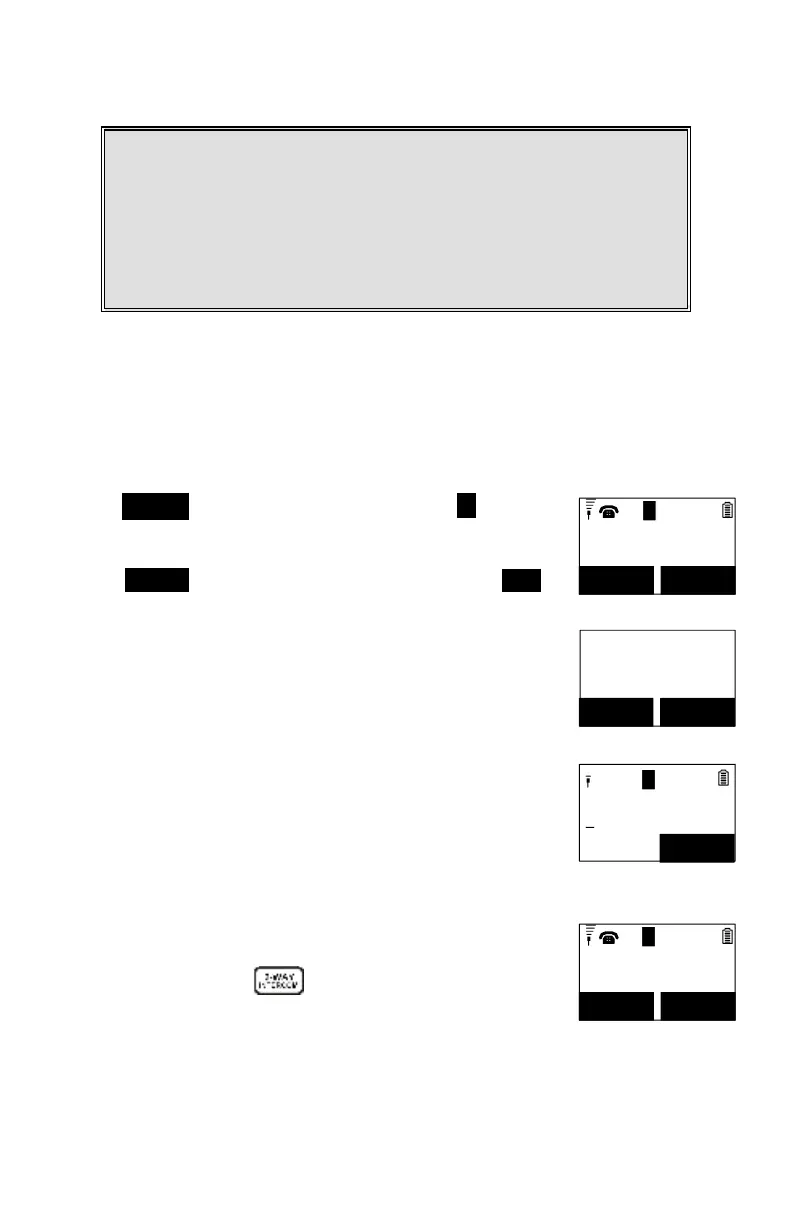
Press OPTION (Right) soft key, followed by the * key to put
the call on hold.
00:00:15
Volume: 3
11
MUTE OPTION
L
1
You have a
call on hold
UNHOLD XFER
Press OPTION (Right) soft key, followed by selecting XFER
item and then entering the destination handset ID, then the
held call will be transferred directly.
After the call is transferred to the destination handset, the
original handset will go back to standby mode automatically.
If you want to talk to the destination handset before the call is
transferred, you can follow the below method:
00:00:15
Volume: 3
11
MUTE OPTION
L
1
During the call, press key, then enter the destination
handset ID.



 To Next Page