Controlling a Networked Projector Using a Web Browser
149
a
You cannot change the following settings using Epson Web Control.
• EDID (EB‑L255F/EB‑L250F)
• HDMI Link
• HDMI EQ Setting
• Fixed Installation
• Pattern Display
• Split Screen Setting
• Content Playback (EB‑L255F/EB‑L250F)
• User Button
• User's Logo
• User Pattern
• Wireless LAN Diagnosis
• Language
• Search Access Point
• Crestron Connected
• Event ID
• Antenna Level
• ECO menu
• Reset Network Settings
• Firmware Update
a
You can select the following settings only with Epson Web Control.
• Monitor Password (up to 16 alphanumeric characters)
• IPv6 Settings (manual)
• HTTP port (port number used for Web Control except for 80
[default], 843, 3620, 3621, 3625, 3629, 4352, 4649, 5357, 10000,
10001, 41794)
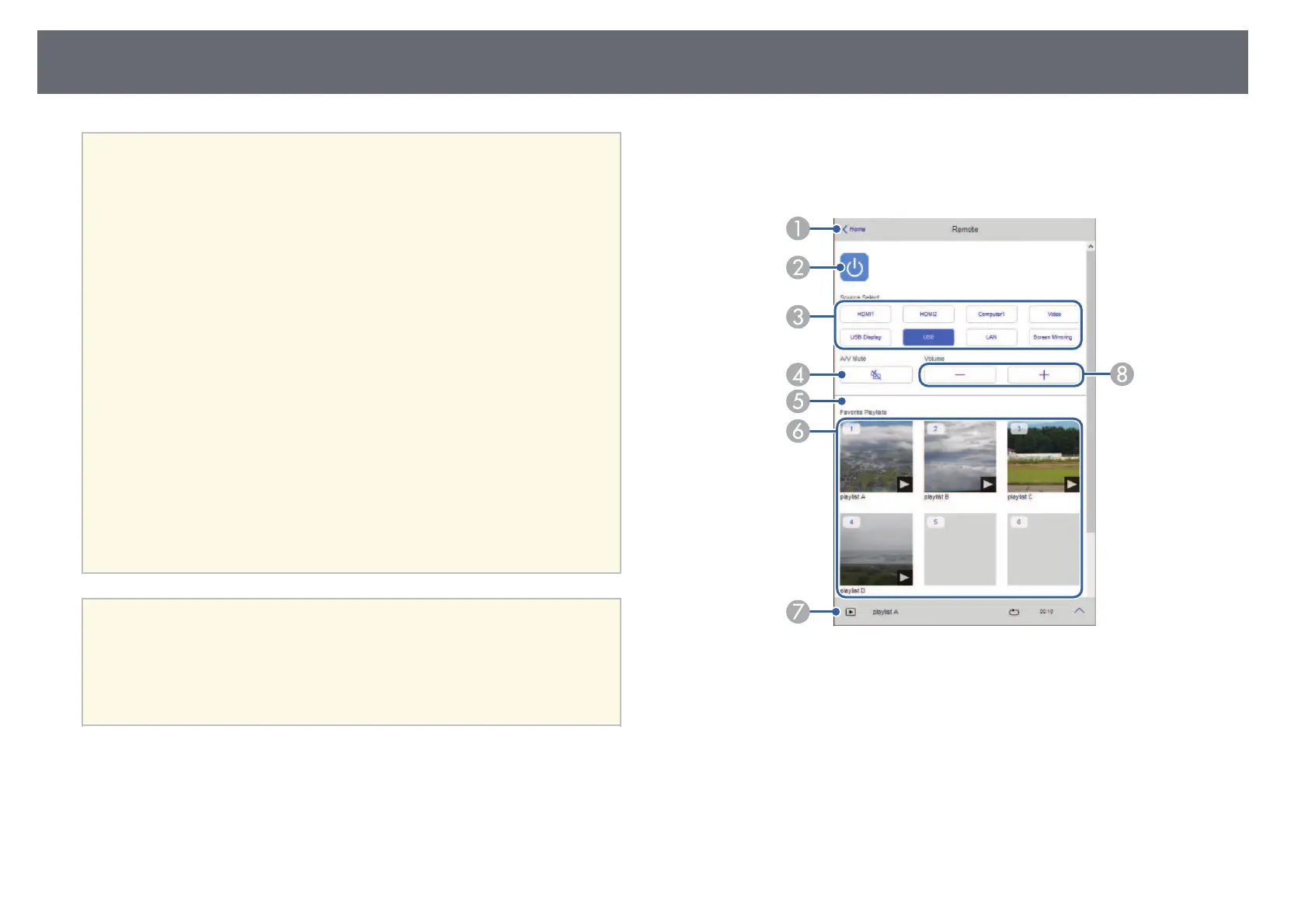
Remote (only in Content Playback mode)
Options on the Remote screen allow you to select the input source, control
the projector, and start projecting playlists.
A
Returns to the Epson Web Control screen.
B
Turns the projector on or off.
C
Selects the input source. (The available sources vary depending on your
projector model.)
D
Turns the video and audio on or off temporarily.











 To Next Page