Projector Connections
25
a
• To connect a computer that does not have a VGA video port, you
need an adapter that allows you to connect to the projector's VGA
video port.
• To project an image source connected to the Computer2/Monitor
Out port, set Monitor Out Port to Computer2 in the projector's
Signal I/O menu.
• You can also set the port to input audio when projecting the
computer source as the Audio Output setting in the projector's
Signal I/O menu.
• Make sure the audio cable is labeled "No resistance".
a
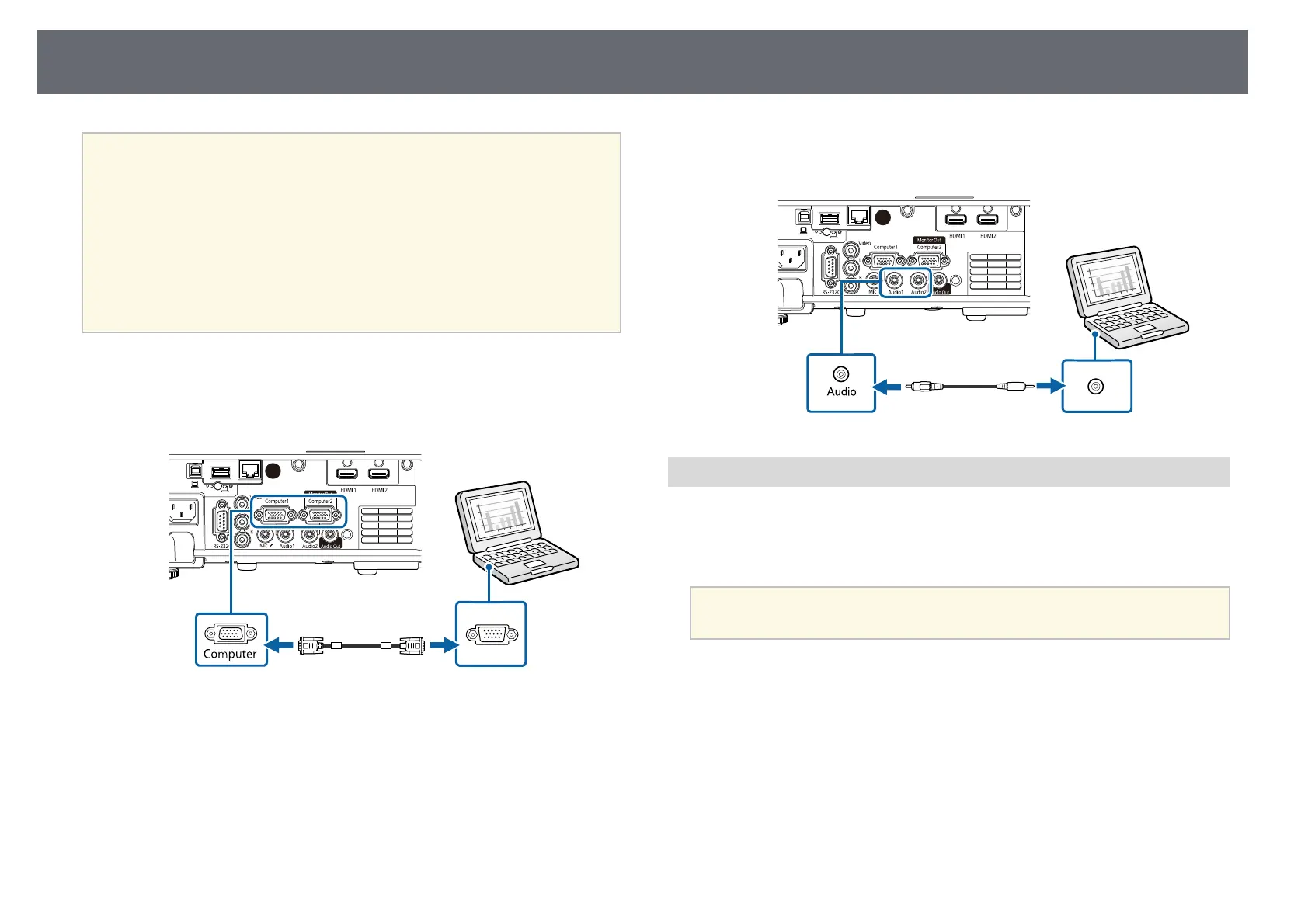
Connect the VGA computer cable to your computer's monitor port.
b
Connect the other end to a Computer port on the projector.
c
Tighten the screws on the VGA connector.
d
Connect the audio cable to your laptop's headphone or audio-out jack,
or your desktop's speaker or audio-out port.
e
Connect the other end to the Audio port that corresponds to the
Computer port you are using.
Connecting to a Computer for USB Video and Audio
If your computer meets the system requirements, you can send video and
audio output to the projector through the computer's USB port. This function
is called USB Display. Connect the projector to your computer using a USB
cable.
a
• If you use a USB hub, the connection may not operate correctly.
Connect the USB cable directly to the projector.











 To Next Page