Home
Epson
Projector
EB‑L255F
Page 49
Epson EB‑L255F - Page 49
247 pages
Manual
Save Page as PDF
To Next Page
To Next Page
To Previous Page
To Previous Page
Loading...
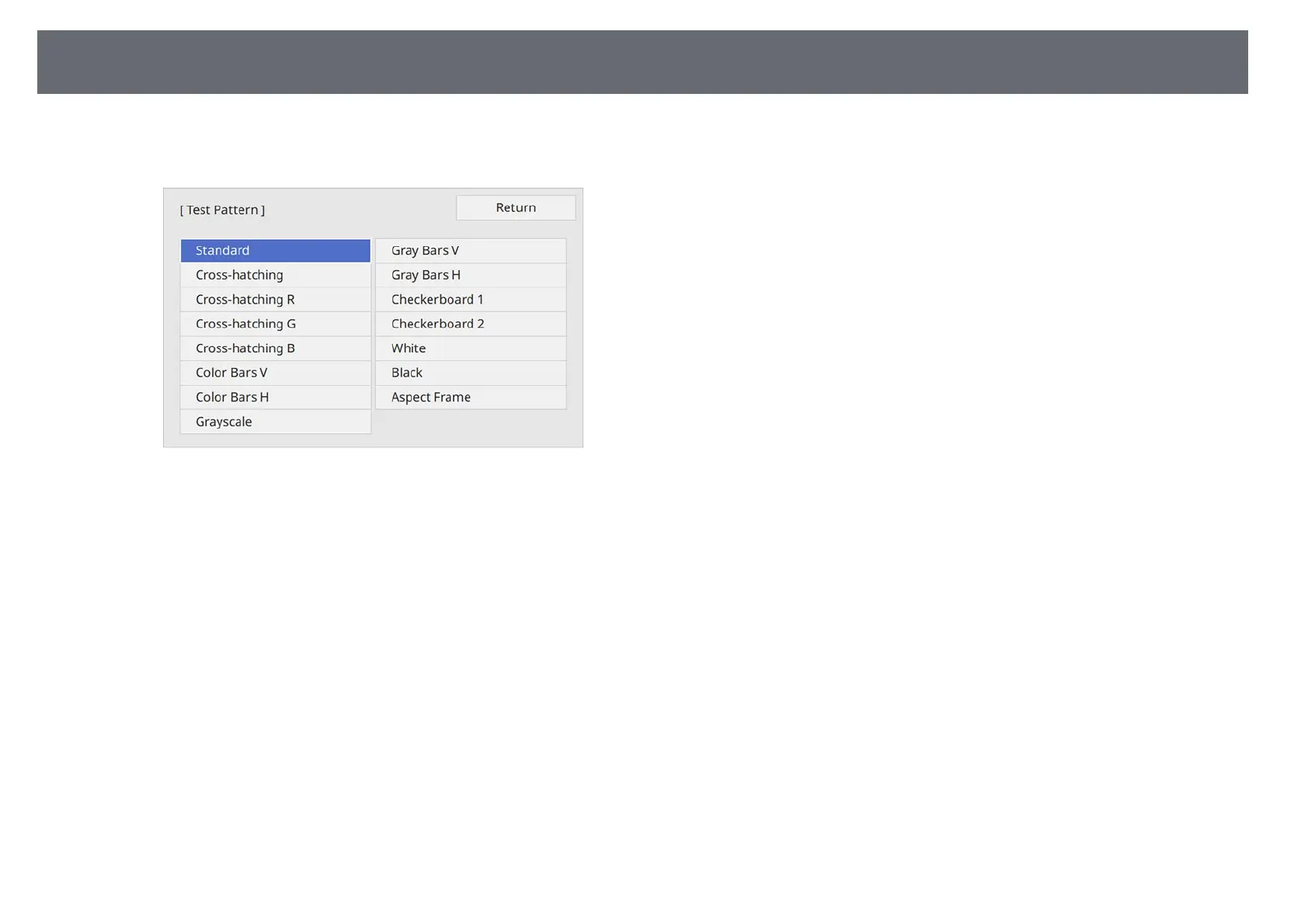
Displaying
a
Test
Pattern
49
e
If
the
Screen
Type
is
set
to
16:9
,
select
the
test
pattern,
and
then
press
[Enter].
(EB
‑
L255F/EB
‑
L250F)
f
Adjust
the
image
as
necessary.
g
To
remove
the
test
pattern,
press
[Esc].
48
50
Table of Contents
Main Page
Default Chapter
2
Table of Contents
2
Notations Used in this Guide
7
Using the Manual to Search for Information
8
Searching by Keyword
8
Jumping Directly from Bookmarks
8
Printing Only the Pages You Need
8
Getting the Latest Version of the Documents
9
Introduction to Your Projector
10
Projector Features
11
Long-Life Laser Light Source
11
Quick and Easy Setup
11
Flexible Connectivity
11
Connect with Computers
12
Connect with Mobile Devices
12
Projecting for Exhibitions
13
Projector Parts and Functions
14
Projector Parts - Front/Top
14
Projector Parts - Rear
15
Projector Parts - Base
16
Projector Parts - Control Panel
17
Projector Parts - Remote Control
18
Setting up the Projector
20
Projector Placement
21
Projector Setup and Installation Options
22
Projector Placement
23
Projection Distance
23
Projector Connections
24
Connecting to a Computer
24
Connecting to a Computer for HDMI Video and Audio
24
Connecting to a Computer for VGA Video and Audio
24
Connecting to a Computer for USB Video and Audio
25
Connecting to Video Sources
26
Connecting to an HDMI Video Source
27
Connecting to a Composite Video Source
27
Connecting to External USB Devices
28
USB Device Projection
28
Connecting to a USB Device
28
Disconnecting a USB Device
29
Connecting to a Document Camera
29
Connecting to External Devices
29
Connecting to a VGA Monitor
29
Connecting to External Speakers
30
Connecting a Microphone
30
Installing Batteries in the Remote Control
32
Remote Control Operation
33
Opening the Lens Cover
34
Using Basic Projector Features
35
Turning on the Projector
36
Home Screen
37
Turning off the Projector
39
Setting the Date and Time
40
Selecting the Language for the Projector Menus
42
Selecting the Language for the Projector Menus
43
Projection Modes
43
Changing the Projection Mode Using the Remote Control
43
Changing the Projection Mode Using the Menus
43
Setting the Screen Type
45
Adjusting the Image Position Using Screen Position
46
Displaying a Test Pattern
48
Adjusting the Image Height
50
Adjusting the Image Height
51
Image Shape
51
Auto V-Keystone
51
Correcting the Image Shape with the Horizontal Keystone Slider
51
Correcting the Image Shape with the Keystone Buttons
52
Correcting the Image Shape with Quick Corner
53
Correcting Image Shape with Arc Correction
55
Correcting Image Shape with Point Correction
57
Resizing the Image with the Zoom Ring
60
Focusing the Image Using the Focus Ring
61
Selecting an Image Source
62
Image Aspect Ratio
64
Changing the Image Aspect Ratio
64
Available Image Aspect Ratios
64
Projected Image Appearance with each Aspect Mode
65
Adjusting Image Quality (Color Mode)
69
Changing the Color Mode
69
Available Color Modes
69
Turning on Automatic Luminance Adjustment
69
Adjusting the Image Color
71
Adjusting the Hue, Saturation, and Brightness
71
Adjusting the Gamma
72
Adjusting the Image Resolution
74
Adjusting the Brightness
76
Adjusting the Brightness
77
Constant Brightness Usage Hours
77
Light Source Operation Time
78
Controlling the Volume with the Volume Buttons
79
Adjusting Projector Features
80
Adjusting Projector Features
81
Projecting Multiple Images Simultaneously
81
Unsupported Input Source Combinations for Split Screen Projection
83
Split Screen Projection Restrictions
83
Projecting a PC Free Presentation
84
Supported PC Free File Types
84
Precautions on PC Free Projection
85
Starting a PC Free Slide Show
85
Starting a PC Free Movie Presentation
87
PC Free Display Options
88
Projecting in Content Playback Mode
89
Switching to Content Playback Mode
89
Using Spotlight Mode
90
Projecting Your Playlists
91
Creating Playlists Using Epson Web Control
92
Adding Effects to Your Projected Image
94
Content Playback Mode Restrictions
95
Shutting off the Image and Sound Temporarily
96
Stopping Video Action Temporarily
97
Zooming In/Zooming out of Images (E-Zoom)
98
Zooming into Images
98
Zooming out of Images
98
Saving a User's Logo Image
100
Saving a User Pattern
102
Saving Auser Pattern
104
Using Multiple Projectors
104
Projector Identification System for Multiple Projector Control
104
Setting the Projector ID
105
Selecting the Projector You Want to Operate
105
Using Multiple Projectors
105
Adjusting Color Uniformity
106
Blending the Image Edges
108
Matching the Image Colors
109
Adjusting the Black Level
111
Modifying the Black Level Adjustment Area
112
Adjusting RGBCMY
113
Scaling an Image
115
Projector Security Features
117
Password Security Types
117
Setting a Password
117
Selecting Password Security Types
118
Entering a Password to Use the Projector
119
Locking the Projector's Buttons
119
Unlocking the Projector's Buttons
120
Installing a Security Cable
120
Using the Projector on a Network
122
Wired Network Projection
123
Connecting to a Wired Network
123
Selecting Wired Network Settings
123
Wireless Network Projection
126
Safety Instructions for Built-In Wireless LAN Module
126
Connection Methods for Wireless Network Projection
126
Installing the Wireless LAN Module
127
Selecting Wireless Network Settings Manually
128
Selecting Wireless Network Settings in Windows
131
Selecting Wireless Network Settings in Mac
131
Setting up Wireless Network Security for Simple AP Mode
131
Setting up Wireless Network Security for Infrastructure Mode
132
Supported Client and CA Certificates
134
Using a QR Code to Connect a Mobile Device
134
Using a USB Key to Connect a Windows Computer
135
Wireless Network Projection from a Mobile Device (Screen Mirroring)
136
Selecting Screen Mirroring Settings
136
Connecting Using Screen Mirroring with the Miracast Function
138
Connecting Using Screen Mirroring in Windows 10
139
Connecting Using Screen Mirroring in Windows 8.1
139
Secure HTTP
141
Importing a Web Server Certificate Using the Menus
141
Supported Web Server Certificates
142
Monitoring and Controlling the Projector
143
Epson Projector Management
144
Controlling a Networked Projector Using a Web Browser
145
Web Control Options
146
Registering Digital Certificates from a Web Browser
153
Setting up Projector Network E-Mail Alerts
154
Network Projector E-Mail Alert Messages
154
Setting up Monitoring Using SNMP
155
Using ESC/VP21 Commands
156
ESC/VP21 Command List
156
Cable Layouts
156
Pjlink Support
158
Art-Net Channel Definitions
159
Crestron Connected Support
161
Setting up Crestron Connected Support
161
Setting Projector Event Schedules
162
Adjusting the Menu Settings
165
Using the Projector's Menus
166
Using the Displayed Keyboard
167
Available Text Using the Displayed Keyboard
167
Image Quality Settings - Image Menu
168
Input Signal Settings - Signal I/O Menu
170
Projector Installation Settings - Installation Menu
172
Projector Installation Settings - Installation Menu
173
Projector Display Settings - Display Menu
174
Projector Display Settings - Display Menu
175
Projector Feature Settings - Operation Menu
176
Projector Administration Settings - Management Menu
178
Event ID Code List
179
Projector Network Settings - Network Menu
181
Network Menu - Network Settings Menu
181
Network Menu - Wireless LAN Menu
182
Network Menu - Wired LAN Menu
184
Network Menu - Mail Notification Menu
185
Network Menu - Projector Control Menu
185
Network Menu - Network Projection Settings
186
Multiple Projector Operation Settings - Multi-Projection Menu
188
Projector Setup Settings - ECO Menu
190
Projector Initial Settings and Reset Options - Initial/All Settings Menu
191
Copying Menu Settings between Projectors (Batch Setup)
192
Transferring Settings from a USB Flash Drive
192
Transferring Settings from a Computer
193
Batch Setup Error Notification
194
Maintaining the Projector
195
Projector Maintenance
196
Cleaning the Lens
197
Cleaning the Projector Case
198
Air Filter and Vent Maintenance
199
Air Filter and Vent Maintenance
199
Cleaning the Air Filter and Vents
199
Replacing the Air Filter
199
Air Filter and Vent Maintenance
200
Updating the Firmware
201
Updating Firmware Using a USB Storage Device
201
Updating Firmware Using a Computer and USB Cable
202
Solving Problems
204
Projection Problems
205
Projector Indicator Status
206
Solving Image or Sound Problems
208
Solutions When no Image Appears
208
Solutions When Image Is Incorrect Using the USB Display Function
209
Solutions When "No Signal" Message Appears
209
Displaying from a Windows Laptop
209
Displaying from a Mac Laptop
210
Solutions When "Not Supported" Message Appears
210
Solutions When Only a Partial Image Appears
210
Solutions When the Image Is Not Rectangular
211
Solutions When the Image Contains Noise or Static
211
Solutions When the Image Is Fuzzy or Blurry
212
Solutions When the Image Brightness or Colors Are Incorrect
212
Solutions When an Afterimage Remains on the Projected Image
213
Solutions to Sound Problems
213
Solutions to Microphone Problems
213
Solutions When Image File Names Are Not Displayed Correctly in PC Free
213
Solutions When You Cannot Project Images Using the PC Free Feature
214
Solving Projector or Remote Control Operation Problems
215
Solutions to Projector Power or Shut-Off Problems
215
Solutions to Problems with the Remote Control
215
Solutions to Password Problems
216
Solution When "The Battery that Saves Your Clock Settings Is Running Low" Message Appears
216
Solutions to Problems in Content Playback Mode
217
Solving Network Problems
218
Solutions When Wireless Authentication Fails
218
Solutions When You Cannot Access the Projector through the Web
218
Solutions When Network Alert E-Mails Are Not Received
218
Solutions When the Image Contains Static During Network Projection
219
Solutions When You Cannot Connect Using Screen Mirroring
219
Solutions When You Cannot Use Two Screen Mirroring Sources
219
Solutions When the Image or Sound Contains Static During Screen Mirroring Connection
219
Solutions When HDMI Link Does Not Function
221
Appendix
222
Optional Accessories and Replacement Parts
223
Screens
223
Cables
223
Mounts
223
External Devices
223
Replacement Parts
224
For Wireless Connection
224
Compatible Accessories from Other Projectors
224
Screen Size and Projection Distance
225
Supported Monitor Display Resolutions
229
Projector Specifications
234
Projector Specifications
235
Connector Specifications
235
External Dimensions
236
USB Display System Requirements
237
Supported Features for Epson Projector Content Manager
238
List of Safety Symbols and Instructions
239
List of Safety Symbols and Instructions
241
Laser Safety Information
241
Laser Warning Labels
241
Glossary
243
Notices
245
FCC Compliance Statement
245
Indication of the Manufacturer and the Importer in Accordance with Requirements of EU Directive
246
Restriction of Use
246
Operating System References
246
Trademarks
246
Copyright Notice
247
Copyright Attribution
247
Related product manuals
Epson EB-L25000U
231 pages
Epson PowerLite EB-L250F
296 pages
Epson EB-L260F
306 pages
Epson EB-L210W
306 pages
Epson EB-L200SW
6 pages
Epson PowerLite EB-L200W
264 pages
Epson PowerLite EB-L210SF
289 pages
Epson PowerLite EB-L200SX
295 pages
Epson EB-L730U
267 pages
Epson EB-L630U
267 pages
Epson EB-L630SU
267 pages
Epson EB-L1405U
256 pages











 To Next Page