Introduction
Printer Parts
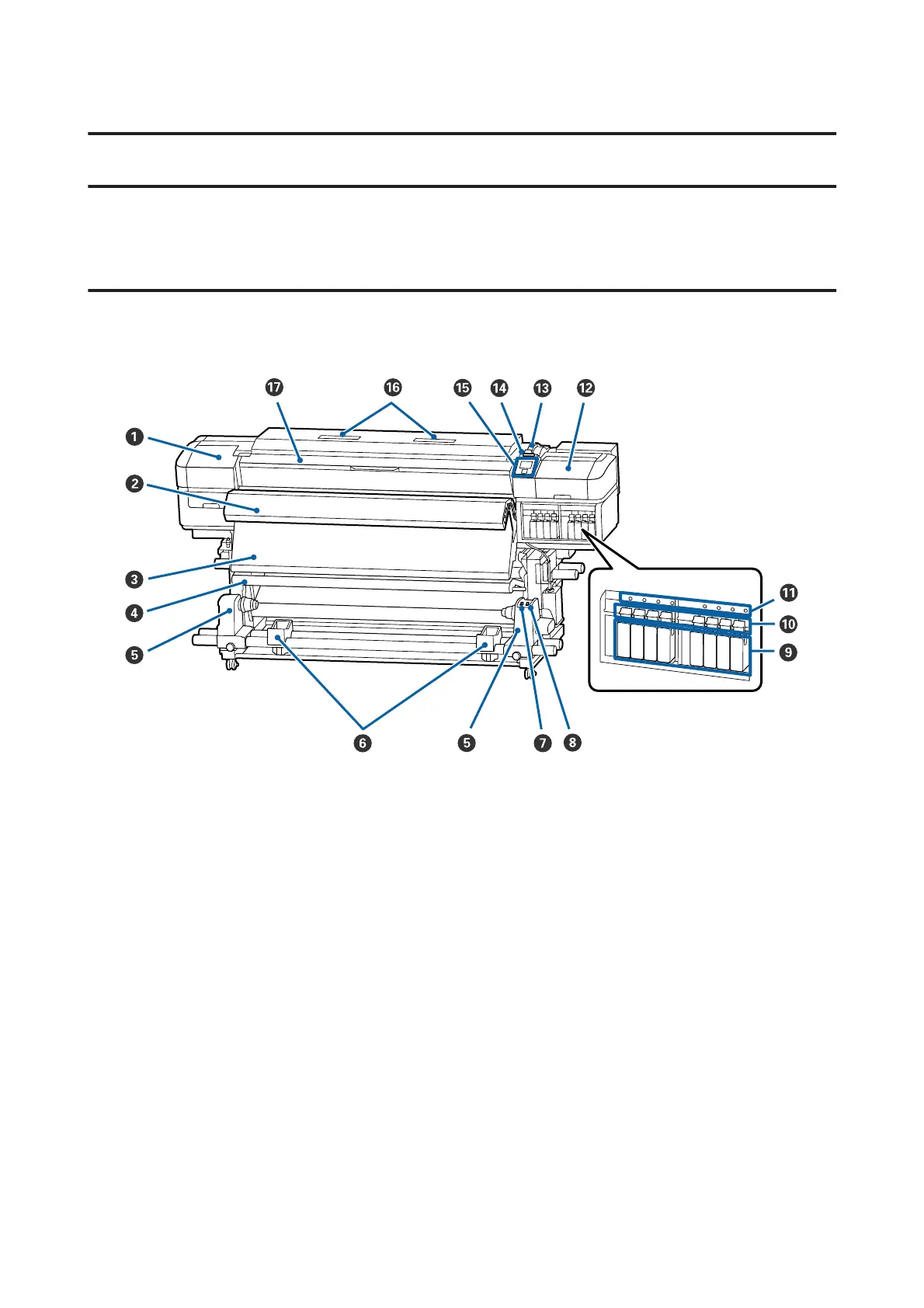
Front Section
The illustration shows the SC-S60600 Series.
A Maintenance cover (left)
Open this cover to clean the area around the print head. Normally closed when using the printer.
U “Cleaning Around the Print Head” on page 62
B Additional Print Drying System
The heater can be used to rapidly dry ink after printing. This is an option for the SC-S80600 Series/SC-S40600
Series.
U Additional Print Drying System Setup Guide
C After heater
The heater can be used to rapidly dry ink after printing.
U “Changing the Heater Temperature and Drying Settings” on page 50
D Tension bar
The tensioner maintains tension to prevent the media sagging as it is taken up.
U “Using the Auto Take-up Reel Unit” on page 32
SC-S80600 Series/SC-S60600 Series/SC-S40600 Series User's Guide
Introduction
5



 To Next Page
 Loading...