Home
Epson
Printer
WF-C879R Series
Setup And Administration Guide
Page 49
Epson WF-C879R Series - Page 49
107 pages
Manual
To Next Page
To Next Page
To Previous Page
To Previous Page
Loading...
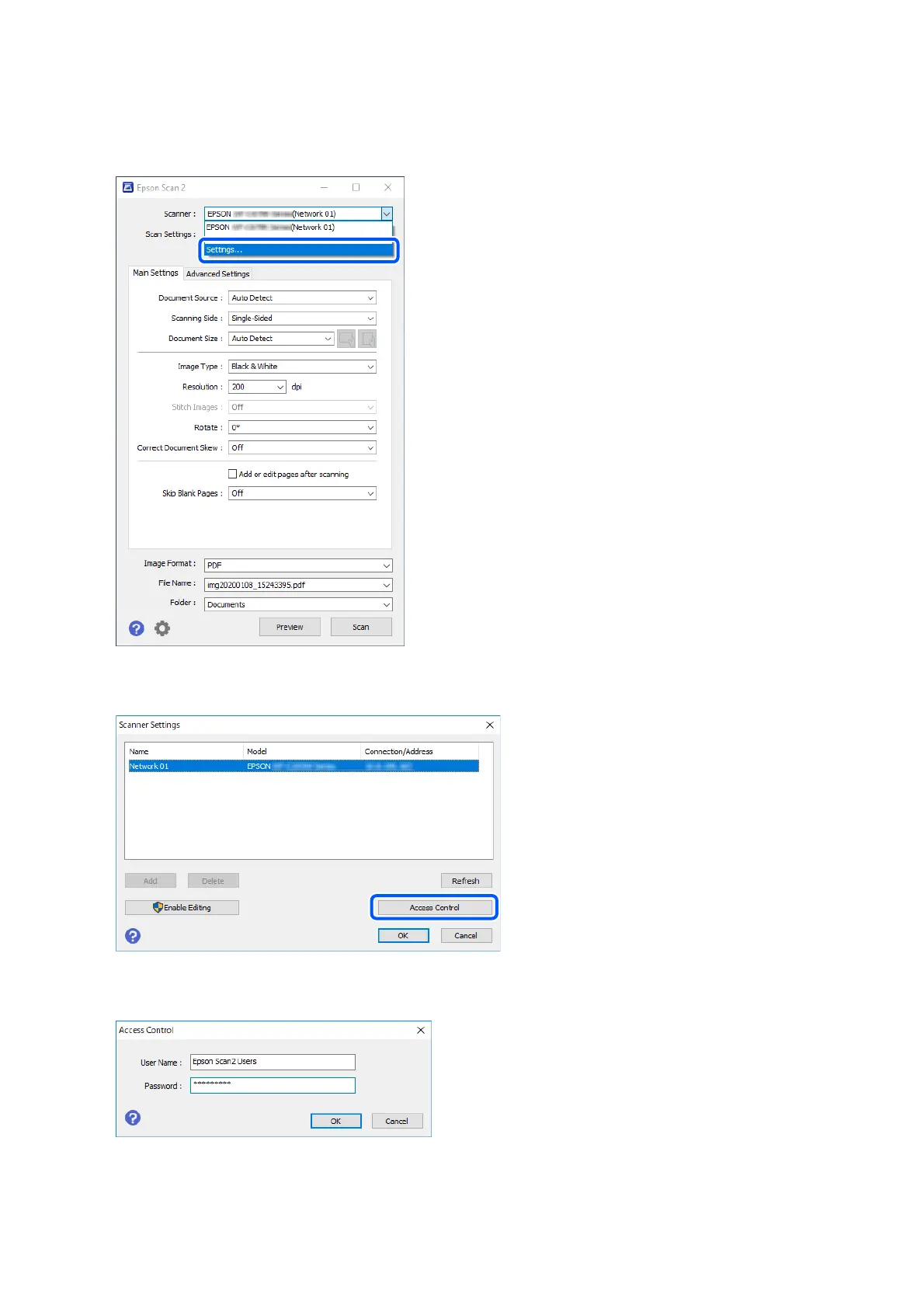
2.
Select
Set
tin
gs
fr
om
Scanner
.
3.
Select the scanner
, and then click
Acc
e
s
s
C
on
tr
o
l
.
4.
Set the
Us
e
r
N
a
m
e
and
Pa
s
s
wo
rd
, and then click
OK
.
5.
Click
OK
.
Setup
& Ad
min
istr
ation Gu
ide
Information Registr
ation and S
ystem Conguration
49
48
50
Table of Contents
Main Page
Default Chapter
2
Table of Contents
2
Introduction
4
The Content of this Document
4
Using this Guide
4
Marks and Symbols
4
Screenshots Used in this Guide
4
Operating System References
4
Terms
5
Overview for the Authentication Method
7
Device Authentication (Local DB)
7
LDAP Server Authentication
7
Device Authentication and LDAP Server Authentication (Local DB and LDAP)
7
System Requirements
8
Printer
8
Client Computer
8
Setting Overview
10
Using Software for Setting
10
Web Config
10
Epson Device Admin
11
Required Settings for the Authentication Method
12
Flow to Set up Printers Individually
13
Flow to Set up Printers in Bulk
14
Application Configuration Comparison
15
Authentication Device Connection
19
Mounting the Authentication Device Table
19
(Optional)
19
Connecting the Authentication Device
21
Operation Check for Authentication Device
23
Available Reading Method for Authentication Information
23
Authentication Device Setting Items
24
Authentication Device, Card ID Save Format Setting Items
24
Information Registration and System Configuration
26
About License Key Acquisition
26
Registration for the License Key
26
Registering the License Key by Using Web Config
26
Registering the License Key by Using Epson Device Admin
28
Creating the Configuration Template
28
Importing the License Key
29
Applying the Configuration Template
30
Set the Printer Individually Using Web Config
33
Using Epson Print Admin Serverless Setting List
34
Making User Authentication Settings (Web Config)
34
Making Print Job Settings (Web Config)
36
Registration for the User Information (Web Config)
38
Synchronization with the LDAP Server (Web Config)
44
Options Functions Setting (Web Config)
46
Batch Setting Using Epson Device Admin (Configuration Template)
59
Operation Flow of Epson Device Admin
60
Making User Authentication Settings (Configuration Template)
62
Making Authentication Device Settings (Configuration Template)
62
Making Print Job Settings (Configuration Template)
63
Making Scan to My Folder Settings (Configuration Template)
64
Prohibit Changing the Destination for Scan to Network Folder/Ftp (Configuration Template)
67
Synchronizing with the LDAP Server (Configuration Template)
67
Registration for the User Information (Configuraiton Template)
71
Other Functions Setting (Configuration Template)
75
Client Computer Setting
82
Installation for the Printer Driver
82
Printer Driver Setting
82
User Settings for Windows Printer Driver
82
User Settings for Mac os Printer Driver
83
Connection Format for Authentication Information
84
Operation and Management
85
Setting an Administrator Password and Administrator Lock
85
User Reports Using Epson Device Admin
85
Creating User Reports
85
Report Output Items
90
Managing Printers by Using Epson Device Admin
91
Displaying Epson Print Admin Serverless Settings Menu
91
User Maintenance
92
Config
95
Email Notifications and Snapshots
96
Deleting the Print Jobs
97
Backing up the Settings
98
Settings in Web Config
98
Configuration Templates in Epson Device Admin
100
Disabling Epson Print Admin Serverless
101
Disabling from Web Config
102
Making Settings for Processing Saved Data
103
Making Settings for Sequential Deletion
103
Solving Problems
104
Cannot Read the Authentication Card
104
Cannot Open Web Config
104
Cannot Activate Epson Print Admin Serverless
104
The Message that Indicates the License Key Has Expired Is Displayed
104
Epson Device Admin Report Has no Content
104
Cannot Set Pull Printing
105
Appendix
106
Functions that Enhance Printer Security
106
User Information Recorded in the Printer
106
Trademarks
107
Other manuals for Epson WF-C879R Series
User Guide
53 pages
Quick Guide For Deployment
2 pages
Related product manuals
Epson WF-C878RDWF
535 pages
Epson WF-C878R Series
535 pages
Workforce Pro WF-C8190 Series
162 pages
Workforce Pro WF-C8610 Series
254 pages
Epson WF-C5790
608 pages
Epson WF-C5890
438 pages
Epson WF-C5210
608 pages
Epson WF-C5790DWF
266 pages
Epson WF-C5710 Series
239 pages
Epson WF-C579R Series
328 pages
WorkForce Pro WF-C4810 Series
383 pages
WorkForce Enterprise WF-C21000 Series
602 pages















 To Next Page