LIP-8040E Gigabit Phone User Guide
5
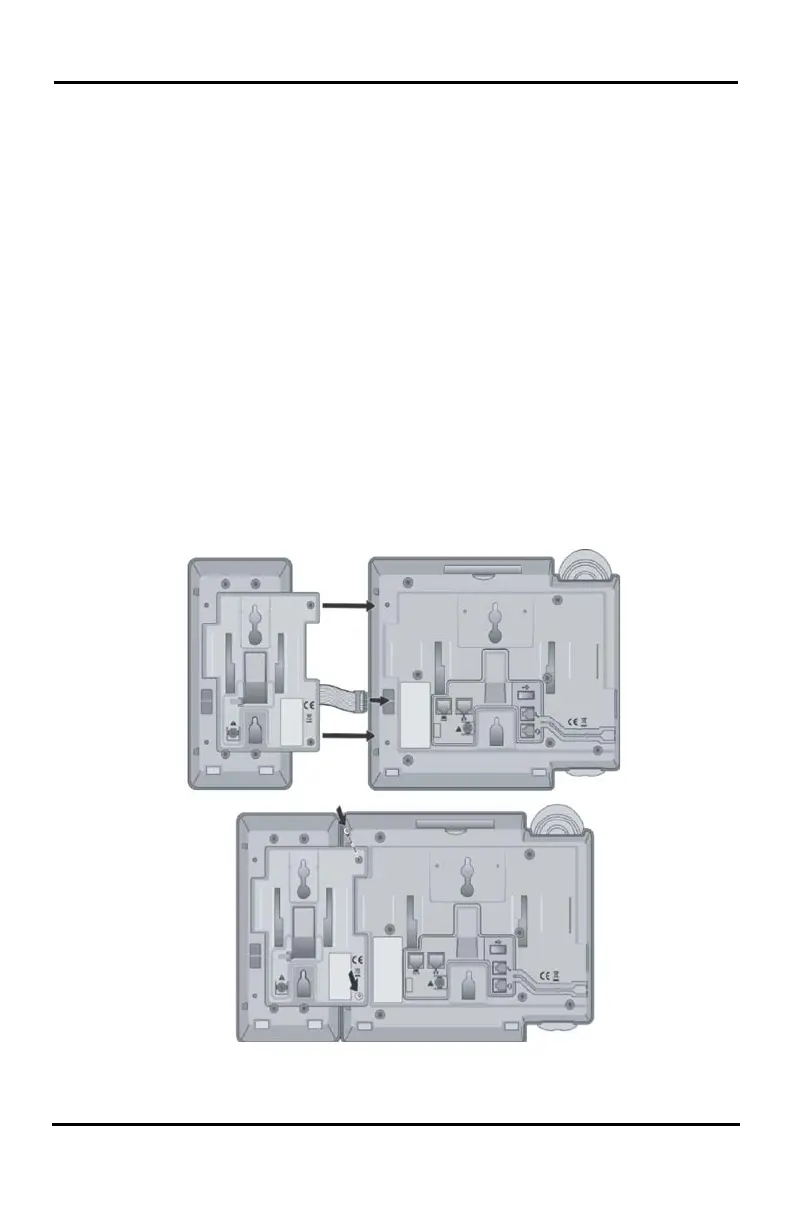
1.6 DSS (Direct Station Select) Console Installation
A DSS console can be installed with the LIP-8000E series
phone as shown in Figure. Up to 3 consoles may be daisy
chained as shown using the flat cable provided. Keep in
mind the following conditions when installing LIP-8000
DSS consoles.
1. The AC/DC adapter must be used for LIP-8048DSS.
2. Up to two (2) LIP-8012LSS and/or LIP-8012DSS can be
installed with LIP-8000E Phone.
3. The LIP-8048DSS must be separately powered.
The available DSS is as follows:
1) LIP-8012DSS
2) LIP-8012LSS
3) LIP-8048DSS
LIP-8000 DSS Installation









 To Next Page