Chapter 3 Operation Instructions SuZhou Eshine Elevator Components Co., Ltd.
―26― YS-K01 Door Controller User Manual
3.4 Upload and Download Parameters
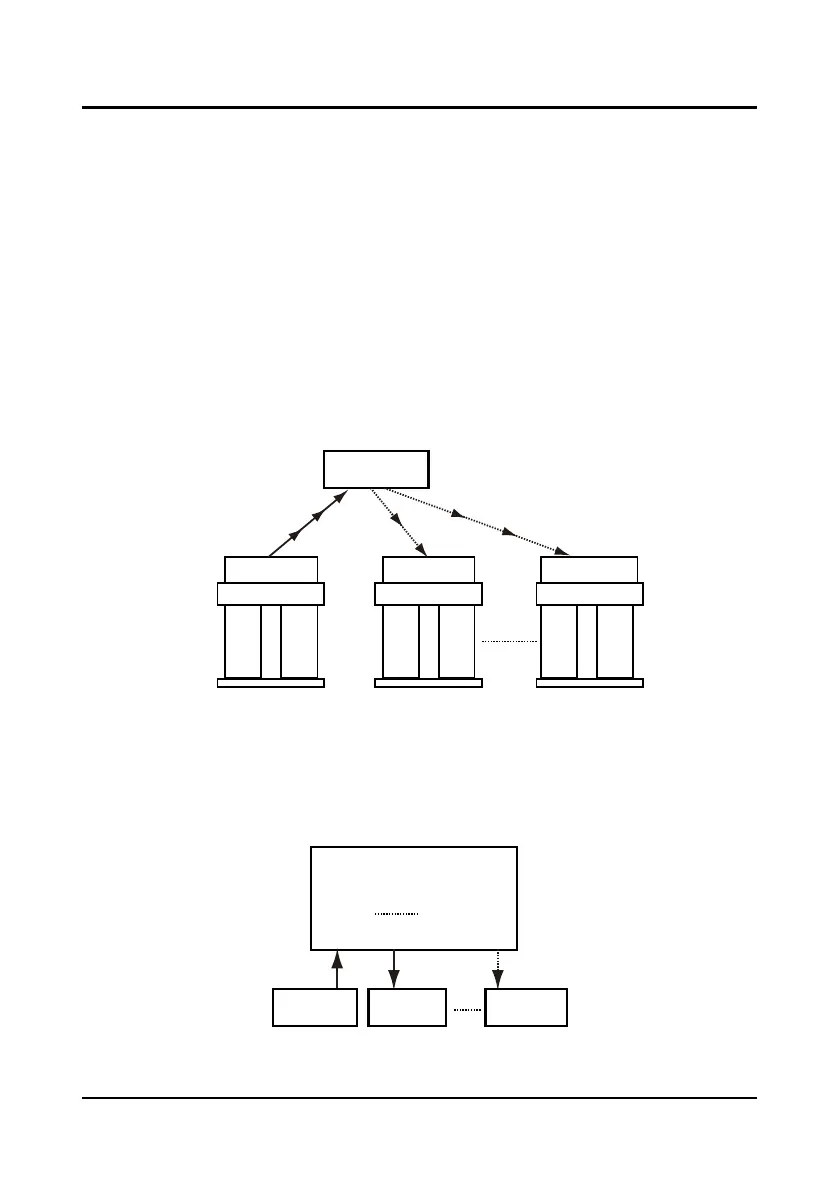
The controller design has control curve parameter storage and batch upload and download
function to meet the requirement of high-efficient elevator debugging and maintenance.
For the same door width and type door machine can use the same curve parameter to achieve
door control. Upload the experience curve parameter from the controller of debugging good
results to the panel. Then download from the panel to the same door width and type door
machine to achieve good door control, which is shown as Figure 3-38.
Example: door 1 and door 2 have the same door width and door mechanical configuration type.
After debugging door 1 operation curve, upload the curve parameter from controller 1 to the
panel corresponding position and compile group number. Then download the curve parameter
from the panel corresponding group number position to the controller 2 to achieve well control of
door 2. It can batch copy to the same controller (3
-
n) in the same way. If the operation test is
normal it can be packed from factory. Parameter batch upload and download function can
improve the efficiency of producing and maintaining.
Figure 3-38 Batch disposal of parameters upload and download
The panel has 12 parameter macro spaces. You can upload the parameter from controller to one
of the 12 macro spaces or download the supported experience parameter from 12 macro spaces
to the target controller to simple the parameter setting at debugging, which is shown as Figure
3-39.
Figure 3-39 Panel macro spaces
No. 1 controller
No. 2 controller
No. n controller
No. 1 door No. 2 door No. n door
Parameter upload
Panel
Parameter download
No. 1 macro space
No. 2 macro space
No. 12 macro space
Experience
parameters
Controller 1 Controller n



 To Next Page