SuZhou Eshine Elevator Components Co., Ltd. Chapter 4 Function Introduction
YS-K01 Door Controller User Manual ―35―
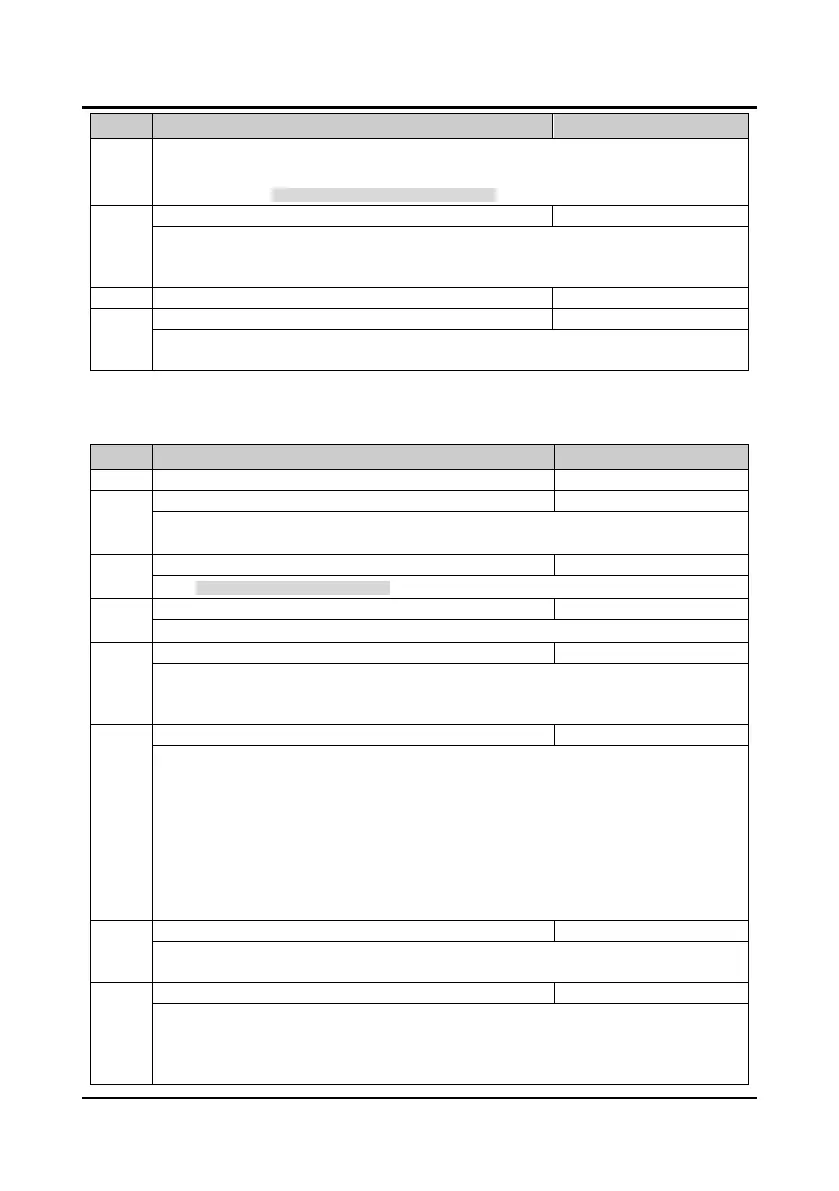
Code Name Description Range
factory setting
• Make sure P0.06 = 0 firstly, then press or key to start auto-tuning. And press
key to stop motor parameter auto-tuning.
• Refer to section 5.1 Parameter Auto-tuning Description for more details.
This parameter is invalid for the KS door machine.
Only enabled for MS door machine: the no load current is 0.40A for the 70W asynchronous motor;
0.50A for the 80W asynchronous motor; 0.60A for the 150W asynchronous motor.
P1.09 Magnetic pole position angle 0.0
359.9
0.0°
After the synchronous motor auto-tuning, the motor magnetic pole position angle will be auto written
into P1.09. This parameter is invalid for the MS door machine.
4.3 Group P2 Encoder Door Width Parameters
Code Name Description Range
factory setting
Encoder pulse number per revolution
P2.01 Encoder direction setting 0,1
0
0: The same direction as the encoder actual connection.
1: The reverse direction to the encoder actual connection.
P2.02 Operating speed of slow speed 0.01
15.00 Hz
7.00Hz
When external terminal slow speed (SS) is enabled, the door machine will operate at this speed.
P2.03 Operating speed at first time power on 0.01
15.00 Hz
4.00Hz
It defines the door machhine operating speed at first time power on.
P2.04 Door width self-learning speed 0.01
15.00 Hz
4.00Hz
It defines the operating speed in door width self-learning process.
In order to reduce the door width error, this parameter must not be too big so as to avoid the shock
when the door is in open/closed door arrived state.
P2.05 Door width self-learning enable 0,1
0
0: Disabled.
1: Door width self-learning is enabled.
• In door control mode P0.05=1, firstly set P0.06 as 0 or 2, then set P2.05 as 1 to start the door
width self-learning, finally P2.05 will becomes zero when it finishes self-learning. (press or
key to start self-learning, press key to stop self-learning)
Door width self-learning proccess:
After start self-learning, the door machine will run at self-learning speed according to “open door →
closed door → open door →closed door”. The door width information will be auto saved when
finished the self-learning.
P2.06 Low digits of pulse count 0
9999
3700
The parameter saves the four low digits of pulse count obtained by door width self-learning (max: four
digits).
P2.07 High digits of pulse count 0
9999
0
The parameter saves the high digits of pulse count obtained by door width self-learning (min: four
digits).
• Door width calculating method: Door width= P2.07 × 10000+P2.06.
• The pulse number of door width obtained by auto-learning can be changed via the panel.



 To Next Page