Chapter 3 Operation Instructions SuZhou Eshine Elevator Components Co., Ltd.
―12― YS-K01 Door Controller User Manual
2
.
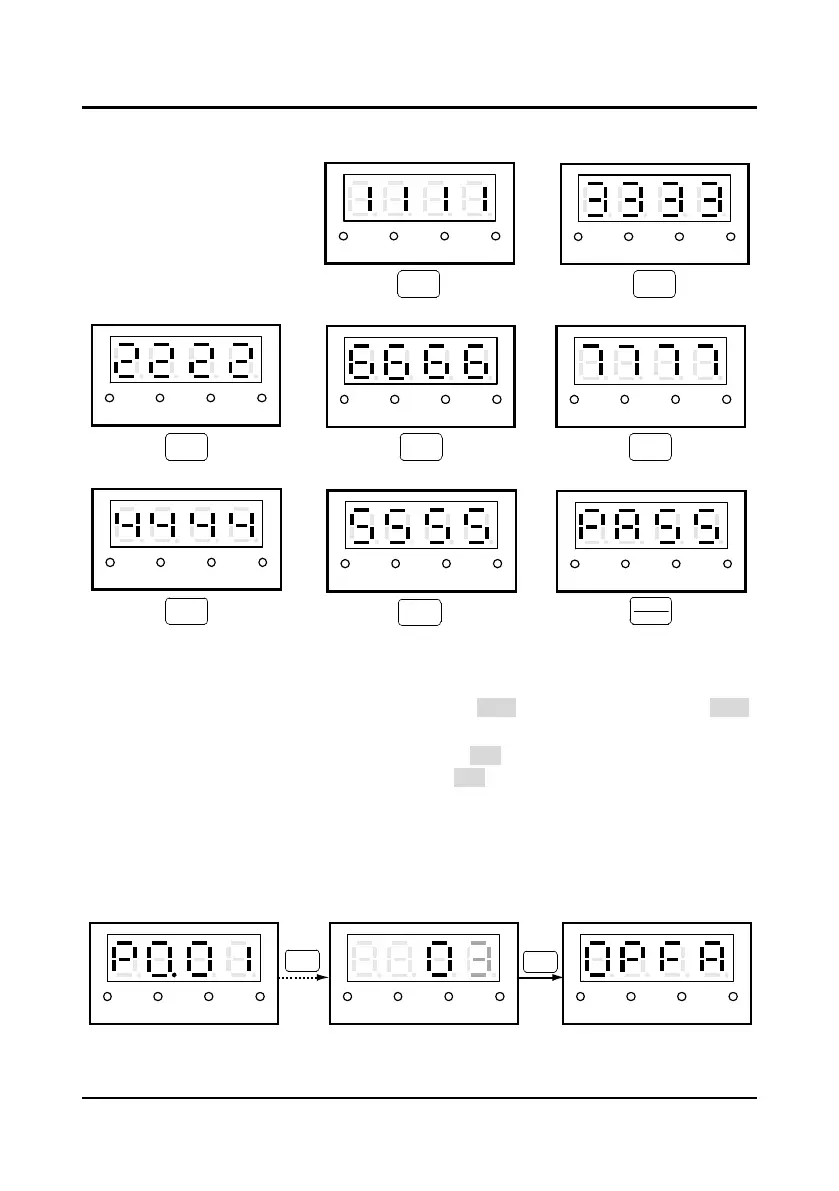
Press any key of the panel and observe the LED and the state indicators to detect the
corresponding key whether is valid. And the correct correspondence is as shown Figure 3-7.
Figure 3-7 The correspondence between YS-P01 panel keys and displays
During this process, if there is no press in 4
-
5 seconds, it will directly jump to the step 4. If the
self-check is success, it will jump to the step 3.
3
.
If the self-testing is success, the panel will display “PASS” and all keys are valid. The “PASS”
will auto-disappear 3
-
5 seconds later and back to display state before self-testing.
4
.
If the self-testing is failure, the panel will display “FAIL”. The possible reasons of self-testing
failure are: no press within 5s or invalid key. The “FAIL” will auto-disappear 3
-
5 seconds later
and back to display state before self-testing.
3.1.3 Reset Parameter and Clear Fault Information of YS-P01
Reset default parameter (synchronous motor parameters)
After set P0.01=3, except the fault parameter value, the parameter value of P0.00
-
P8.14 will be
reset to the default parameter. At reset default parameter, the panel displays as Figure 3-8.
Figure 3-8 Reset the default parameter
Hz
A V
RUN
Hz
A V
RUN
Hz
A V
RUN
Hz
A V
RUN
Hz
A V
RUN
Hz
A V
RUN
Hz
A V
RUN
Hz
A V
RUN
>
STOP
RESET
ENTER
PRG
>
DC
DO
>>
Hz
A V
RUN
Hz
A V
RUN
ENTER
Hz
A V
RUN
ENTER



 To Next Page