SuZhou Eshine Elevator Components Co., Ltd. Chapter 4 Function Introduction
YS-K01 Door Controller User Manual ―33―
Chapter 4 Function Introduction
This chapter will provide user with detail function introduction of each group. And the factory
setting value is the default value of synchronous KS motor.
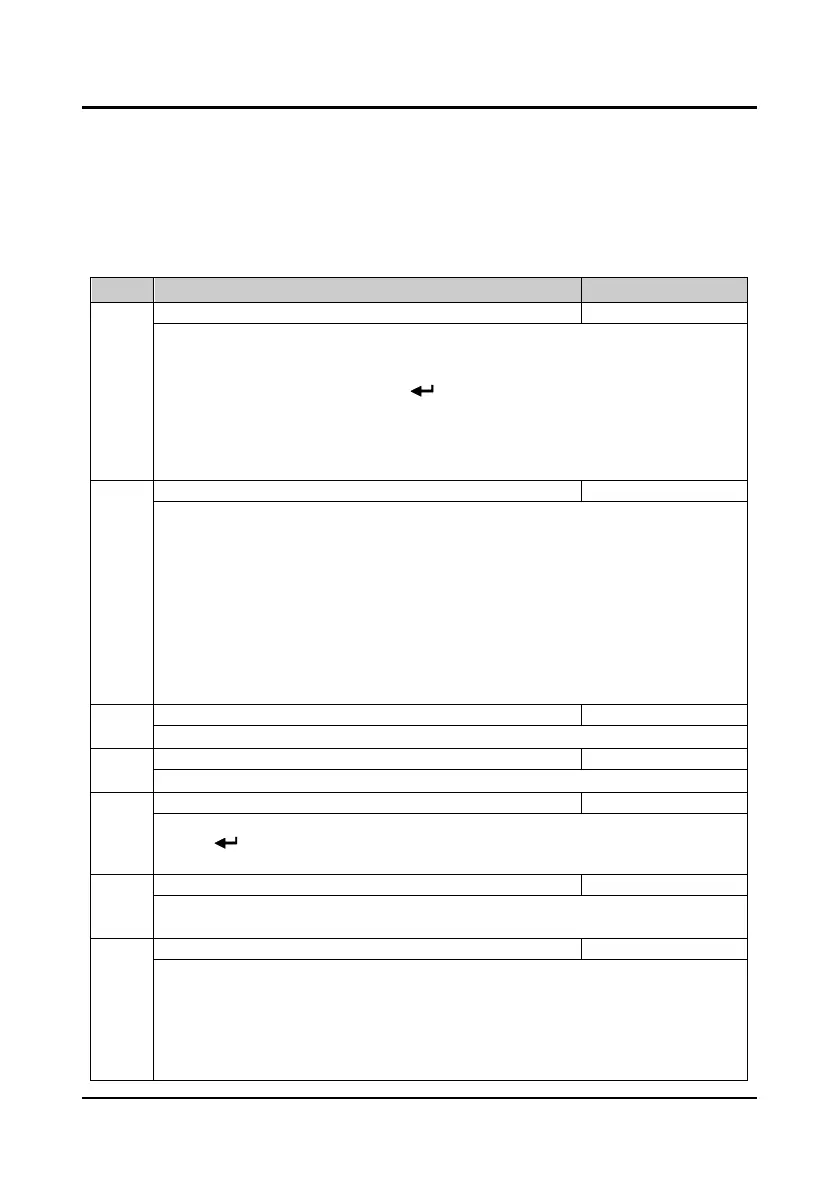
4.1 Group P0 Basic Parameters
Code Name Description Range
factory setting
P0.00 User password 0000
9999
0
XXXX: To enable the password protection function, set any non-zero number as the password.
• After set the password, it need input the correct password when you enter into parameter setting
state. Otherwise you can not change any parameter via panel, but only check.
• After input the correct password, press key to save to the present value and return to P0.01,
the user’s password will be valid. If want to change the parameters, it need input correct
password. If detect that there is press within 5minutes, it will restart 5 minutes timing again.
0000: The factory setting of controller and no user’s password.
• If the user unlocks the password, it means clearing the user’s password.
P0.01 Parameter batch disposal selection 00
30
00
00: No function. It need manually set the parameter.
01: Upload parameters.
02: Download parameters.
03: Reset default parameter, synchronous motor parameters.
04: Clear fault information.
05-10: Reserved.
11: Reset the first group parameters of Eshine (reset 70W asynchronous motor parameters).
12: Reset the second group parameters of Eshine (reset 80W asynchronous motor parameters).
13: Reset the third group parameters of Eshine (reset 150W asynchronous motor parameters).
14-30: Reserved.
P0.02 Parameter upload number 1
12
1
Select the parameter upload number.
P0.03 Parameter download number 1
12
1
Select the parameter download number.
P0.04 Parameter batch disposal comfirm 0,1
0
0: No function.
1: Press key to comfirm the batch disposal. This parameter (P0.04) will restore to zero when the
parameter batch disposal is finished.
P0.05 Mode selection 0,1
1
0: Factory mode (Door machine specific function is invalid).
1: Door control mode.
P0.06 Control command selection 0
2
0
0: Panel control (manually).
• The starting and stopping is controlled through the panel. Press key opens the elevator
door, press key closes the elevator door, and press the key stops controller.
1: Terminal control (auto).
• The controller realizes door opening or closing via the control system sending OD and CD
commands.



 To Next Page