Chapter 3 Operation Instructions SuZhou Eshine Elevator Components Co., Ltd.
―32― YS-K01 Door Controller User Manual
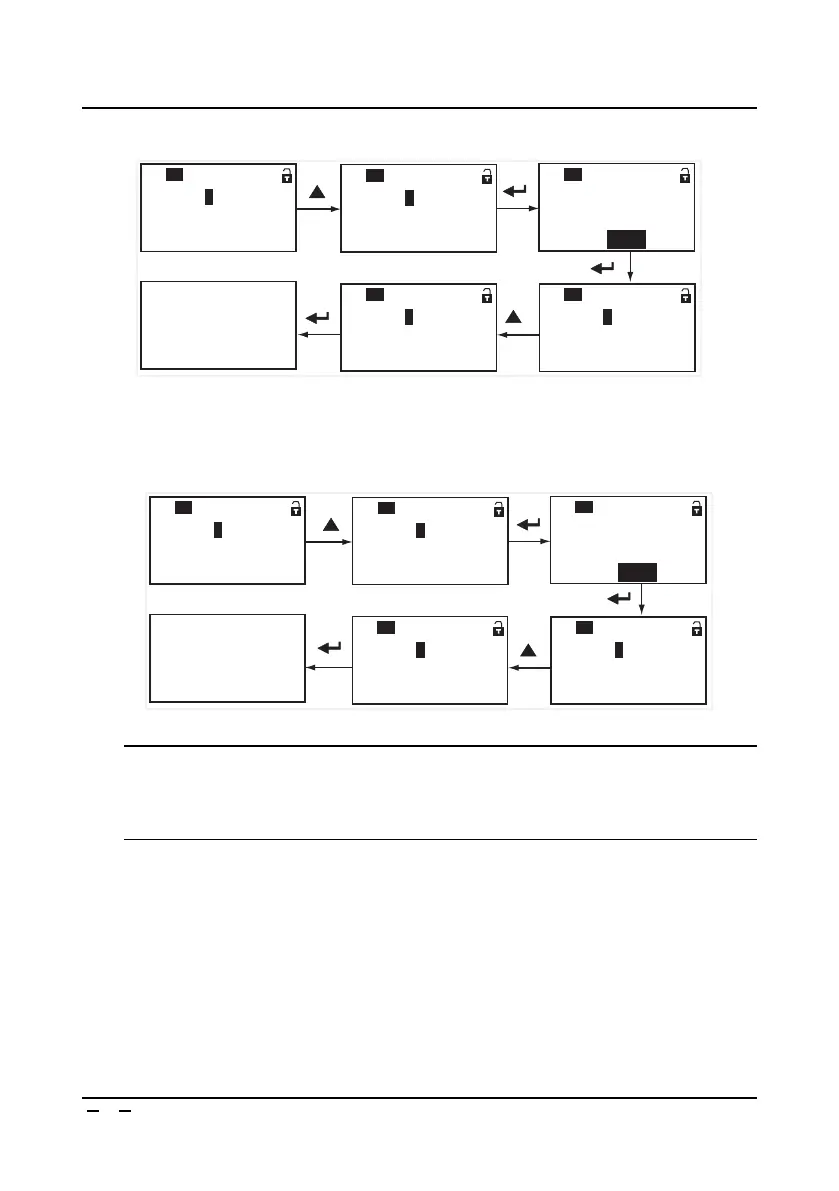
2. If download panel group 3 (there is not parameter) parameters to the present controller and
then prompts download failure shown as Figure 3-46, it will enter stop state.
Figure 3-46 YS-P03 without parameters download
3. If the group 8 of panel has saved the parameters of YS-K32 controller, this parameters can’t be
downloaded to the YS-K01 controller, shown as Figure 3-47 for the download failure then enter
stop state.
Figure 3-47 YS-P03 does not download between different controllers
Note:
1. Only at stopping state can upload or download parameters. The uploaded/downloaded
parameters range is: All the parameters from P0.05 to P8.14 (except P1.09 and P2.01).
2. The panel’s parameters are the controller’s default parameters if without uploading ever.
No parameter in the 3 group,
please upload first
= 1
P0.
04
:
Comfirm this disposal
Range: 0~1
= 0 1
P0.
03
:
Parameter download No.
Range: 1~12
= 0 3
P0.
03
:
Parameter download No.
Range: 1~12
= 0
P0.
04
:
Invalid
Range: 0~1
Batch disposal comfirm
QUICKCDOD BASIC
P0.
04
:
Parameters of K32 can not be
downloaded to K01
= 1
P0.
04
:
Comfirm this disposal
Range: 0~1
= 0 1
P0.
03
:
Parameter download No.
Range: 1~12
= 0 8
P0.
03
:
Parameter download No.
Range: 1~12
= 0
P0.
04
:
Invalid
Range: 0~1
Batch disposal comfirm
QUICKCDOD BASIC
P0.
04
:



 To Next Page