Chapter 3 Operation Instructions SuZhou Eshine Elevator Components Co., Ltd.
―14― YS-K01 Door Controller User Manual
3.2 YS-P02 Panel Description
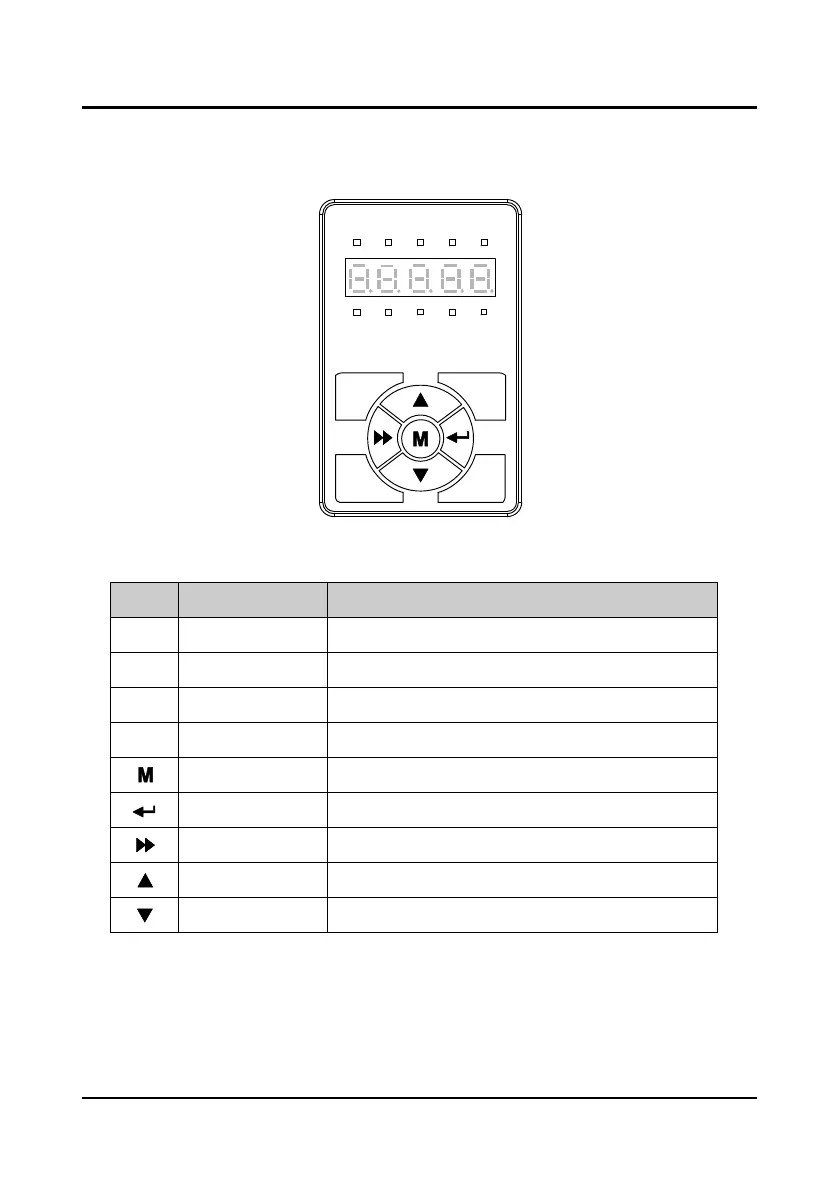
The default parameters of the controller can be changed via the optional LED panel (YS-P02).
The YS-P02 is shown as Figure 3-13.
Figure 3-13 YS-P02 panel
There are keys on the YS-P02 panel and their functions, as shown in Table 3-5.
Table 3-5 Description of keys of YS-P02
Key Name Function
Programmable/escape Entry or exit programming key
OD key OD running command
CD key CD running command
Stop/reset key To stop running; and to manually reset the fault
Multi-function key Reserved
ENT enter/confirm key Confirm saving the data
SHF shift key Selecting display parameter and shift bit
Increment key Increase value or parameter
Decrement key Decrease value or parameter
The YS-P02 panel has 5-digit LED digital tubes and the meaning is shown in Table 3-2. But the
left LED digital tube of YS-P02 will not display all the time (except when the initial power on and
the panel self-testing).
ENTSHF
CDPRG
STOPOD
Hz
A V RPM %
REVFWD ALM LO/RE LOCK
YS-P02



 To Next Page