248 Element User Manual
Text Indicators in live/blind
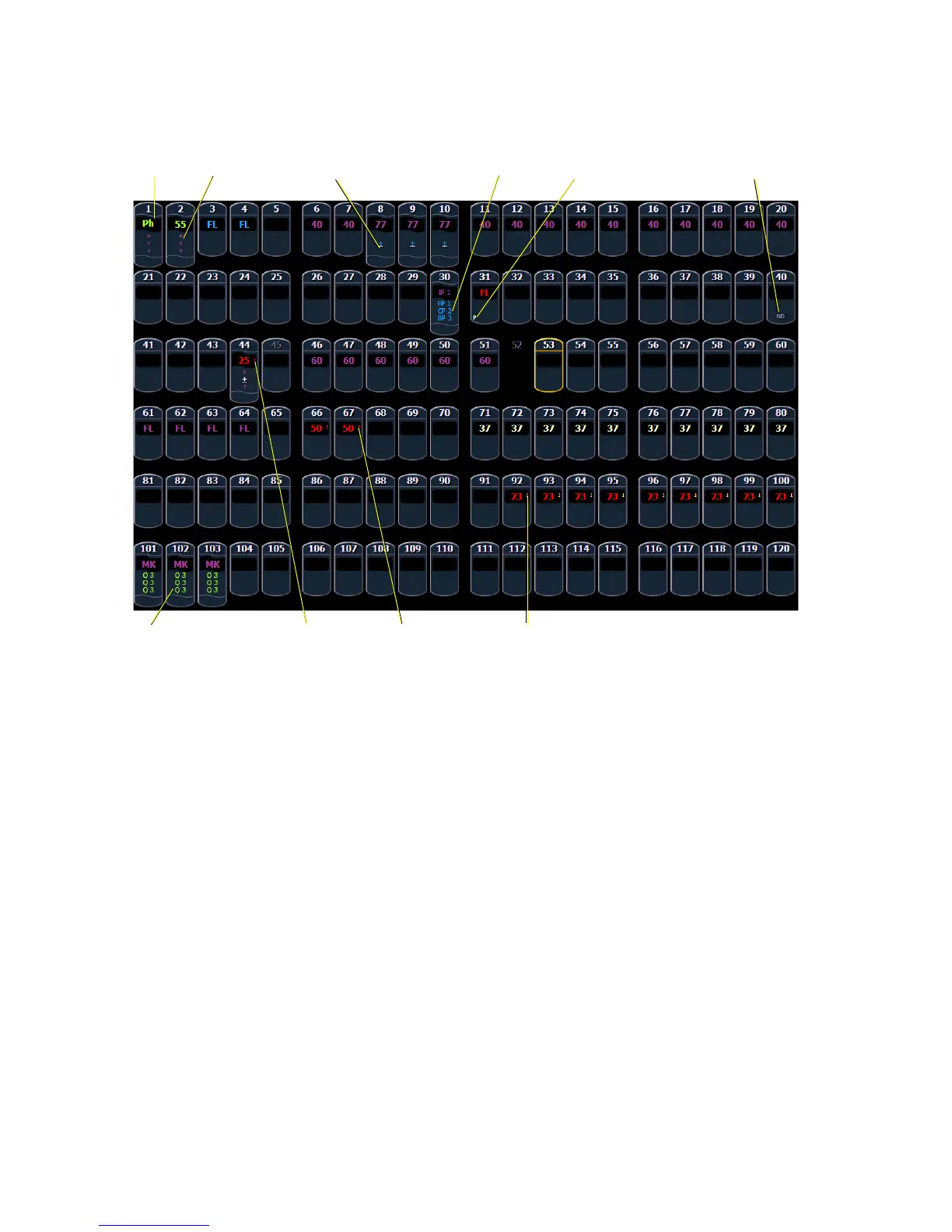
Please note examples of text indicators in the following graphic:
Color conventions listed above apply to text indicators as well. Therefore red indicates a manual
value that must be stored.
• _ . . . . . . . . . . . . . . . . . . .Underlined value (white) indicates a system-applied block
(also called an auto-block).
• + . . . . . . . . . . . . . . . . . . .Found in place of parameter data in summary view. Indicates
that parameters in that category are at different values. This
indicator is found only in the summary view.
• B. . . . . . . . . . . . . . . . . . .Indicates the channel or parameter is manually blocked. This
block must be stored.
• I . . . . . . . . . . . . . . . . . . .Channel is controlled by an inhibitive submaster.
• IP, CP, FP, BP . . . . . . . .Indicates that the value is referenced to a palette (Intensity,
Color, Focus, or Beam). This text is followed by a number,
indicating which palette is being referenced. This can be
substituted with the palette label if the “Show Reference
Label” setting is activated.
• P . . . . . . . . . . . . . . . . . . .Indicates the channel is parked.
• Ph. . . . . . . . . . . . . . . . . .Indicates the channel is at a preheat level.
• Q. . . . . . . . . . . . . . . . . . .Found in the non-intensity categories of a marked channel.
The “Q” is followed by a number indicating which cue the
mark is in preparation for.














 To Next Page