C Display Conventions 249
• R. . . . . . . . . . . . . . . . . . .Indicates a manual reference override. Manual changes have
been made that override a previously stored reference (such
as to a palette). Once recorded, the reference will be broken.
If updated, the referenced target will be updated as well,
unless otherwise instructed.
• ! . . . . . . . . . . . . . . . . . . .Indicates an ACN, RDM, or dimmer error.
• ND . . . . . . . . . . . . . . . . .Indicates that a channel has been patched as a non-dim
fixture type.
• S . . . . . . . . . . . . . . . . . . .Indicates that a channel is stored to a shielded submaster.
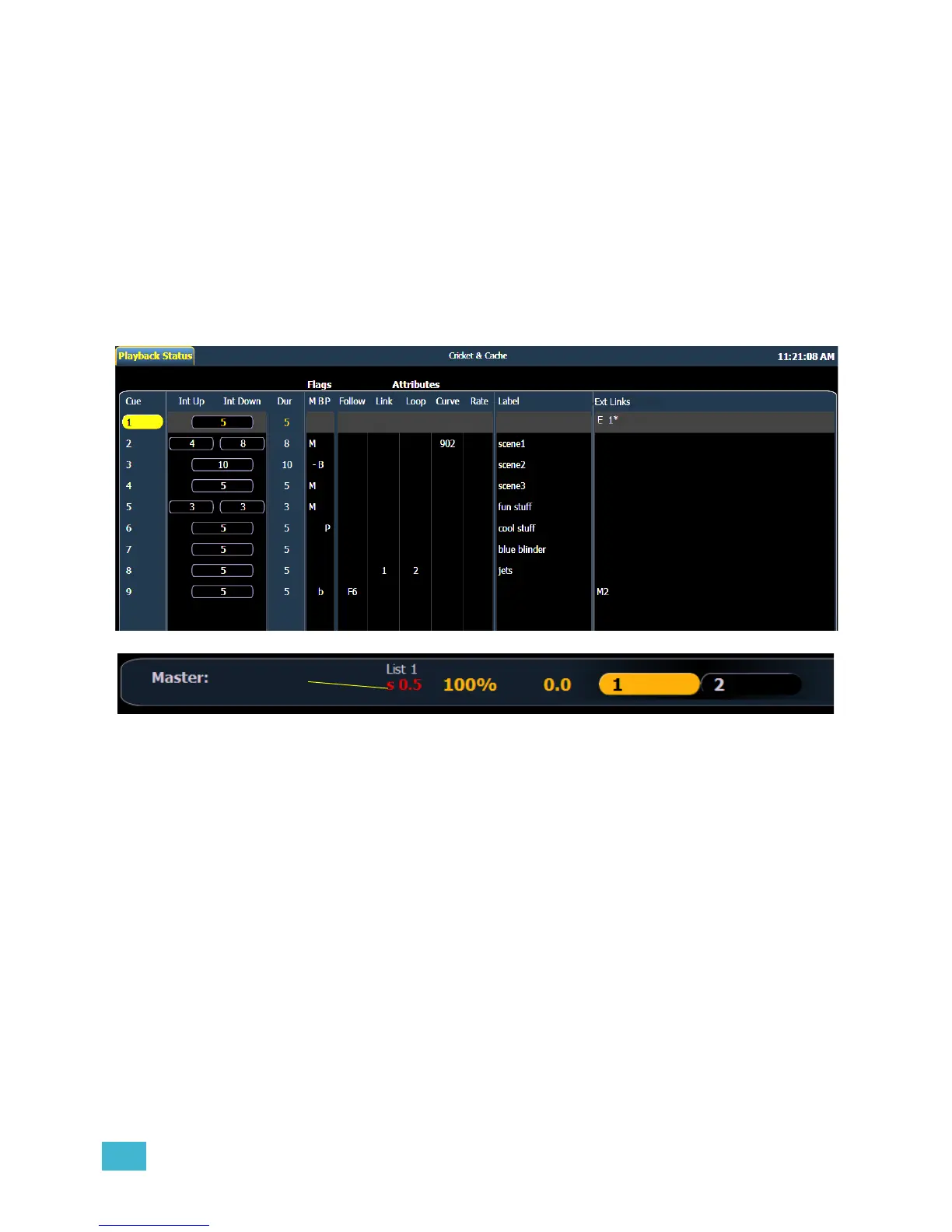
Indicators in the Playback Status Display
Color indicators
• Gold . . . . . . . . . . . . . . . .Any item (cue, list, page) highlighted in gold indicates
“current”.
Outlined in gold indicates “selected”.
• Red. . . . . . . . . . . . . . . . .Cue fade is in progress (cue list area).
Text indicators
• B or b (see cue 3). . . . . .Indicates a blocked cue. “B” indicates the entire cue is
blocked. “b” indicates a channel/parameter block only. Found
in the cue display “Flags” area.
• F6 (see cue 9) . . . . . . . .Indicates a follow time associated with the cue (in this case,
6 seconds). Found in the cue display.
• M (see cue 2) . . . . . . . . .Indicates a marked cue. “M” indicates an AutoMark.
• D. . . . . . . . . . . . . . . . . . .Indicates that AutoMark is disabled.
• P (see cue 6) . . . . . . . . .Indicates the cue will preheat. Found in the cue display
“Flags” area.














 To Next Page