20
225
Eversense E3 CGM User Guide
Symbol Explanation
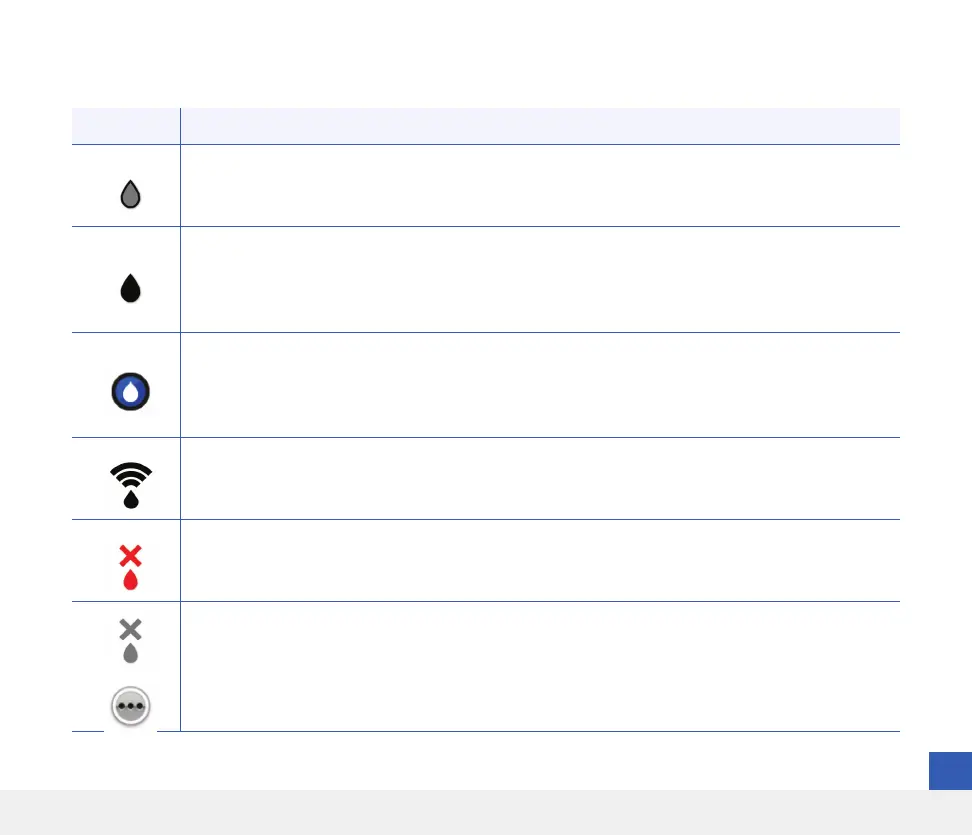
Calibration in Progress
Appears on the glucose trend line and the Event Log during the ~15 minutes while a calibration is in
progress. The icon will turn either red, black or blue when calibration is no longer in progress.
Calibration Incomplete
Appears on the glucose trend line and the Event log when not enough data is collected to complete
the calibration. For example, when the transmitter is removed from over the sensor during the
~15 minute calibration period.
Calibration Cannot be Used
Appears on the glucose trend line and the Event Log when a calibration has been entered that
cannot be used. For example, the value entered is less than 40 mg/dL or more than 400 mg/dL.
In this case, the calibration value is stored as a manual BG entry.
System Connection Successful
Appears when the smart transmitter is connected to the smartphone and the sensor is linked to the
smart transmitter. The bars indicate the strength of the connection.
Transmitter and Sensor Connection
Appears before a transmitter is linked to a sensor and when the connection between a transmitter
and sensor is interrupted.
Transmitter and Mobile App Connection
Appears when the BLE connection between the transmitter and mobile app is interrupted.
Multiple Alerts (more than one alert or event)
Appears when there are two or more alerts or events in a short interval.
Symbols on the Eversense CGM Mobile App (continued)



 To Next Page