FUEL SYSTEM
Injector Coefficient Database
Dealers can now download the coefficient files for new service fuel injectors from
a database available on the internet.
This process eliminates the need for a 3.5 inch floppy drive on the service laptop
computer and the problems created when the disk is packaged with a service
fuel injector is damaged.
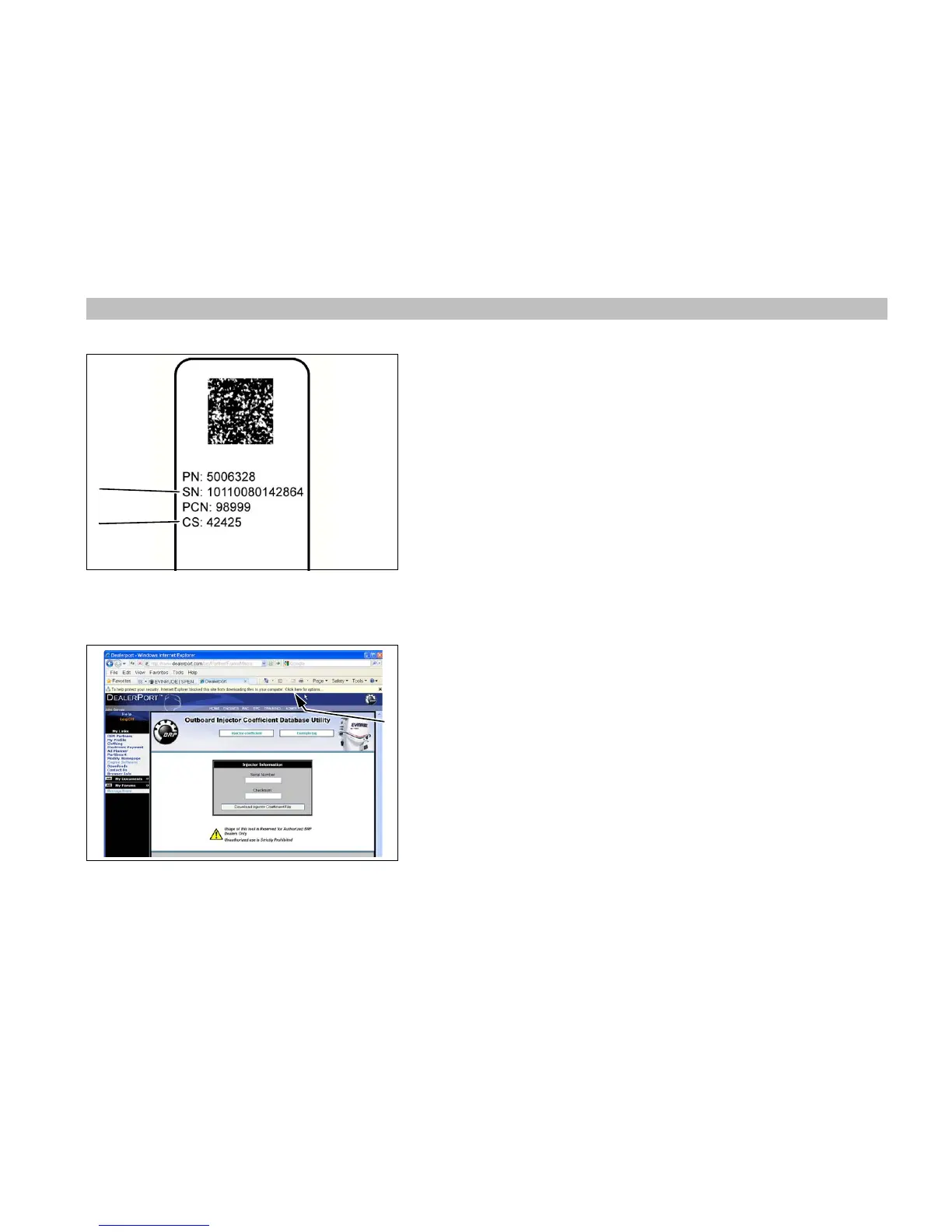
Refer to the serial number label attached to the fuel injector electrical connector.
ACCURATELY record the 14-digit Serial Number (SN) and the 5-digit Checksum
(CS) number from the injector serial number label.
Log on to DealerPort or BossWeb to download injector coefficient files from the
internet. Refer to Service Bulletin 2010-07(S) for complete instructions. A copy
of this bulletin is packaged with each service fuel injector.
Internet Browser Blocks Download of Injector
Coefficient File
The problem After entering injector serial number and checksum, nothing hap-
pens after pressing the “Download Injector Coefficient File” button.
The cause: Internet browser security settings are blocking download of the coef-
ficient file and displays a security message bar above the screen.
The fix: Click on the security message bar that reads “Click here for options.”
Select “Download File” to start the download process.






 To Next Page