41
EVINRUDE DIAGNOSTICS SOFTWARE
Initial Setup
Software Registration
Important Information for Evinrude Diagnostics
Software Version 5.1 Program Installation
Initial Setup
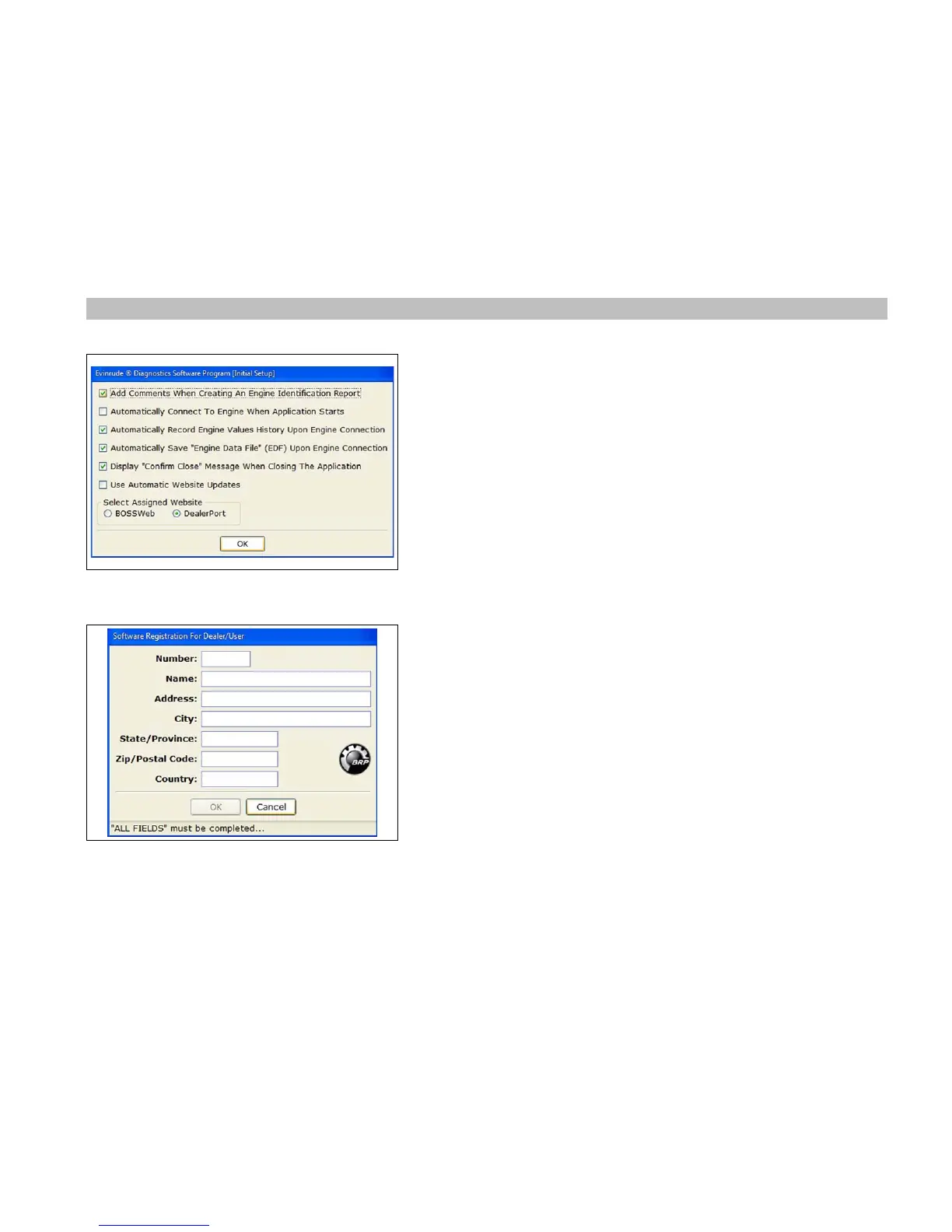
The first time the program is run, an Initial Setup form will appear. Initial setup
items are set to default conditions. Possible changes are as follows:
• Unless directed by BRP do not uncheck "Automatically Save Engine Data File
(EDF) Upon Engine Connection".
• If computer normally has an internet connection then check the "Use Auto-
matic Website Updates".
• Verify assigned website (DealerPort or BossWeb, depending on your sub-
scription service).
Changes to these selections may be made at any time, by selecting the “Tools”
menu and selecting “Options”.
Software Registration
Software registration is required to run this program.
• After the Initial Setup is complete, the program will check for a prior version of
Evinrude Diagnostics registration. If prior version registration information is
found, Evinrude Diagnostics version 5.1 will automatically use the existing reg-
istration information.
• If a prior version is not found, the user MUST complete the registration, Enter
your dealer number, dealership name, address and country. An internet con-
nection is NOT needed to complete this registration.
Note: Registration information is only used for identification purposes on printed
reports.




 To Next Page