EXTENDED MODE
CARD G / FIT 65 V 6.15 E / April 2010
17.9 STATUS REPORT
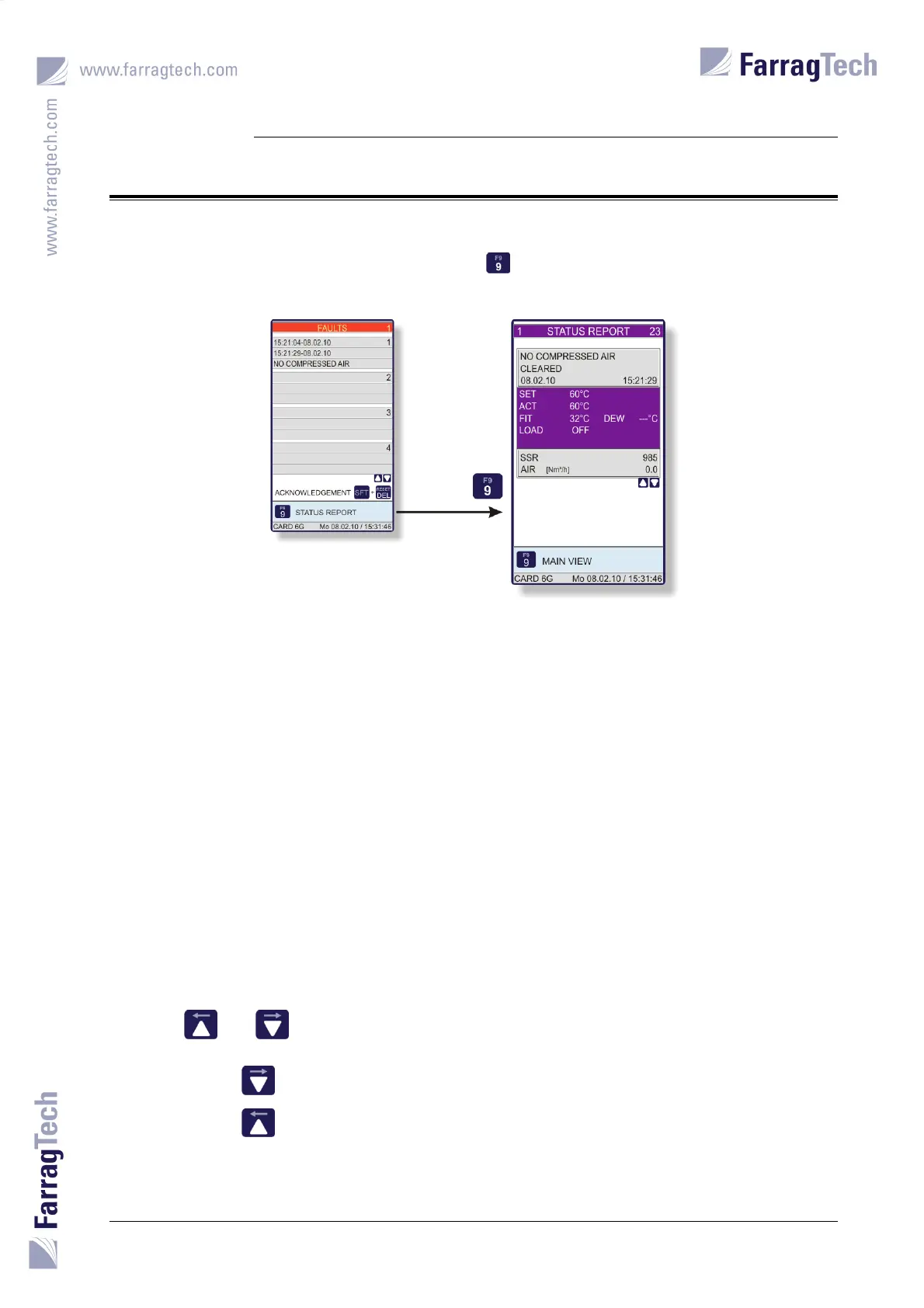
The STATUS REPORT is
accessed from the FAULTS SCREEN with the key and facilitates trouble shooting and fault
diagnosis.
This screen shows the last 200 alarm and event messages. If there are more than 200 entries, the
oldest one will be replaced.
Additional process data are saved with the fault (or event):
Drying set value
Process air temperature
Temperature on the board of the FIT-controller
Dew point (if a dew point sensor is mounted)
Operating status of loading
Heater control signal
Compressed air consumption
The number in the upper display on the right hand side shows how many entries are present. The
number on the left hand side shows the running position of the displayed record.
The keys and must be used to scroll through the different records.
Pressing the key for 3 seconds displays the last (oldest) record.
Pressing the key for 3 seconds displays the first (youngest) record.


 To Next Page