EXTENDED MODE
CARD G / FIT 61 V 6.15 E / April 2010
17.7.2 WEEKLY TIMER LOADING
The loading of the drying hopper can be
started and stopped through a discrete weekly timer.
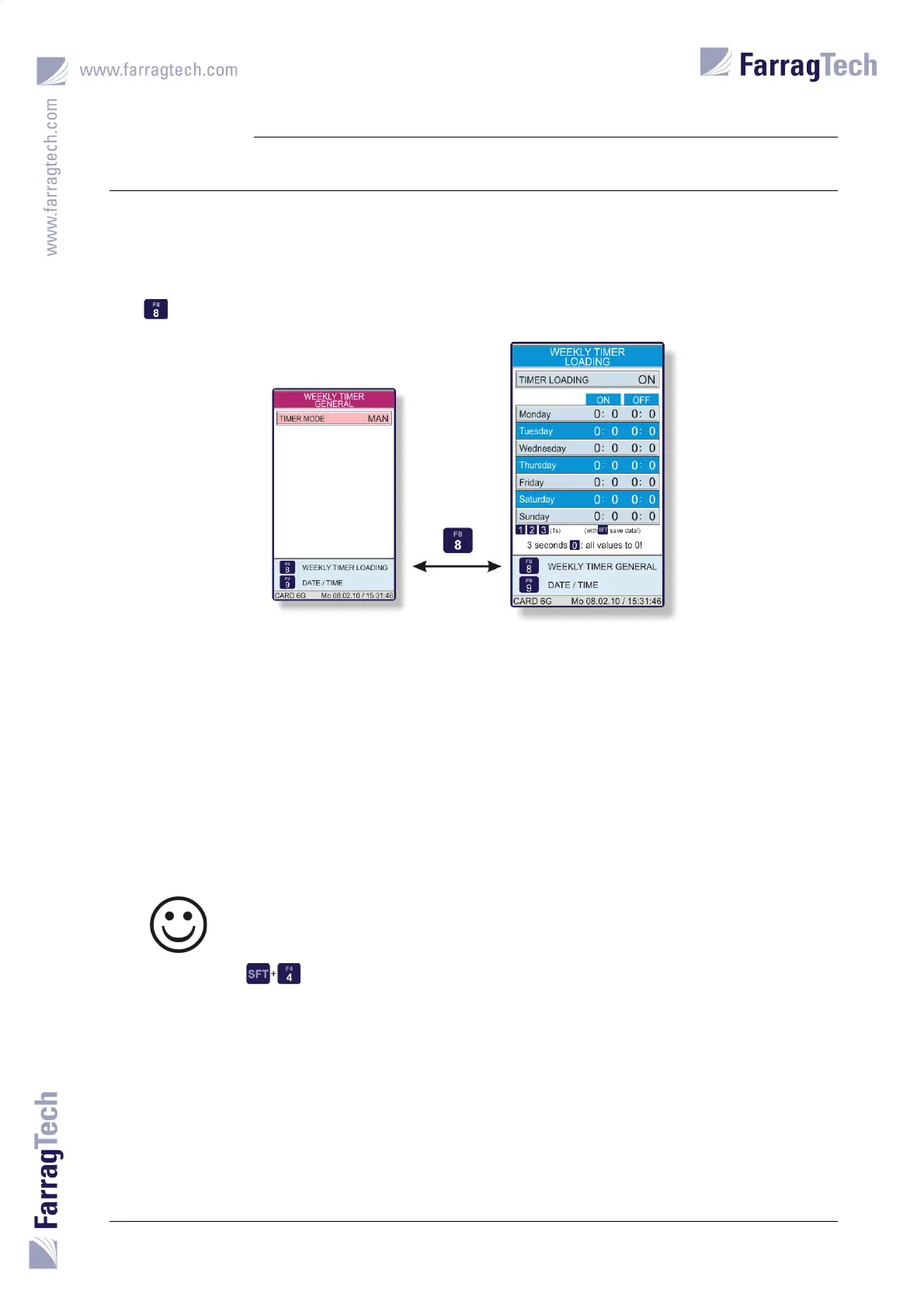
The WEEKLY TIMER LOADING is accessed from the screen WEEKLY TIMER GENERAL with the
key .
The switching times become visible as soon as the weekly timer is activated. One ON-time and
one OFF-time can be set per day.
The same rules as described in chapter 17.7.1 WEEKLY TIMER GENERAL on page 58 apply for setting
the switching times.
Three weekly timer programs have been pre-set which can be enabled or reprogrammed by the
operator (see chapter 17.7.1 WEEKLY TIMER GENERAL on page 58 for detailed information).
Only the drying process will be controlled by the G
ENERAL WEEKLY TIMER if the
WEEKLY TIMER FOR LOADING is activated. It can be deactivated without affecting
the proper function of the W
EEKLY TIMER FOR LOADING.
Independent from which weekly timer and switching program is chosen, the
loading process can always be activated or deactivated by using the keys
at the same time. The weekly timer starts or stops the loading process
at the next valid switching time.


 To Next Page