EXTENDED MODE
CARD G / FIT 55 V 6.15 E / April 2010
17.6 RECIPES
17.6.1 STANDARD RECIPES
This screen includes a database
with preassigned drying data for the most common materials. They can be loaded into the drying
program. The user may decide to keep the preassigned data or alter the existing data. It is
recommended to use the CUSTOMER RECIPES (see chapter 17.6.2 on page 57) menu to program
custom recipes.
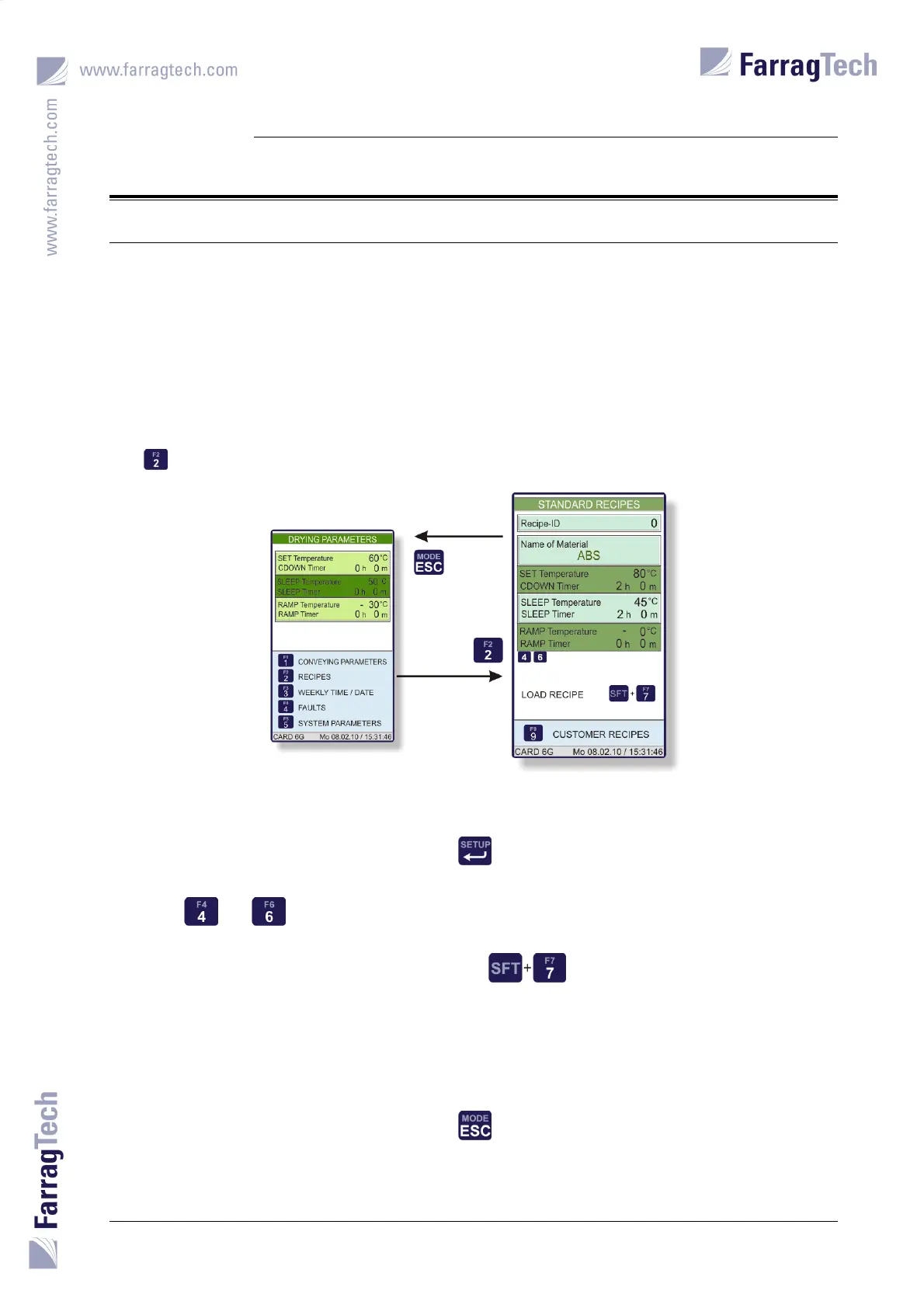
The STANDARD RECIPES are accessed from the screen with the DRYING PARAMETERS with the
key .
The STANDARD RECIPES database contains 30 preassigned recipes. To scroll through the various
records, the cursor must be moved to the parameter RECIPE-ID. Pressing the key
shows the next record.
The keys and can be used to decrease or increase the R
ECIPE-ID by 5.
To load a record into the drying program, the keys need to be pressed simultaneously.
The screen D
RYING PARAMETERS is opened and allows checking the loaded values once more. If
necessary, changes can be made again.
After pressing the key
the MAIN SCREEN appears.


 To Next Page