37
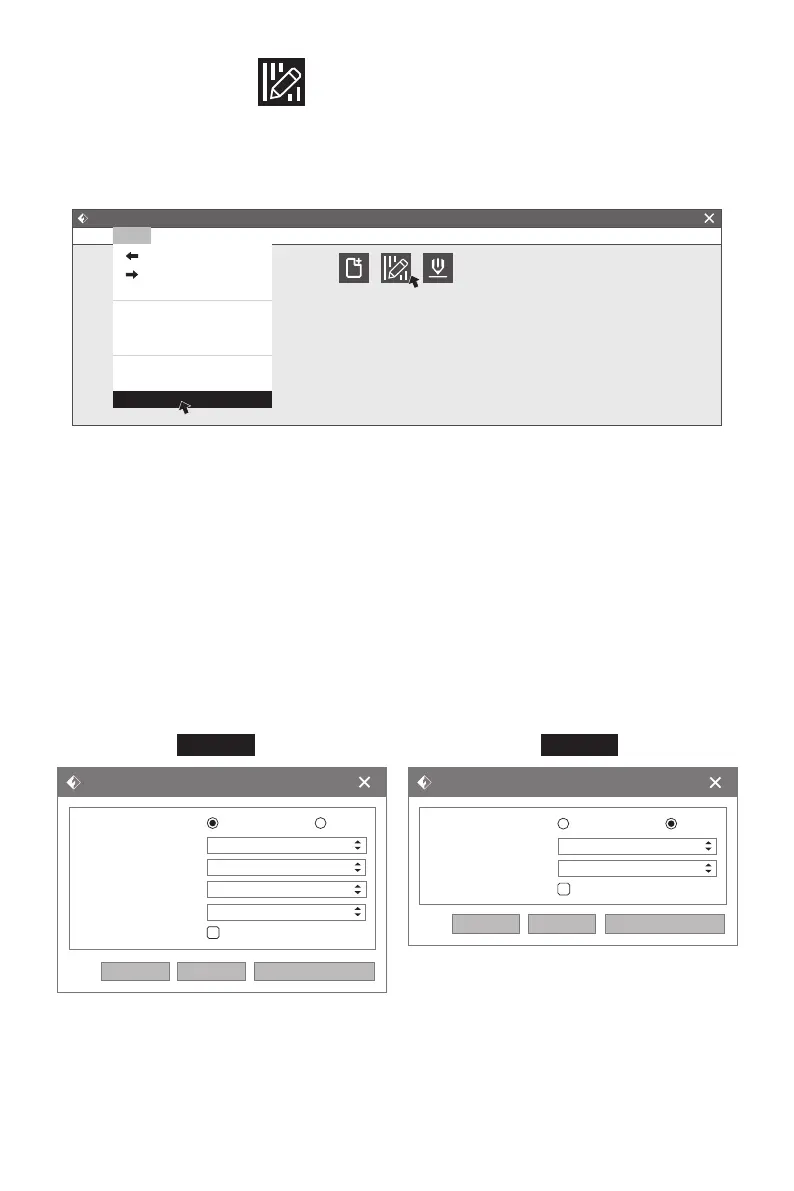
After loading the model, click [Edit]--[Supports] or click the Supports icon directly, then
you will enter the support edit mode (as shown in the picture below).
Click [Back] to exit when you finish editing.
1.Support Options
Click the Support Options, an option box will appear, supports options include “Tree-
like”and “Linear”, when choose “Treelike”, click [OK], then it will generate treelike
structure; when choose “Linear”, click [OK], then it will generate linear structure.
Treelike Supports: You can set up treelike specifications such as overhang thresh, post
diameter, base diameter and base height.
Linear Supports: You can set up linear specifications such as overhang thresh and pillar
size.
If it is a model with supports, when you choose one of the supports options, the software
will judge whether existing supports need to be deleted or not on the basis of the type of
existing support, and will pop up the corresponding prompt to let you make the choice.
2.Auto Supports
Click the [Auto Supports] button, the software will judge the position where supports
are needed and generate corresponding treelike or linear supports. If it is a model with
supports, the existing supports will be deleted and new supports will create.
Supports Options
Supports Type:
Overhang Threshold:
Pillar Size:
Touch Platform Only:
Treelike
55°
1.5mm
Linear
OK Cancel Restore Defaults
Supports Options
Supports Type:
Overhang Threshold:
Post Diameter:
Base Diameter:
Base Height:
Touch Platform Only:
Treelike
55°
3.0mm
6.0mm
6.0mm
OK Cancel Restore Defaults
Linear
Treelike Linear
Flashprint - untitle.fpp
File(F)
Load Supports Print
Print(P) View(V) Tools(T) Help(H)
Ctrl+Z
Ctrl+Y
Ctrl+A
Ctrl+V
Del
Undo
Redo
Empty Undo-Stack
Select All
Duplicate
Delete
Auto Laout All
Repair Models
Supports
Edit(E)















 To Next Page