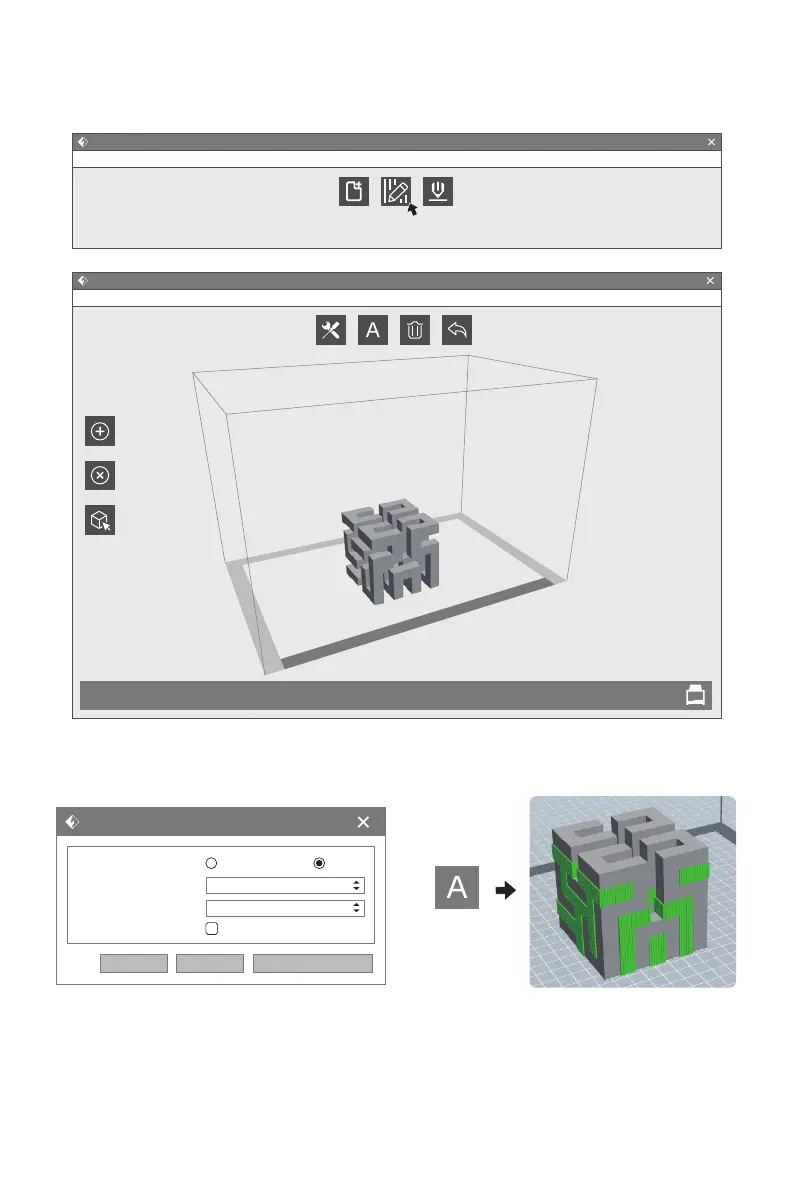
Adding supports for suspended structure model to ensure print success.
1.Click [Supports] icon and start support setting. Auto support setting is available. Click
[Delete] on the left and support delete supports by manual.
2.Click [Support Options] to choose
tree-support or linear-support. Overhang
thresholds means the angle of the model
suspended, if it is greater than this angle,
the support will be generated.
3.Click [Auto Supports] and supports
create autocratically.
Add Supports
FlashForge Creator Pro 2
Flashprint - untitle.fpp
File(F)
Supports
Options
Add
Delete
Model
Celect
Auto
Supports
Clear
Supports
Edit(E) Print(P) View(V) Tools(T) Help(H)
Back
Auto
Supports
48
Flashprint - untitle.fpp
File(F)
Load Supports Print
Edit(E) Print(P) View(V) Tools(T) Help(H)
Supports Options
Supports Type:
Overhang Threshold:
Pillar Size:
Touch Platform Only:
Treelike
55°
1.5mm
Linear
OK Cancel Restore Defaults















 To Next Page