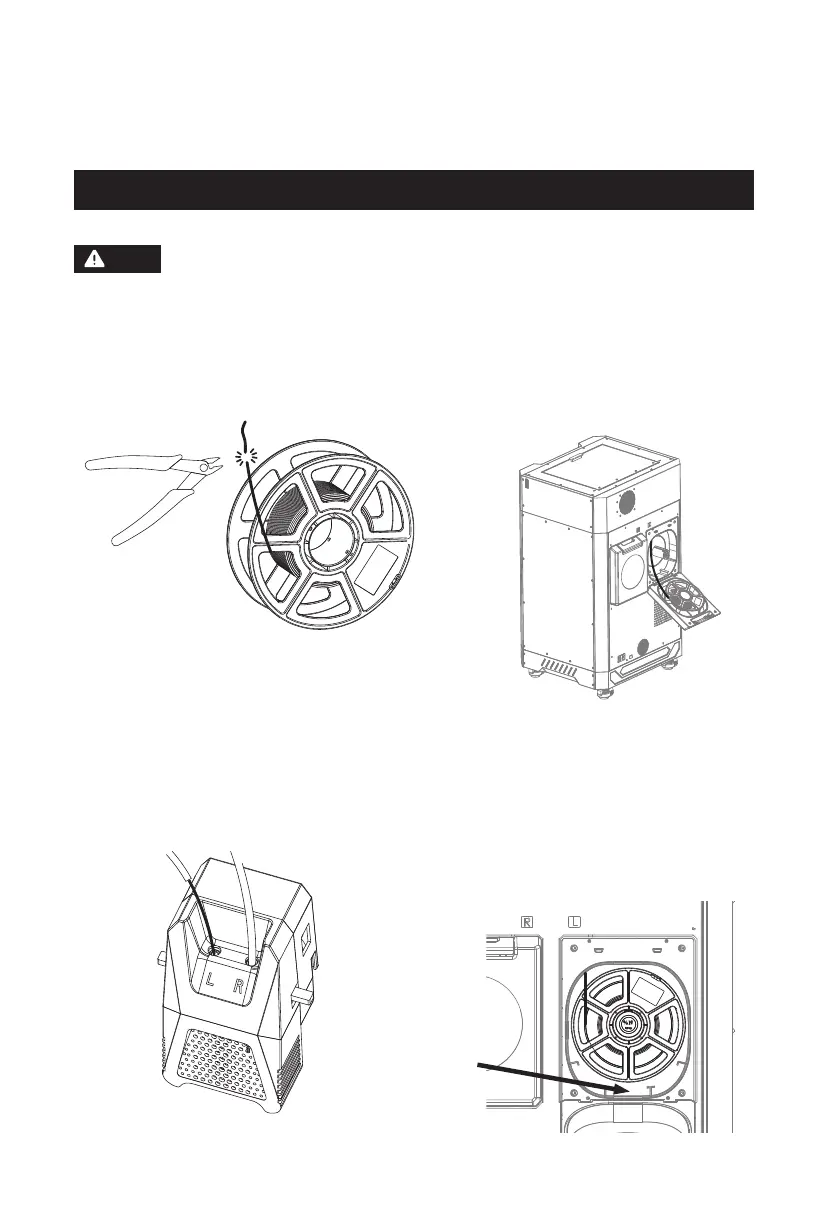
When loading filament, please pay attention to the left and right
corresponding labels on the extruder, filament guide tube, and
filament chamber.
2.3 Filament Loading
1. After unpacking the new filament, cut the
bent end with diagonal pliers.
2. Open the filament chamber and
manually pass the filament through
the corresponding filament sensor
until it is visible from the other end
of the filament guide tube. (Note the
label indicating the matching extruder
and hole.)
Note
Desiccant slot
3. Insert the filament extending from the guide
tube into the corresponding filament inlet,
and push it into the filament feeding roller
until you feel some resistance; or press the
filament feeding handle, push it into the
feeding roller and secure it.
4. Finally, place the filament into the
filament chamber, and you can put the
desiccant provided with the printer into
the slot. Close the cover. [Note: For
smooth filament rotation, place the
filament corresponding to the left nozzle
in a clockwise direction and counter-
clockwise for the filament corresponding
to the right nozzle.]
12















 To Next Page