Before operating it, please first unload the
filament and then disconnect the power.
Buckle of the
nozzle assembly
Method 1: Preheat the nozzle to the temperature of the used filament, remove
the filament guide tube, press the handle, pull out the filament, and
insert the unclogging pin tool into the nozzle to extruder filament inside.
Method 2: If Method 1 doesn't work, refer to the nozzle assembly replacement
method to replace the nozzle assembly.
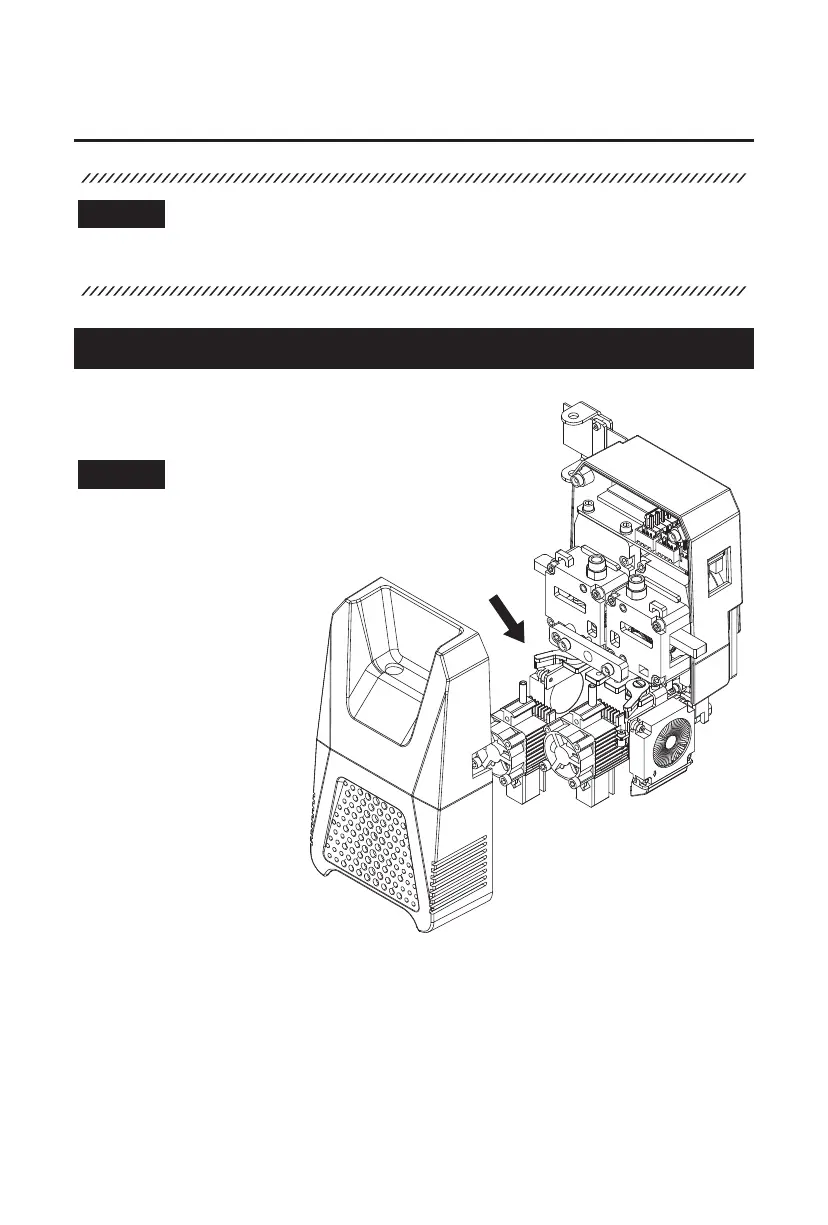
1. Open the front cover
of the extruder.
2. Toggle the buckle of the
nozzle assembly and
remove the nozzle
assembly.
3. Install the new nozzle
assembly and secure
it by fastening the
buckle of the nozzle
assembly.
5.1.2 Clogged Nozzle Cleaning
5.1.1 Nozzle Assembly Replacement
5.1 Extruder Maintenance
5. Maintenance
The interface layout may change whenever there is
an upgrade of firmware. The following is only a brief
overview of the functions.
Note
Note
32















 To Next Page