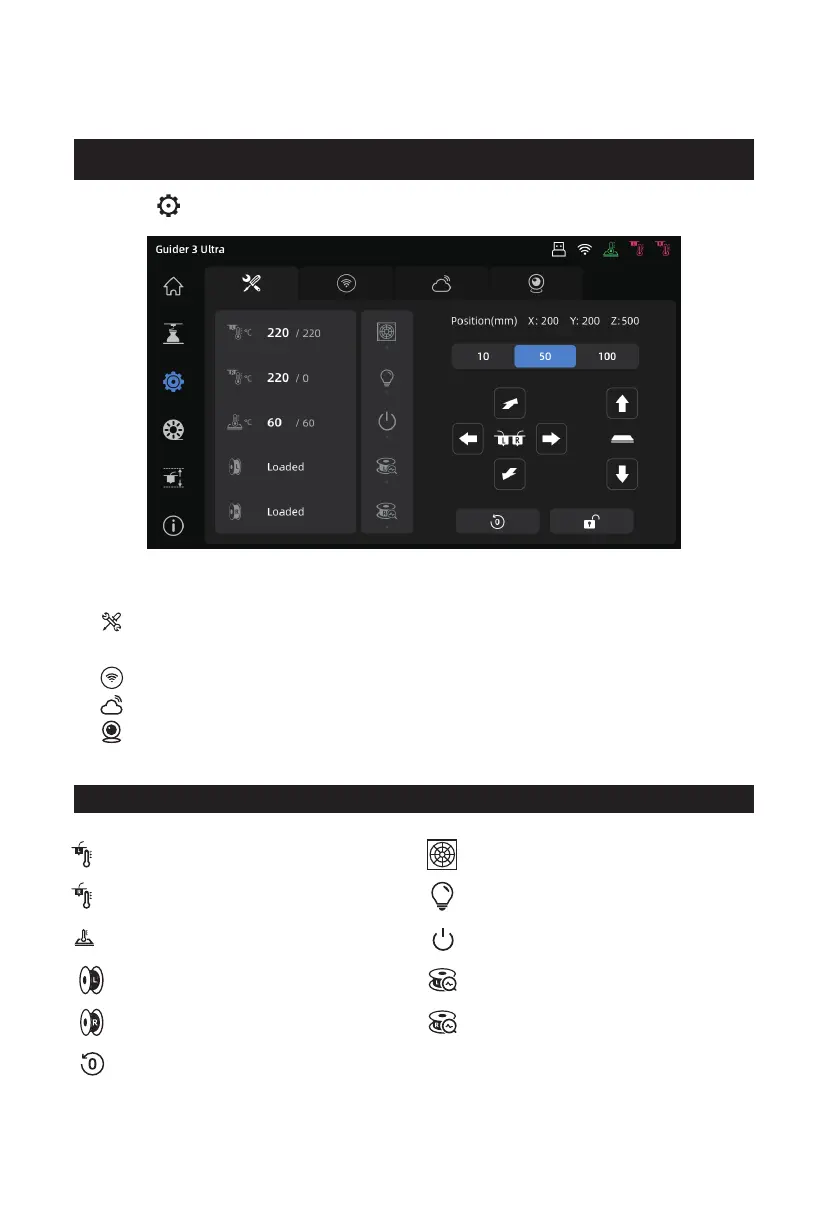
Click the [ ] icon on the left to enter the settings interface.
3.3 Settings Interface
Top icons from left to right are:
[Move] Extruder; Platform; Chamber Preheating; Fan Settings;
Manual XYZ-axis Movement; Chamber Light Switch;
[Network] Wireless Network, Wired Network, Hotspot;
[Cloud Platform] Connect to FlashCloud or Polar Cloud;
[Camera] Enable the camera and time-lapse video; View videos and photos.
Left nozzle temperature setting
Right nozzle temperature setting
Platform temperature setting
Left-nozzle filament loading status
Right-nozzle filament loading status
Return the extruder/platform to its
original position
Icons in the settings interface
Filter fan switch
Chamber light switch
Auto shutdown switch
Left-nozzle filament detection switch
Right-nozzle filament detection switch
℃
℃
℃
17















 To Next Page