4.3 Dual-Extruder Printing Mode
For the first dual-extruder printing, please perform XY offset calibration
of the left and right nozzles to align the right nozzle with the left one.
Before calibrating, load filaments into both the left and right extruders
and ensure they can extrude filament properly (refer to Section 2.3).
During dual-extruder printing, it's recommended to use the left extruder
for printing the model and the right extruder for printing the support
structures, as explained in the [Note] in Section 4.2.
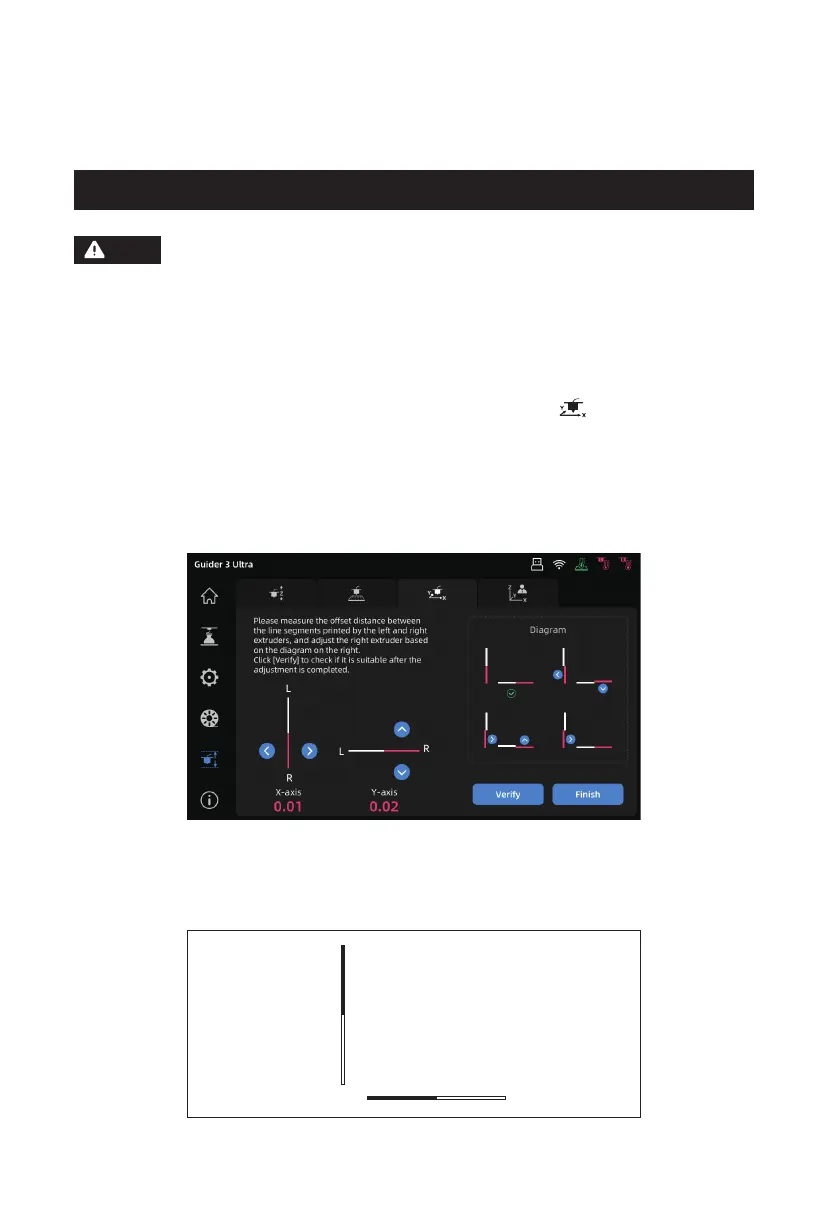
1. Enter the leveling and calibration interface and click the [ ] icon to access the
[XY Offset] interface. After clicking [Start], the printer will automatically heat up,
and when it reaches the target temperature, both left and right nozzles will print
a test line in the XY direction.
2. After printing is completed, measure the deviation distance between the two lines
in the same direction using a ruler. Compare the printed test lines with the on-
screen examples. Adjust the right nozzle's XY offset following the instructions.
3. After adjusting is completed, click [Verify] to print the test lines again. If there is
still any deviation, please repeat the above Step 2. When the actual printed lines
are like the figure below, it indicates that the XY offset values of the left and right
nozzles are within a reasonable range. Click [Finish] to save the data.
Note
21















 To Next Page