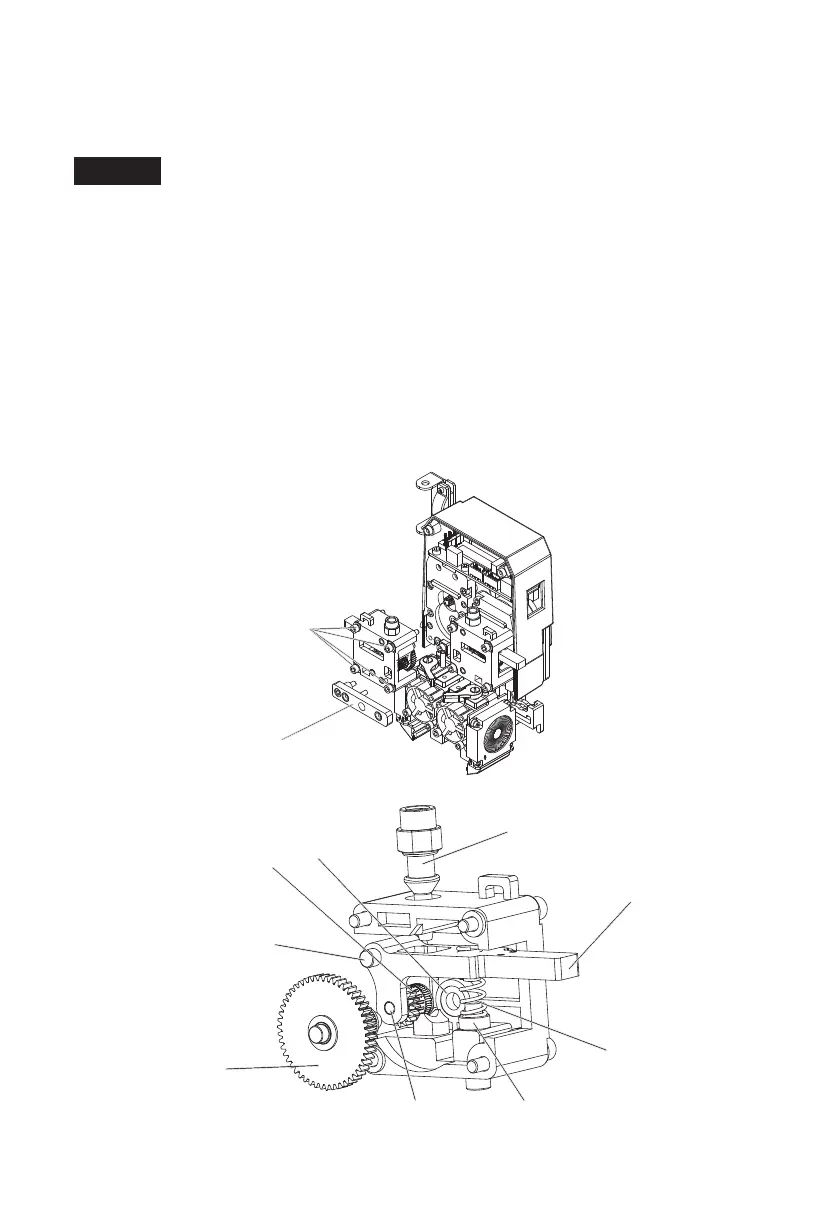
Magnetic holder
Extrusion box fixing screws
Filament guide tube
Handle
Handle spring
Handle spring seat
Filament feeding
roller pivot shaft
Motor reduction
gear
Bearing
Filament feeding roller
Handle pivot shaft
If filament is stuck and cannot be removed from the extrusion box, you can
disassemble the extrusion box and remove the filament.
Here are the steps:
Cut the zip ties on the extrusion box. Remove the two screws on the magnetic
holder and the four screws that fix the extrusion box. Pull the extrusion box out
(if necessary, remove the hot end as well by unscrewing the handle). Once the
stuck filament inside the extrusion box is removed, reinstall the extrusion box
(see the diagram below for extrusion box components). When installing the
extrusion box, you can first remove the nozzle assembly, align the bearing with
the extrusion box base, press the handle to insert the handle pivot shaft into the
corresponding hole, and finally tighten the extrusion box fixing screws. Reinstall
the magnetic holder, tighten the screws, and secure the wiring harness with new
zip ties.
Note
33















 To Next Page