FLUXUS WD100, WD200 8 Start-up of the Transmitter
42 UMFLUXUS_F5WDV1-1EN, 2016-04-08
8.3.3 Navigation
8.4 HotCodes
A HotCode is a key sequence that activates certain functions and settings:
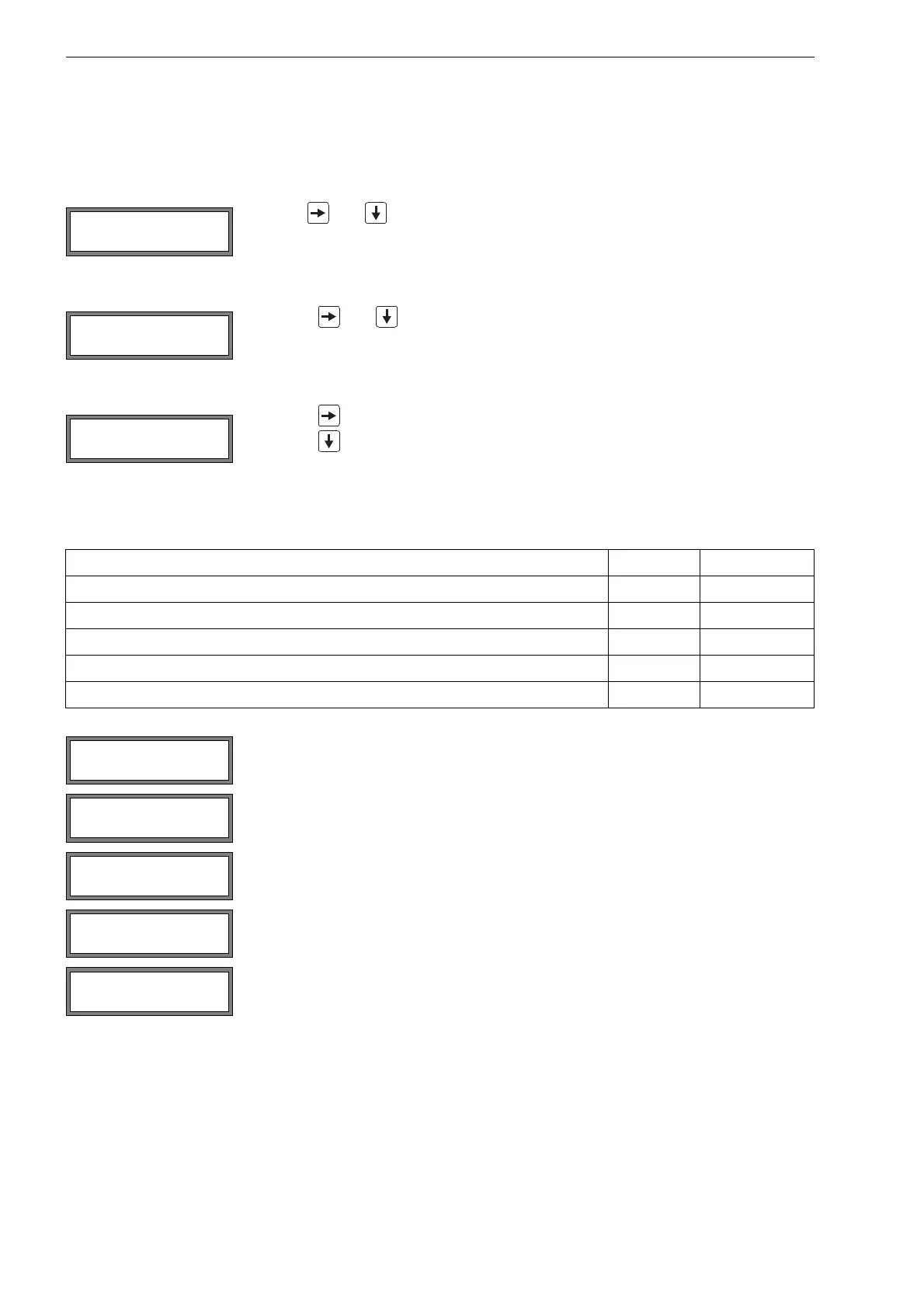
A vertical arrow ↕ will be displayed if the menu item contains a scroll list. The current list item will be displayed in the lower
line.
Use key and to select a list item in the lower line. Press ENTER.
Some menu items contain a horizontal scroll list in the lower line. The selected list item is displayed in capital letters and
in angle brackets.
Press key and to scroll through the lower line and select a list item.
Press ENTER.
Some menu items contain a horizontal scroll list in the upper line. The selected list item is displayed in capital letters and
in angle brackets. The current value of the list item is displayed in the lower line.
Press key to scroll through the upper line and select a list item.
Press key to scroll through the lower line and select a value for the selected list item.
Press ENTER.
function HotCode see section
language selection 9090xx 8.5
manual input of the lower limit for the inner pipe diameter 071001 11.7
activation/deactivation of the SuperUser mode 071049 14.1
change of the transmission parameters of the RS232 interface 232-0- 12.2.4
resetting the contrast of the display to fluid 555000 13.4
Select Special Funct.\SYSTEM settings\Miscellaneous.
Select yes to enter a HotCode.
Enter the HotCode. Press ENTER.
An error message will be displayed if an invalid HotCode has been entered. Press ENTER.
Select yes to enter the HotCode again or no to return to the menu item Miscellaneous.
R1=FUNC<typ mode
Function: MAX
SYSTEM settings↕
Miscellaneous
Please input a
HOTCODE: 000000
INVALID HOTCODE
hotcode: 000000



 To Next Page