Fluke 192/196/199
Users Manual
18
Acquiring Waveforms
Selecting AC-Coupling
After a reset, the test tool is dc-coupled so that ac and dc
voltages appear on the screen.
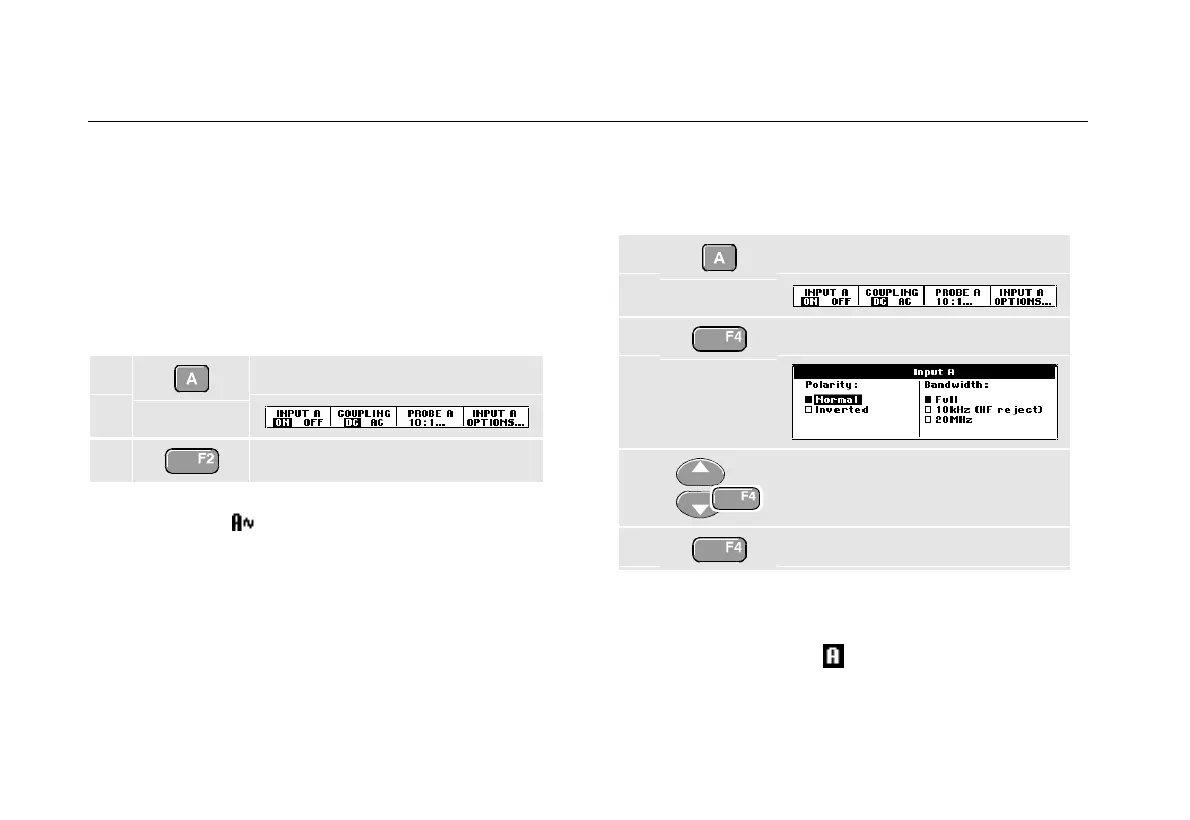
Use ac-coupling when you wish to observe a small ac
signal that rides on a dc signal. To select ac-coupling, do
the following:
1 Display the INPUT A key labels.
2 Highlight AC.
Observe that the bottom left of the screen displays the
ac-coupling icon:
.
Reversing the Polarity of the Displayed
Waveform
To invert the input A waveform, do the following:
1 Display the INPUT A key labels.
2 Open the Input A menu.
3 Select Inverted and accept
inverted waveform display.
4 Exit the menu.
For example, a negative-going waveform is displayed as
positive-going waveform which may provide a more
meaningful view. An inverted display is identified by an
inversed trace identifier (
) at the right of the waveform.










 To Next Page