Fluke 192/196/199
Users Manual
44
Setting Trigger Level and Slope
The Connect-and-View™ function enables hands-off
triggering to display complex unknown signals.
When your test tool is in manual range, do the following:
Perform an auto set. AUTO appears
at the top right of the screen.
Automatic triggering assures a stable display of virtually
any signal.
From this point, you can take over the basic trigger
controls such as level, slope and delay. To optimize
trigger level and slope manually, do the following:
1 Display the TRIGGER key labels.
2 Trigger on either positive slope or
negative slope of the chosen
waveform.
3 Enable the arrow keys for manual
trigger level adjustment.
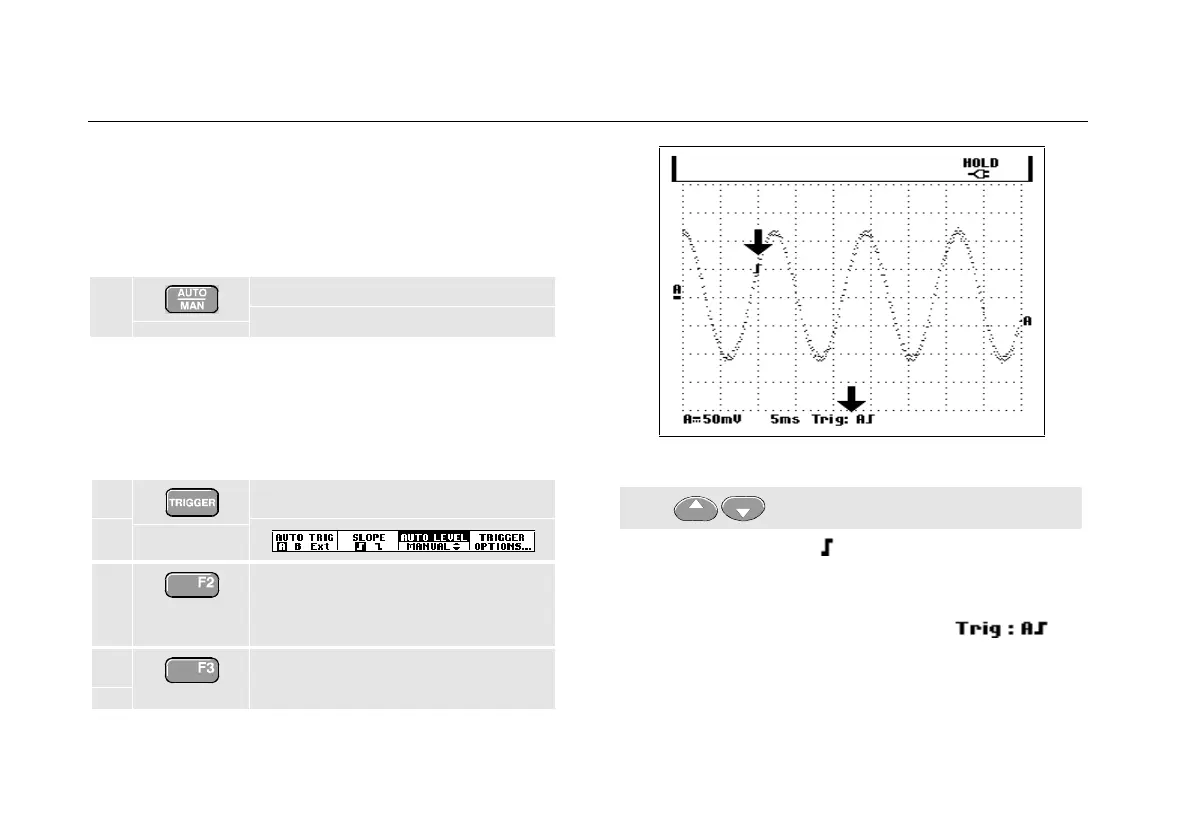
Figure 26. Screen with all Trigger Information
4 Adjust the trigger level.
Observe the trigger icon that indicates the trigger
position, trigger level, and slope.
At the bottom of the screen the trigger parameters are
displayed. (See Figure 26.) For example,
means that input A is used as the trigger source with a
positive slope.
When no trigger is found, the trigger parameters appear
in gray.










 To Next Page