Triggering on Waveforms
Triggering on Edges
5
47
Triggering on Edges
If the signal is instable or has a very low frequency, use
edge triggering to obtain full manual trigger control.
To trigger on rising edges of the input A waveform, do the
following:
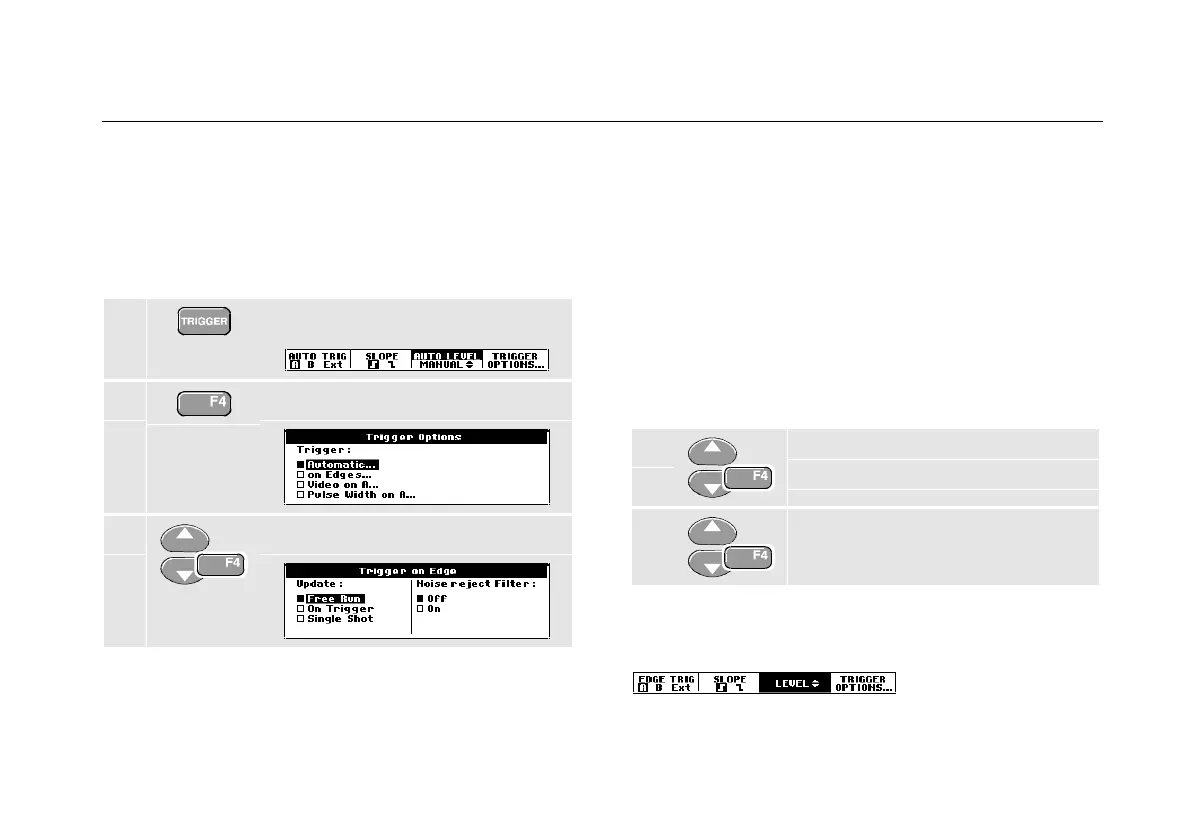
1 Display the TRIGGER key labels.
2 Open the Trigger Options menu.
3 Open the Trigger on Edge menu.
When Free Run is selected, the test tool updates the
screen even if there are no triggers. A trace always
appears on the screen.
When On Trigger is selected, the test tool needs a
trigger to display a waveform. Use this mode if you want
to update the screen only when valid triggers occur.
When Single Shot is selected, the test tool waits for a
trigger. After receiving a trigger, the waveform is
displayed and the instruments is set to HOLD.
In most cases it is advised to use the Free Run mode:
4 Select Free Run, jump to Noise
reject Filter.
5 Set Noise reject Filter to Off.
Observe that the key labels at the bottom of the screen
have adapted to allow further selection of specific edge
trigger settings:










 To Next Page