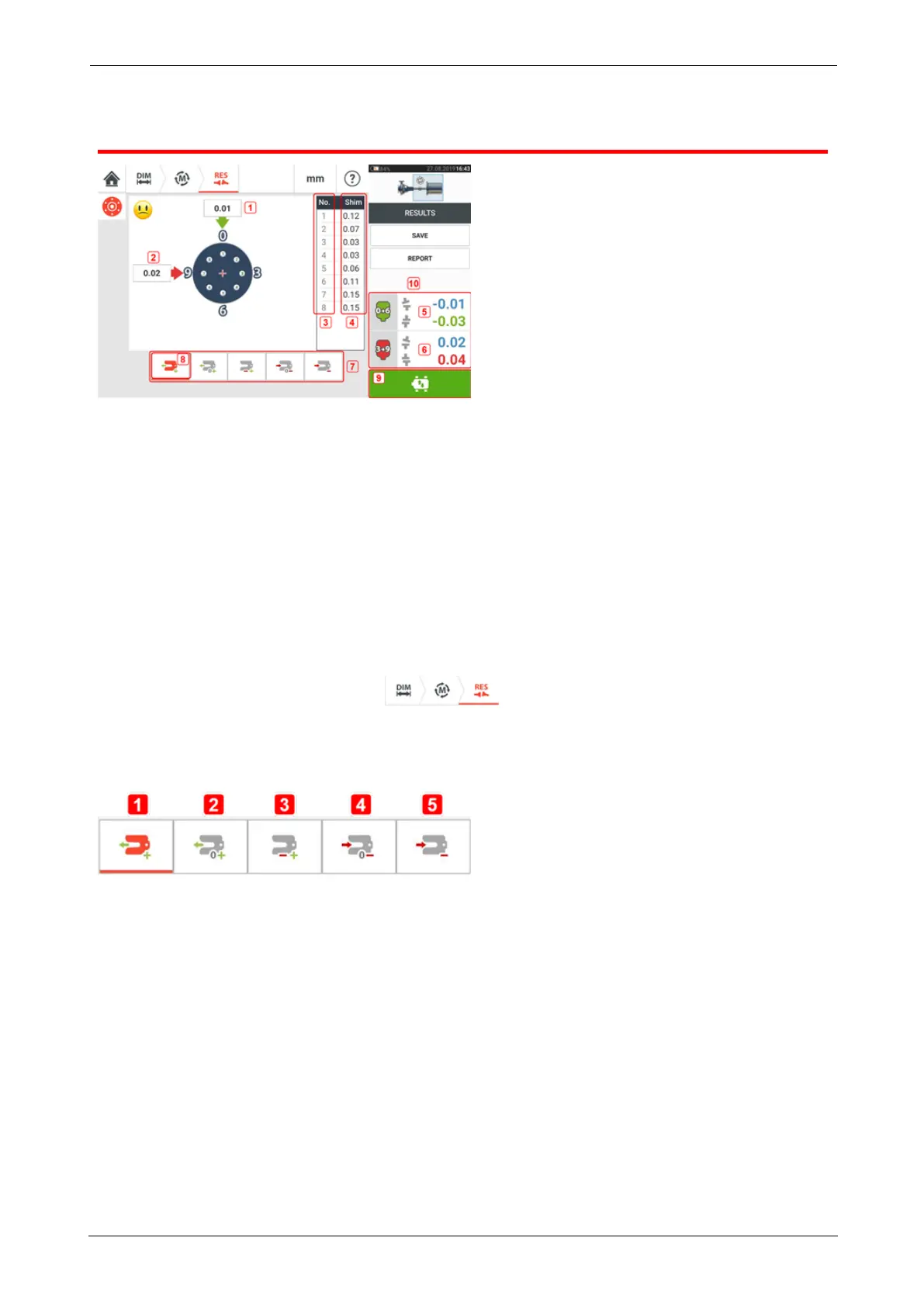
Vertical results
l (1) Flange correction in 0-6 direction
l (2) Flange correction in 3-9 direction
l (3) Bolt position
l (4) Shimming values
l (5) Coupling gap and offset in the 0-6 direction
l (6) Coupling gap and offset in the 3-9 direction
l (7) Shim correction modes
l (8) Shim correction mode used in this example
l (9) Initiates Live Move
l (10) Tapping the coupling results area accesses the measurement table.
In the results screen, the three icons – dimensions, measurement and results –
are active and may be used anytime.
Shimming modes
Shimming modes are defined as follows:
l (1) mode indicates all positive shimming
l (2) mode indicates "zero/plus" shimming. In this mode, one bolt position is set to zero
and the rest are positive
l (3) mode indicates optimized shimming. In this mode, half of the corrections will pos-
itive, and the other half negative.
l (4)mode indicates "zero/minus" shimming. In this mode, one bolt position is set to zero
and the rest are negative.
l (5) mode indicates all negative shimming
Sign convention
POSITIVE GAP opens towards 0:00 or 3:00
POSITIVE OFFSET if the top coupling half is offset towards 0:00 or 3:00
SHAFTALIGNtouch 105
On-board help



 To Next Page