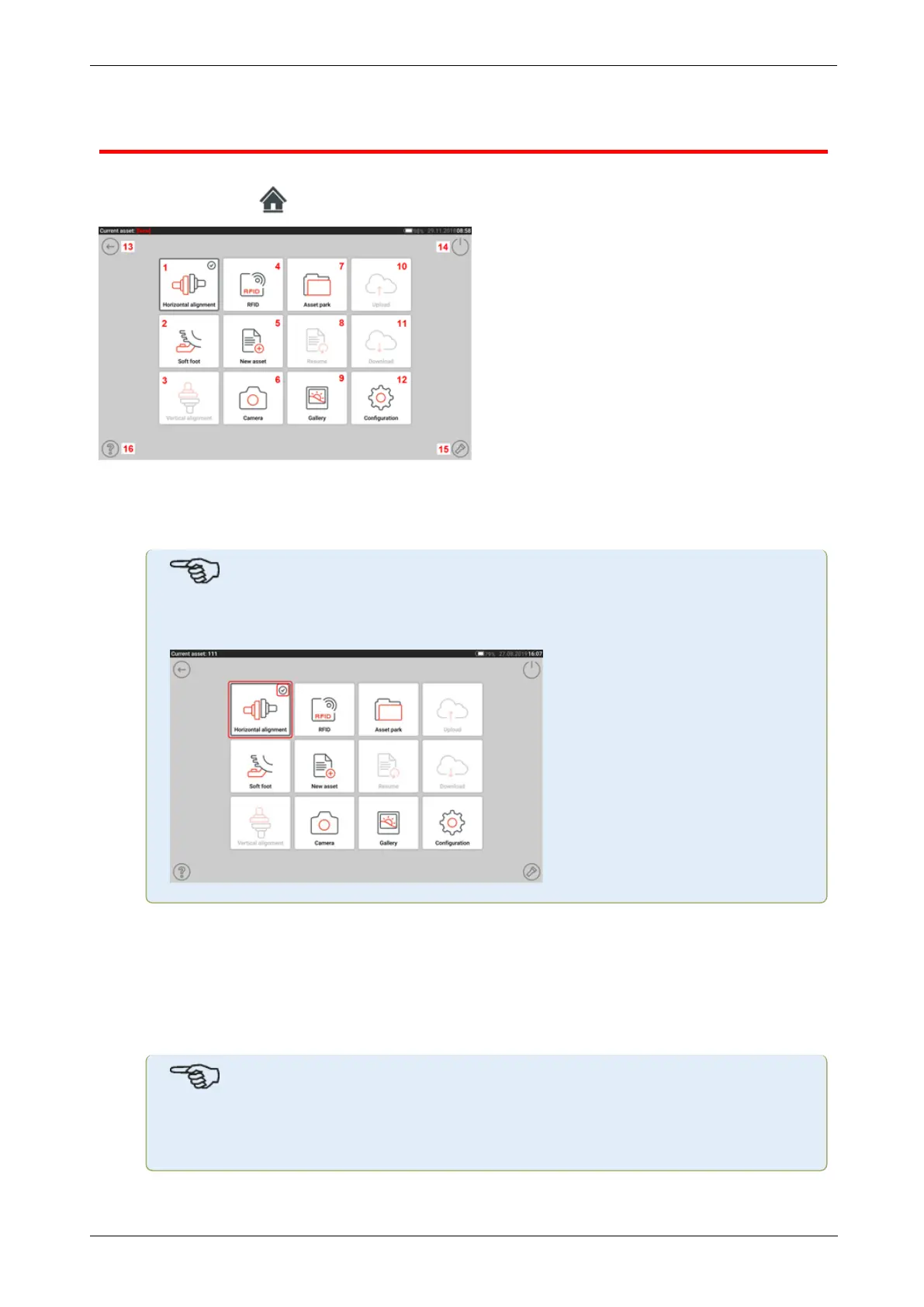
Home screen
The home screen is displayed when the device is switched on. The home screen may also be
accessed by tapping the "Home" icon.
Tapping the respective icon accesses the following respective functions:
l (1) The "Horizontal alignment" icon is used to access the horizontal alignment applic-
ation.
l
Note
If an asset is open, a check mark will appear next to the icon of the application to
be performed.
l (2) The "Soft foot" icon is used to access soft foot measurement.
l (3) The "Vertical alignment" icon is used to access the vertical alignment application. If
this icon is inactive, tap the "New asset" icon(5) to activate the vertical alignment icon.
l (4) The "RFID"icon is used to open assets assigned to respective RFID tags.
l (5) The "New asset" icon is used to start a new asset (this may be a pump-motor com-
bination).
Note
For any opened asset, different applications that may include shaft alignment and
soft foot measurement, may be performed.
l (6) The "Camera" icon is used to access the built-in camera.
18 Version:2.3
On-board help



 To Next Page