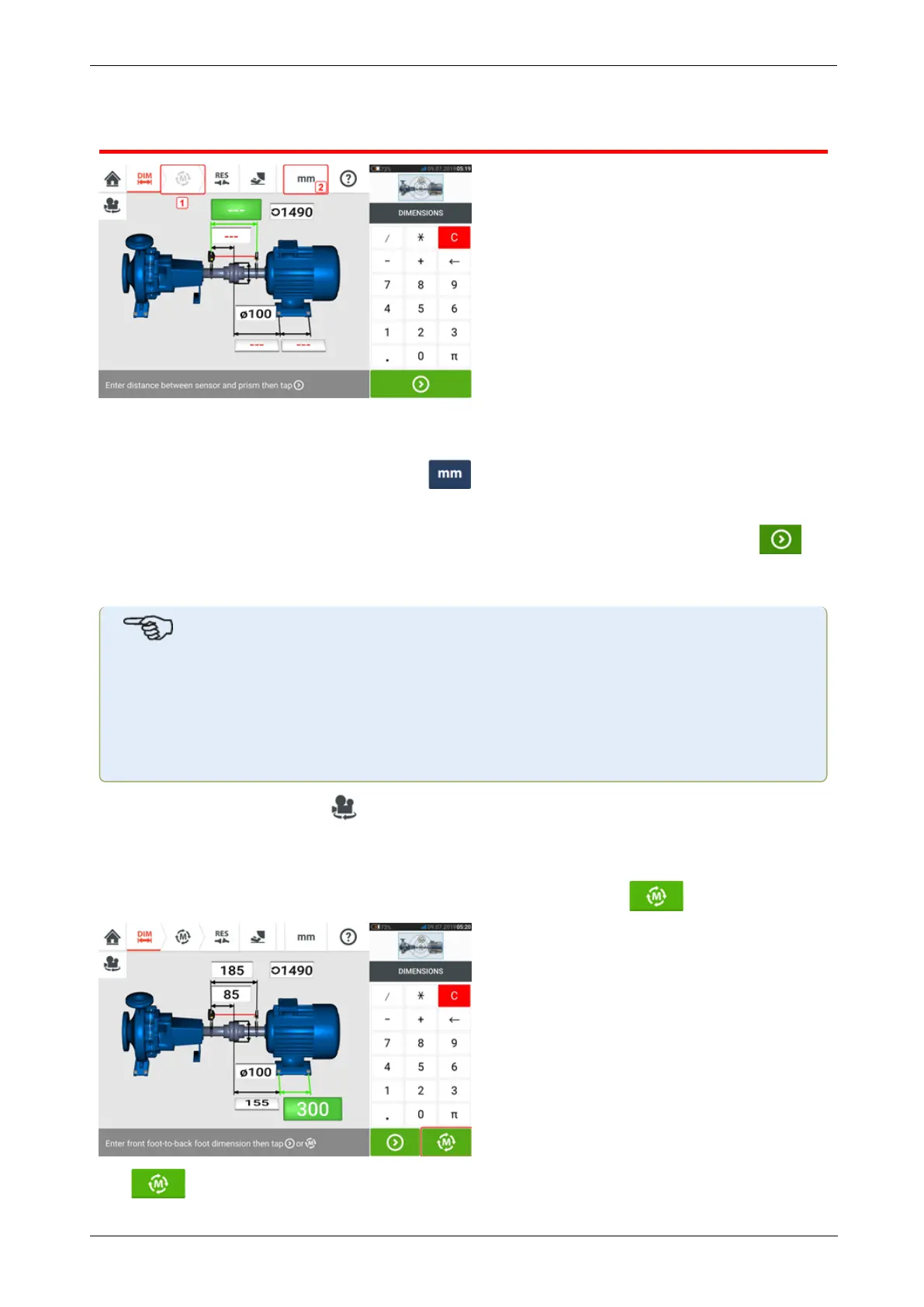
Dimensions
l (1) Grayed out icons are disabled within the active screen. The 'Measure' icon is
enabled after all dimensions have been entered.
l
(2) Tap the measurement units icon to set desired units. The icon toggles between
"mm" and "inch".
Tap the dimension fields and enter all required dimensions. The user may elect to tap
the ‘Next’ button to proceed to enter next dimension. Dimensions may be entered only when
the dimension field is highlighted green.
Note
If units are set to Imperial system, inch fractions may be entered as follows: For
1
/
8
"
enter 1/8 = 0.125"; For 10
3
/
8
" enter 10 + 3/8 = 10.375".
Thecouplingdiametervaluemaybedetermined by entering the measured cir-
cumference of the coupling and dividing the value by π (pi) (=
3.142).Forexample33"/π=10.5";Or330 mm/π=105mm
The rotate machine view icon is used to rotate the view of the machines and mounted com-
ponents on the display.
Machine and coupling properties may be edited by tapping the respective machine or coupling.
When all required dimensions have been entered, the ‘Measure’ icon appears.
Tap to proceed with measurement.
34 Version:2.3
On-board help



 To Next Page