Extend measurement range manually
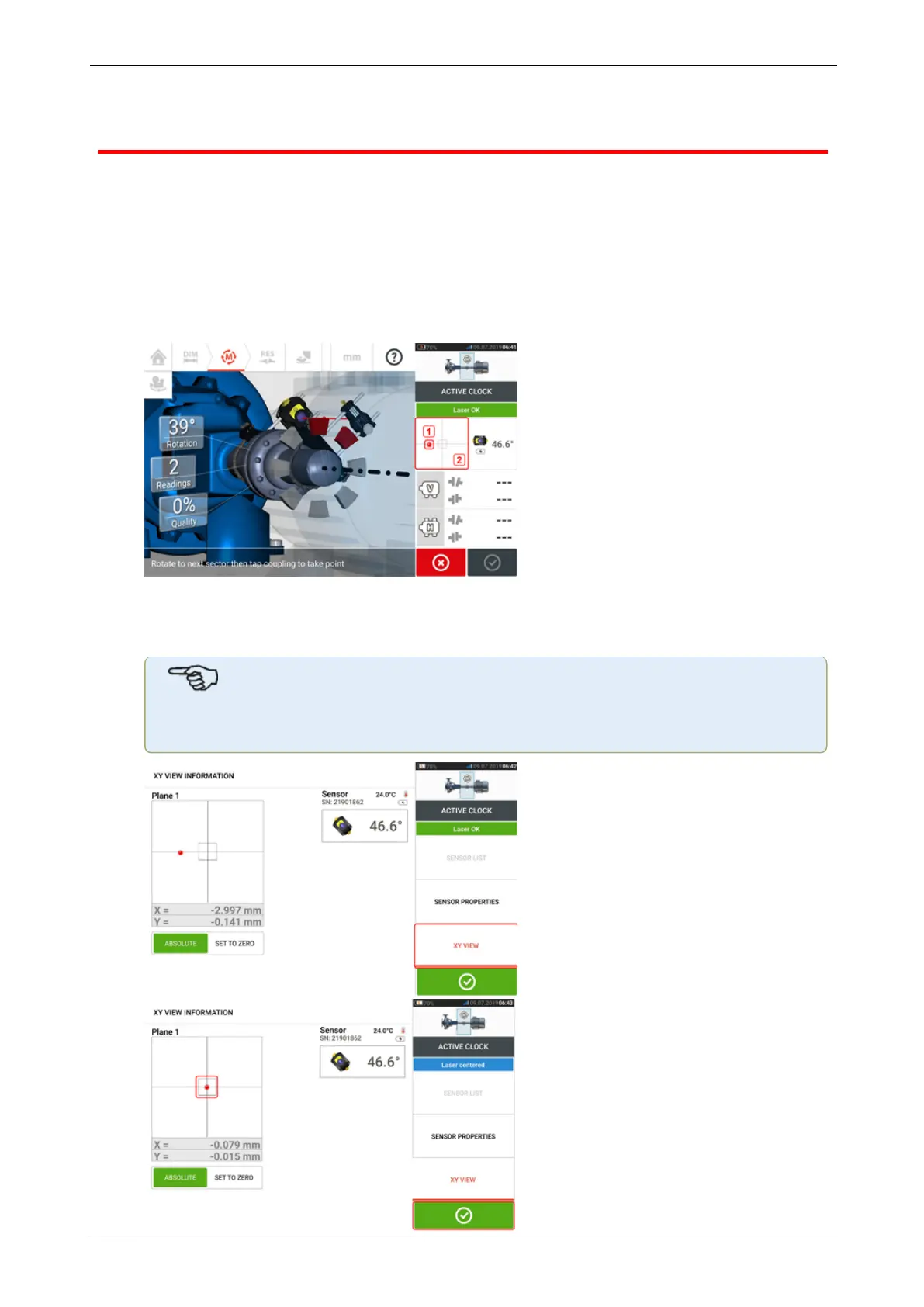
Measurement range may be extended manually in both Active Clock and Static measurement
modes. This range extension allows the adjustment of the laser beam such that it does not
miss the detector surface when measuring shafts with gross misalignment or angular mis-
alignment over large distances. During measurement, manual extension is prompted by
accessing the XY view before 'Laser End' is displayed.
l If the laser dot (1)on the display continues to move further away from the center of the
detector screen while rotating shafts to take measurements, tap the detector area (2) to
access the "XY view" screen.
l After accessing the "XY view", use the yellow horizontal angle adjustment knob and the
vertical position adjustment thumbwheel to adjust the laser dot such that it is positioned
inside or very close to the square target.
Note
During the laser adjustment procedure, avoid readjusting the sensor.
SHAFTALIGNtouch 65
On-board help



 To Next Page