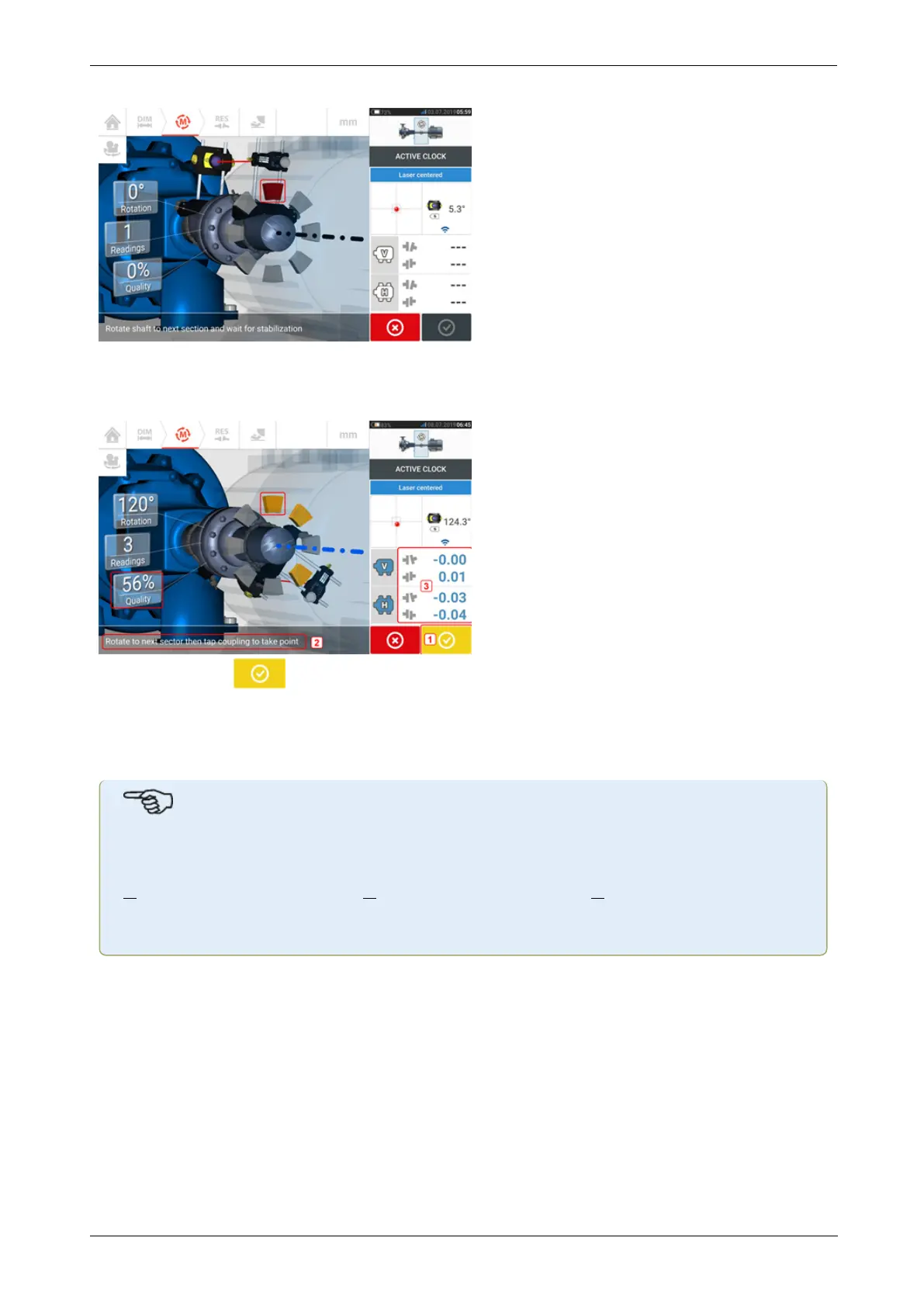
After measurement is taken, the sector is highlighted red. This is an indication of the meas-
urement quality. Rotate shafts to the next sector and repeat the previous step for the set act-
ive points. The color of the measured sectors shows the attained measurement quality.
The proceed icon (1) also indicates the attained measurement quality. In this particular
example, the number of active points set is 4 and therefore the hint (2) to take a further meas-
urement point.
Note: Coupling results (3) are displayed because three measurement points are sufficient to
determine the alignment condition.
Note
As shafts are rotated, and depending on the physical condition of the machines, the act-
ive clock sectors change color from red (quality < 40%) to amber (quality
>40%<60%) to green (quality >60%<80%) to blue (quality >80%). Coupling results
are displayed as soon as the measurement quality attains 40% (active clock sector
turns amber).
Once the set number of active clock measurement points is attained, measurement stops.
60 Version:2.3
On-board help



 To Next Page