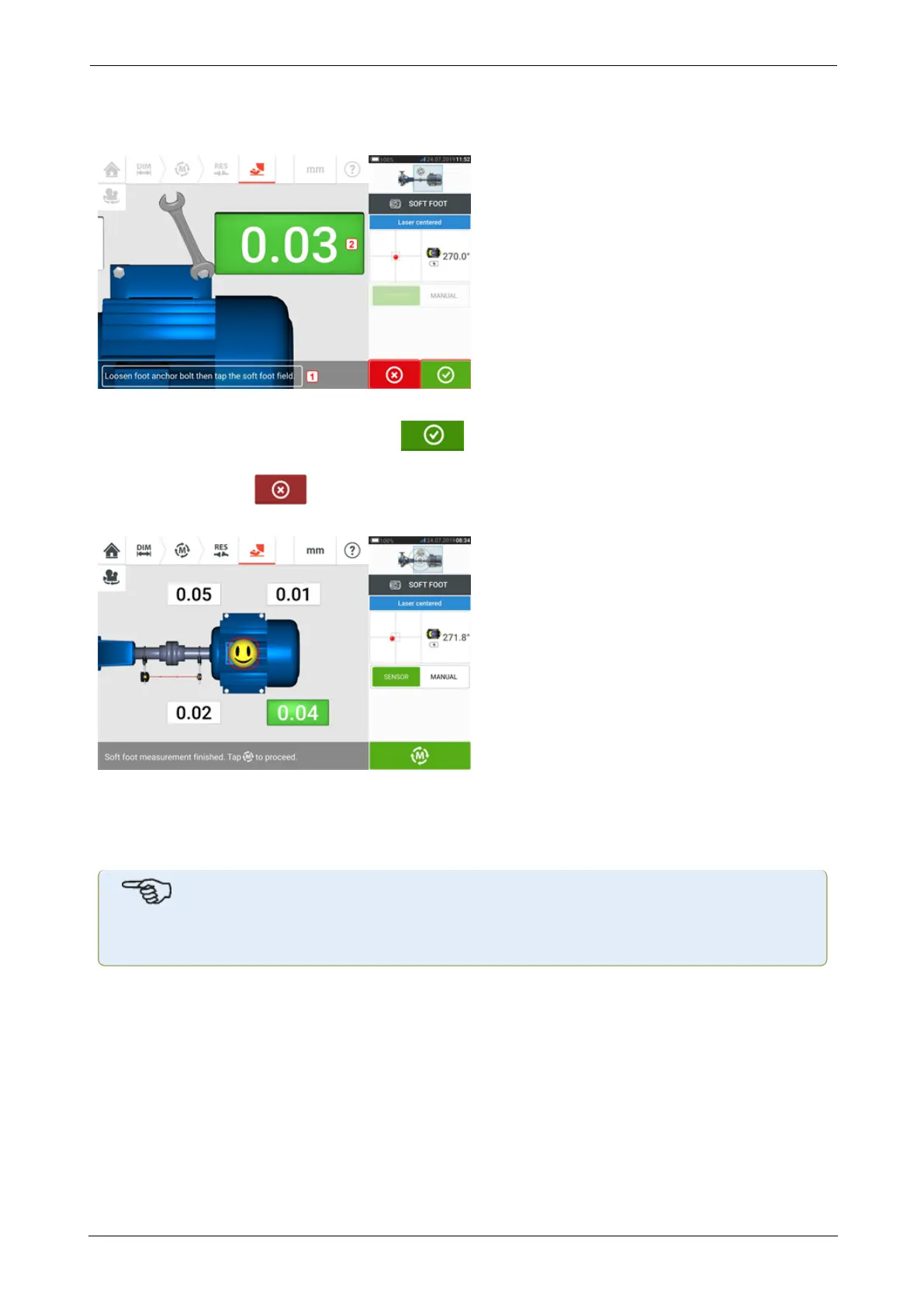
Once the sensor and reflector have been positioned horizontally, the on-screen needle rests on
the respective green sector, and the following adjustment screen appears.
Loosen the corresponding foot bolt (see hint 1). The recorded soft foot value is displayed [2].
When the soft foot value stabilizes, tap the 'Proceed' icon or recorded value (2), then
tighten the bolt (see hint 1). If desired, the soft foot measurement at the corresponding foot is
canceled by tapping the 'Cancel' icon. The above soft foot measurement procedure is
repeated for all four feet positions.
The smiley indicates the soft foot condition. A happy smiley indicates that the measured soft
foot is within tolerance and further corrections are unnecessary. Acceptable soft foot tolerance
is 0.05 mm (2 mil). A sad smiley indicates that the measured soft foot is out of tolerance and
shimming corrections are necessary.
Note
The set soft foot tolerance may be displayed by tapping the smiley within the machine.
If during soft foot measurement the shafts rotate away from the 3:00 or 9:00 o’clock position,
the following hint screen appears.
SHAFTALIGNtouch 97
On-board help



 To Next Page