iTuner Manual
61
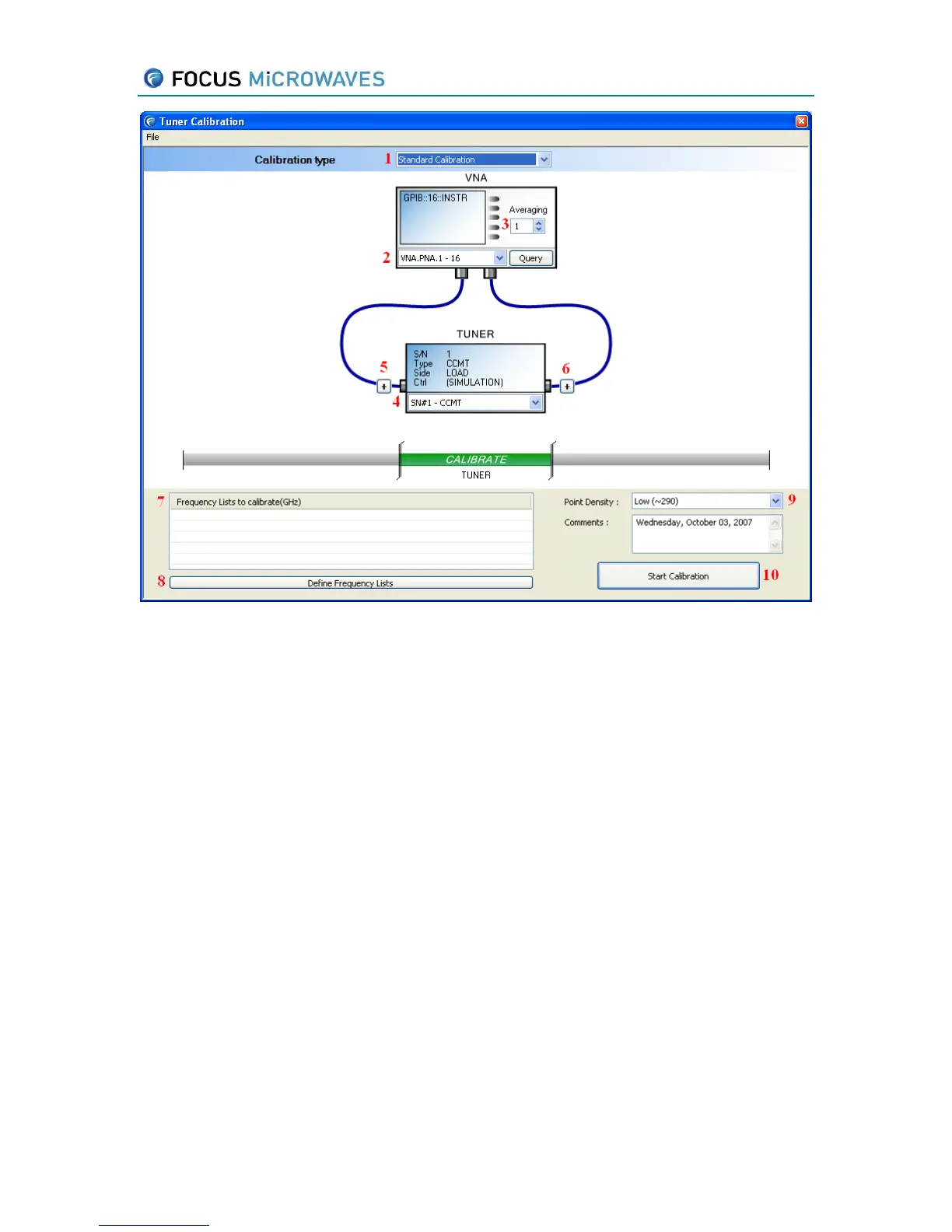
Figure 6-2
1. Select the Calibration type: For standalone tuner calibration use Standard Calibration.
2. Select the VNA to be used for calibration. The VNA must already be defined and
configured.
3. Select the VNA averaging to be used
4. Select the tuner to be calibrated.
5. Click the [+] to remove a known twoport (.S2P file) from the input side of the tuner
calibration.
6. Click the [+] to remove a known twoport (.S2P file) from the output side of the tuner
calibration.
7. This window displays the list(s) of frequencies to be calibrated. (see section 6.1.1)
8. Opens the Frequency Definition window (see section 6.1.1)
9. Select the calibration point density desired. DO NOT CHOOSE A DENSITY GREATER
THAN HIGH.
10. Start the calibration process. This will take (typically) from 5-30 minutes depending on
the type of tuner and the speed of the VNA.
Upon completion of the calibration process, the calibrations will be saved in the program’s
database.



 To Next Page