11
2. Panel Descriptions
2-1. Main Unit
2-1-1. Front Panel
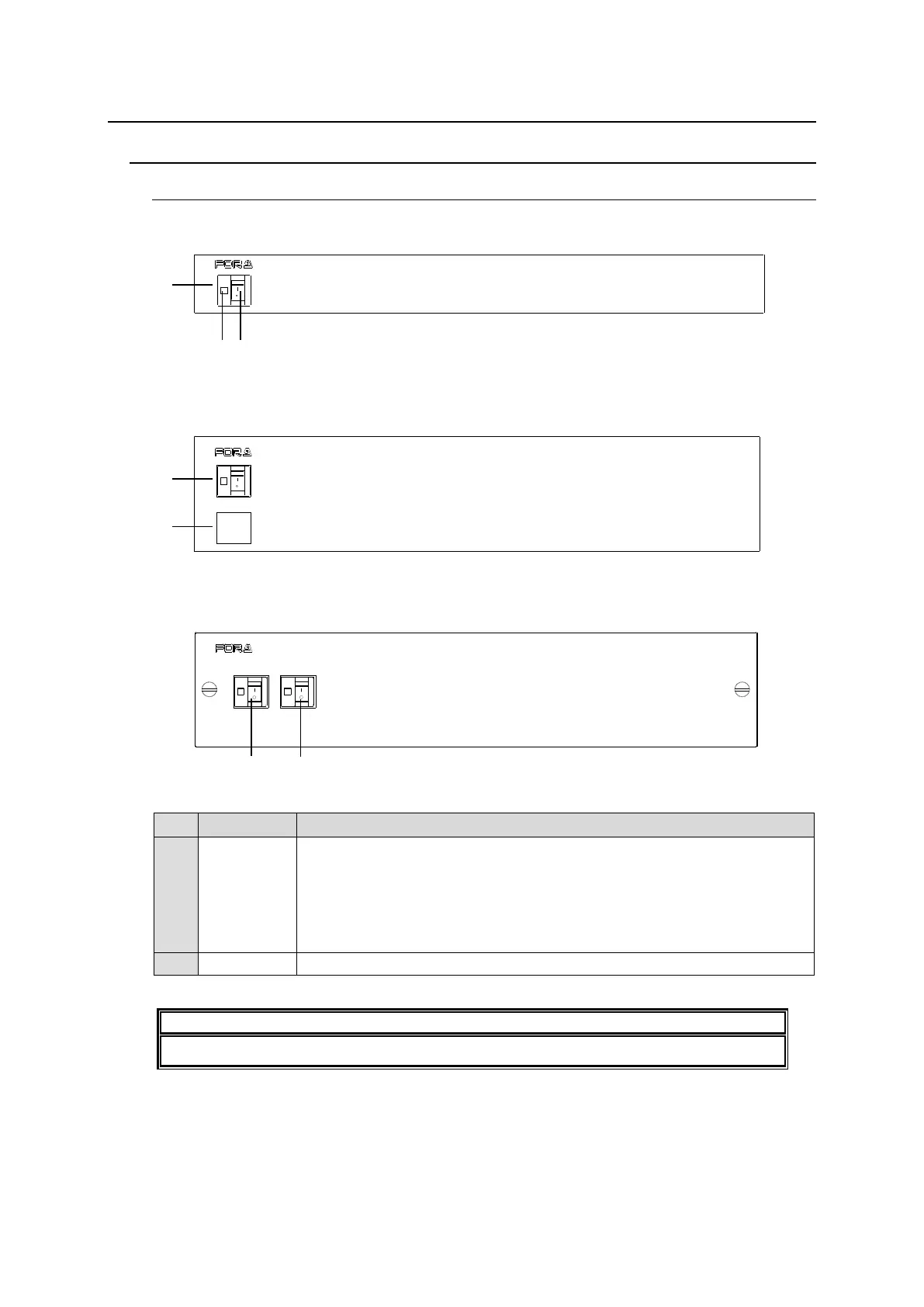
MFR-1616 / MFR-1616A
* The above figure is MFR-1616.
MFR-1616R / MFR-3216 / MFR-3232
* The above figure is MFR-1616R.
MFR-3216RPS / MFR-3232RPS
* The above figure is MFR-3232RPS.
Power switch 1 (standard equipment)
(1) Switch to turn unit power On/Off.
(2) LED indicator
Lit green DC power supply: Normal
Unlit DC power supply: Error
Lit orange No MFR-LAN connection (MFR-1616A only)
Power switch 2 (optional equipment) (1) and (2) the same as POWER1.
Whenever restarting the main unit, restart the web browser as well.
MFR-1616R
ROUTING SWITCHER
POWER 1
POWER 2
ON
OFF
OFF
ON
ROUTING SWITCHER
MFR-1616
POWER
POWER 1
POWER 2
ON
OFF
ON
OFF
MFR-3232RPS
ROUTING SWITCHER



 To Next Page
 Loading...