51
10 : MODIFIERS
UNDERSTANDING MODIFIER MIN AND MAX
MIN and MAX set the range of a modier. This lets ne-tune modiers in musical way.
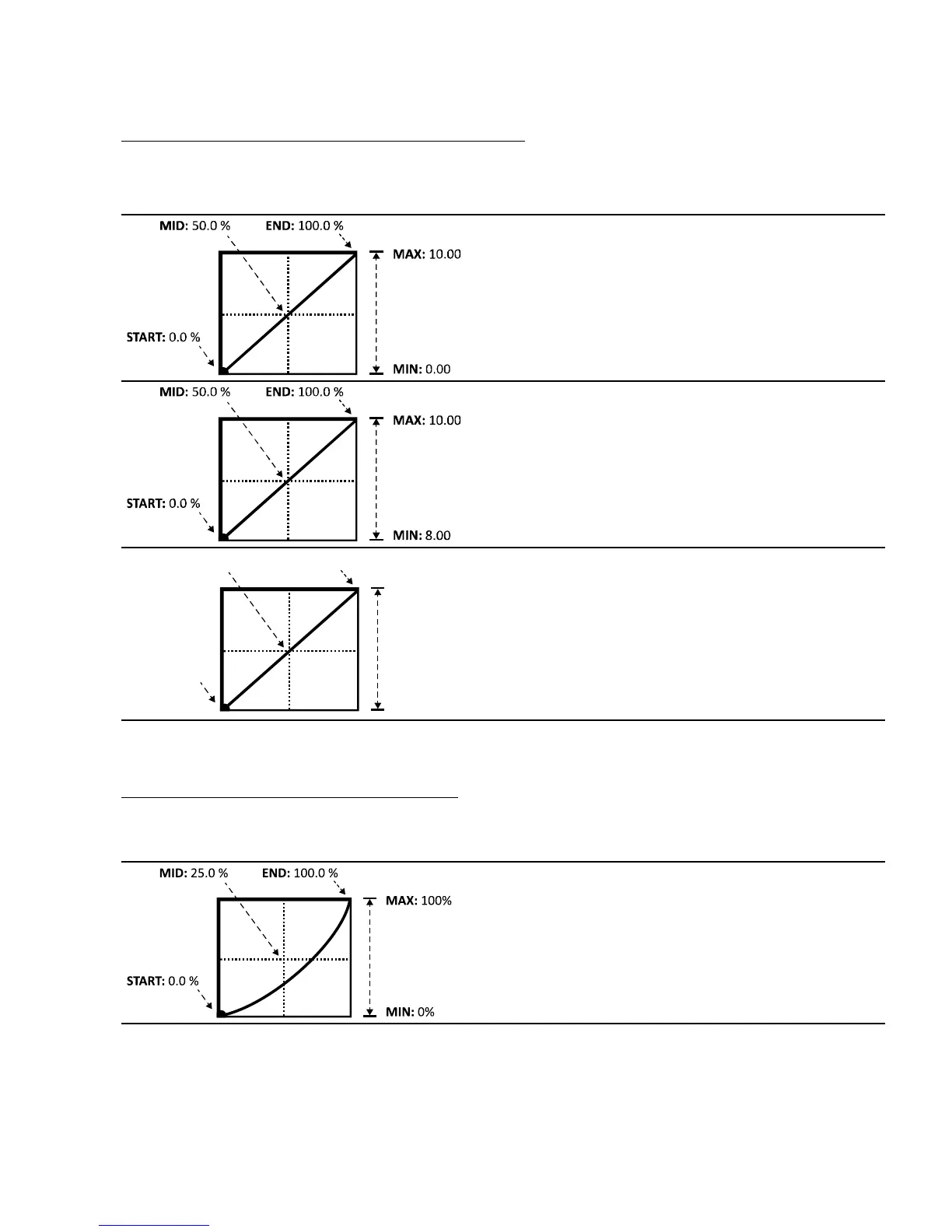
In the example below, we’re imagining a volume pedal whose range goes from zero to ten.
Here is your basic default vanilla volume pedal.
Our pedal’s start (heel down position) has the
volume at 0.00 or silent, and the pedal stop (toe
down position) has the volume at 10.0 or all the
way up.
Here’s something dierent: with MIN increased to
8.00, the volume never goes below 8.00 in the heel
position, then up to full on for toe down.
Maybe this could be used to bring the rhythm parts
down and then up to full volume for the leads.
MAX: 0.00
0.0 %
Here, MIN is at 10.0, the loudest setting, while MAX
is at 0.0, or silent. This is a reverse volume pedal!
USE MID TO CREATE BASIC CURVES
Let’s imagine a modier on the FEEDBACK of a delay to demonstrate changes to the mapping of the
response. By now you should be familiar with the default curve, so let’s skip right to the tweaked one:
As we adjust “MID”, the line becomes a curve.
At 25%, we nd a taper which means “when the
pedal is halfway forward, the MIX will be only 25%
between MIN and MAX. For this example, that
means ner control of feedback in the low end of
the range, and then a more rapid increase at the
top.



 To Next Page