52
10 : MODIFIERS
START: 0.0%
MID: 50%
END: 100%
SCALE: 2.0
OFFSET: 100%
START: 0.0%
MID: 50%
END: 100%
SCALE: 10.0
OFFSET: 0%
START: 47.2%
MID: 0%
END: 60.6%
SCALE: 10.0
OFFSET: -100%
ADVANCED MODIFIER CURVES AND SHAPES
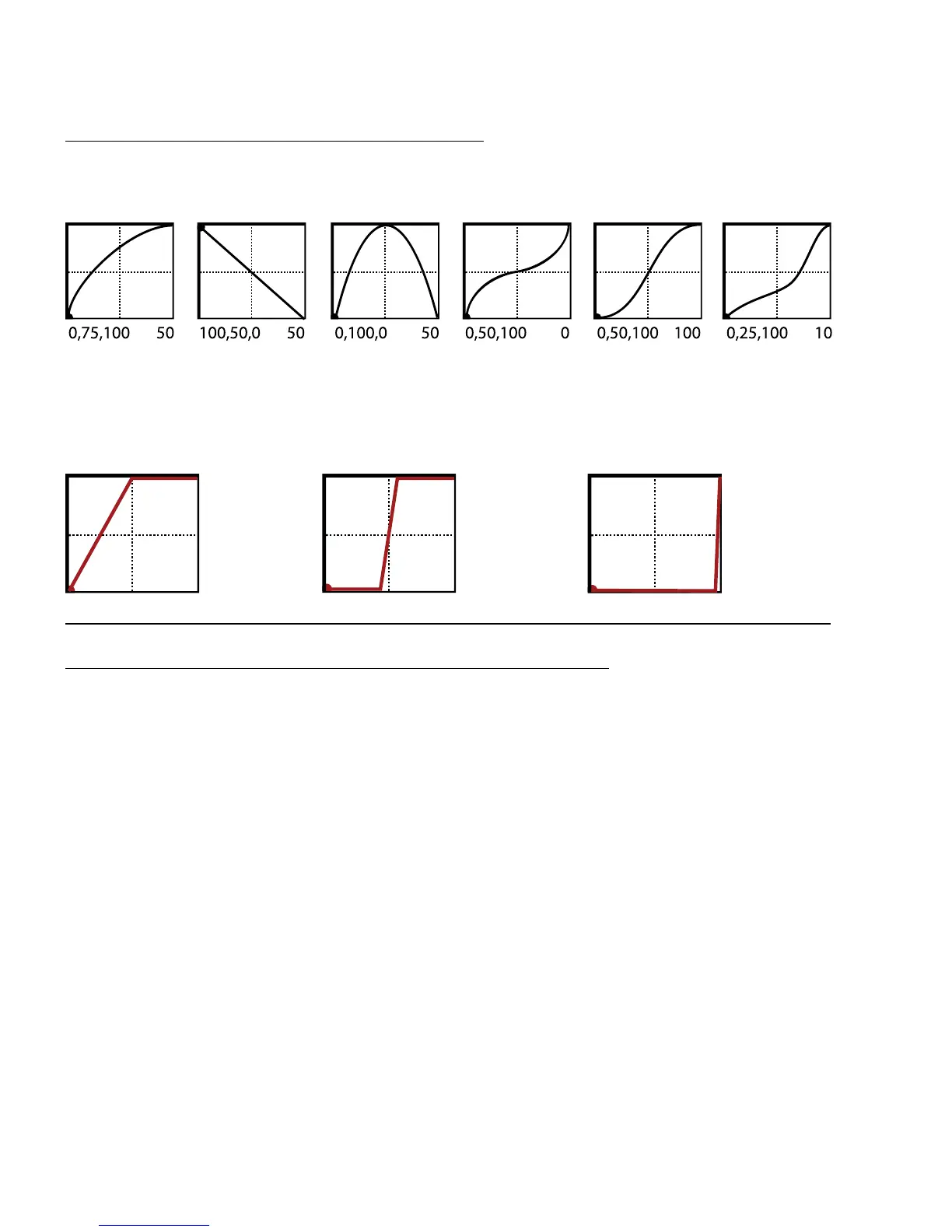
You can also adjust START, END, and SLOPE (which introduces an “S” or “backwards S” shape). The numbers
below each example show the settings for START, MID, END and SLOPE. With a bit of practice, you will learn
to achieve desired modier eects quickly. Try dialing in the shapes below.
SCALE and OFFSET also re-map modier response. SCALE adds vertical exaggeration or compression, while
SHIFT moves the entire curve up or down on the Y-axis. Areas outside the graph boundaries will be clipped
and replaced by line segments. The examples below show some interesting possible applications. (Here,
curves are shown in red because they overlap graph boundaries.)
AUTO-ENGAGE TURNS EFFECTS ON/OFF AUTOMATICALLY
Ever heard of a wah pedal with no toe-switch? It turns on automatically when you use it and then bypasses
when you pull it all the way back. That’s the concept of “Auto-Engage.” Try it! You’ll quickly nd that Auto
Engage comfortably eliminates the need for expression pedal “toe” switches.
AUTOENGAGE brings a block out of bypass when the SOURCE for one of its modiers triggers the eect. It
is based on two parameters found on the MODIFIER screen:
AUTOENG – Determines whether or not the block containing a modier will automatically engage or
bypass based on the level of a modier source. FAST, MEDIUM and SLOW determine how quickly the eect
turns ON or OFF once auto-engage is triggered. Use SLOW settings to “relax” Auto Engage so your eect
doesn’t snap on or o unexpectedly.
The three POSITION (“POS”) options engage the eect when the controller value approaches the
OFF VALUE.
The three SPEED (“SPD”) options engage the eect when the controller is moved quickly.
Set to OFF to disable Auto Engage.
OFF VAL – Sets the threshold that SOURCE must approach for auto-engage to occur. When OFF VALUE is
set below 50%, the eect is bypassed when the controller goes below the OFF VALUE. If OFF VALUE is set
to 50% or higher, the eect is bypassed when the controller goes above than the OFF VALUE.
For “heel down = bypassed”, set to 5%. For “toe down = bypassed”, set to 95%.



 To Next Page