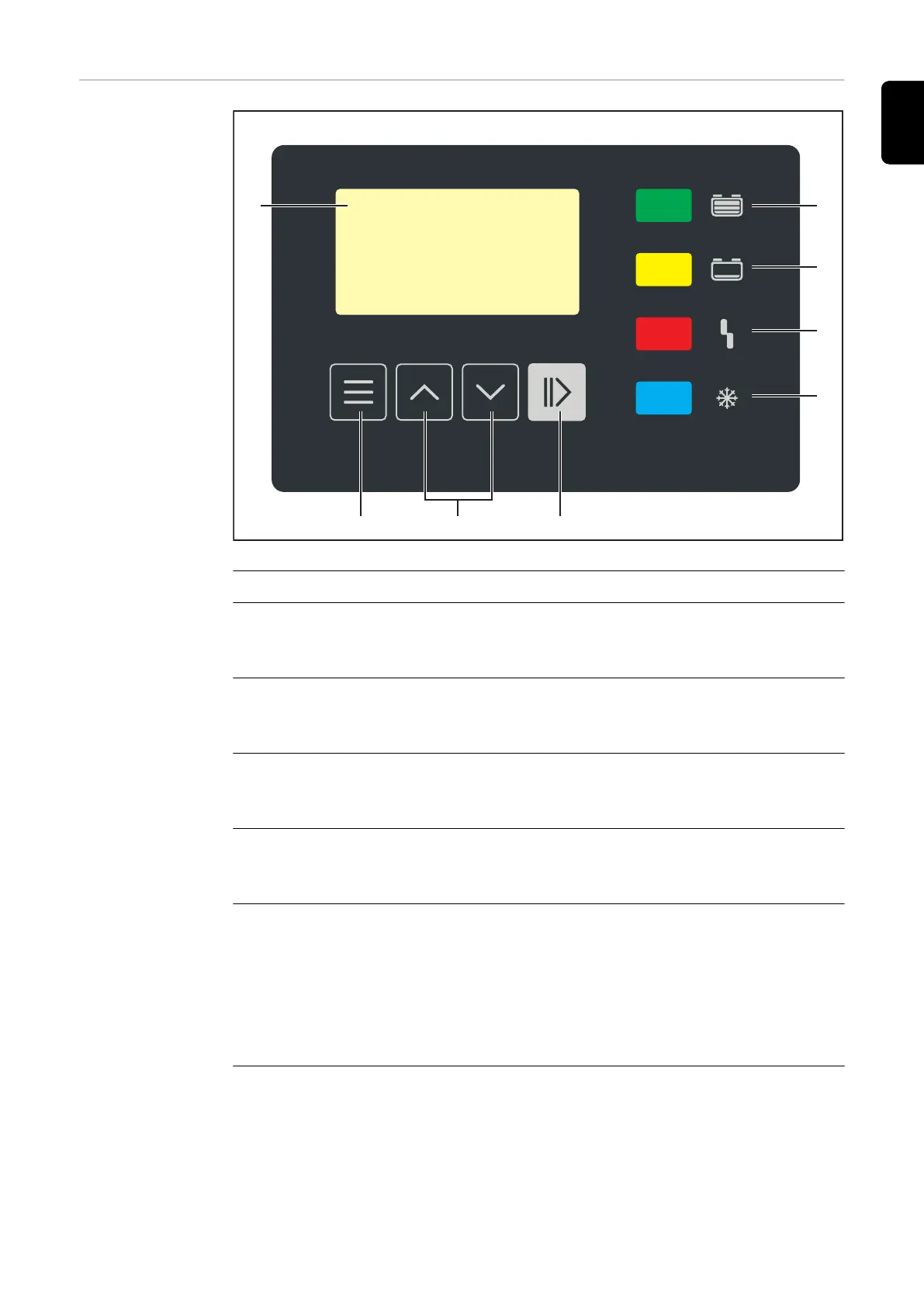
Control panel
(1) (8)
(7)
(6)
(5)
(4)(3)(2)
No. Function
(1) Display
Display of the current charging parameters.
Display of settings.
(2) "Menu" button
Select the desired menu.
Return to the higher-level selection.
(3) "Up/Down" buttons
Select the desired menu item.
Set the desired value.
(4) "Pause/Start" button
Pause and resume the charging process.
Confirm a menu item or setting.
(5) "Battery Cold" indicator (blue)
Signals a cooled down battery ready for use.
Lights up continuously: At the end of charging, the set cooling time or, option-
ally, the battery temperature has been reached.
Flashes every second: The water refill indicator has also been activated. De-
tailed information can be found in the Additional functions section of the "Dis-
play" chapter.
(6) "Error" display (red)
Lights up continuously: The device outputs an error. The current situation does
not allow for proper charging. While the red indicator is lit, charging cannot take
place (charging interrupted). The display shows a corresponding status code.
23
EN-US









 To Next Page