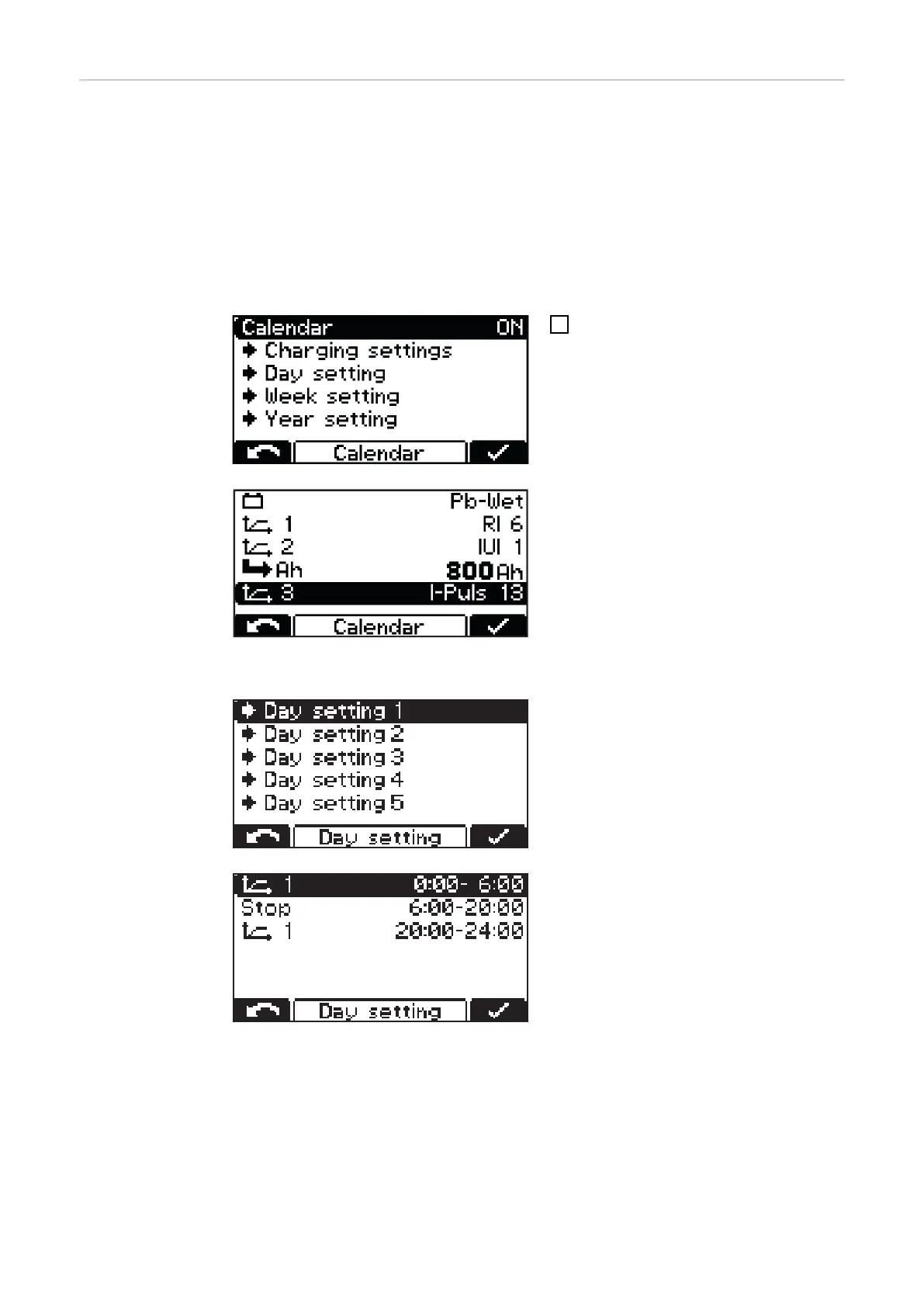
Calendar calendar
The calendar function enables charging to be started automatically according to the fol-
lowing criteria:
- Time window within which charging should not be started when a battery is connec-
ted.
- Time window within which a defined curve 1 should be started when a battery is
connected.
- Time window within which a defined curve 2 should be started when a battery is
connected.
1
To activate the calendar function, se-
lect and confirm the "ON" setting.
"Charging settings" menu item:
- Type of battery for all curves:
e.g. Pb-WET.
- Curve settings when the correspond-
ing curve is selected.
Further settings are possible within the calendar function:
"Day setting 1-5":
The day settings allow up to 5 different
charge start time profiles to be defined,
with the following setting options:
- Symbol for curve 1:
Time window within which curve 1
should be started (e.g.: 0:00-6:00)
- Stop:
Time window within which no charging
should take place (e.g.: 6:00-20:00)
- Symbol for curve 1:
Time window within which curve 1
should be started (e.g.: 20:00-24:00)
40












 To Next Page