NOTE!
Ongoing charges are not influenced by the set time windows.
▶
If a battery is connected at 05:45 in the above example, charging is stopped when
necessary and is not interrupted by the specified end time (6:00 in the example) of
the set time window.
▶
If the battery is connected within the stop time window, charging will start automatic-
ally in the next time window. If a manual charge start is triggered during the stop
time window, charging always takes place with curve 1.
Additional setting options:
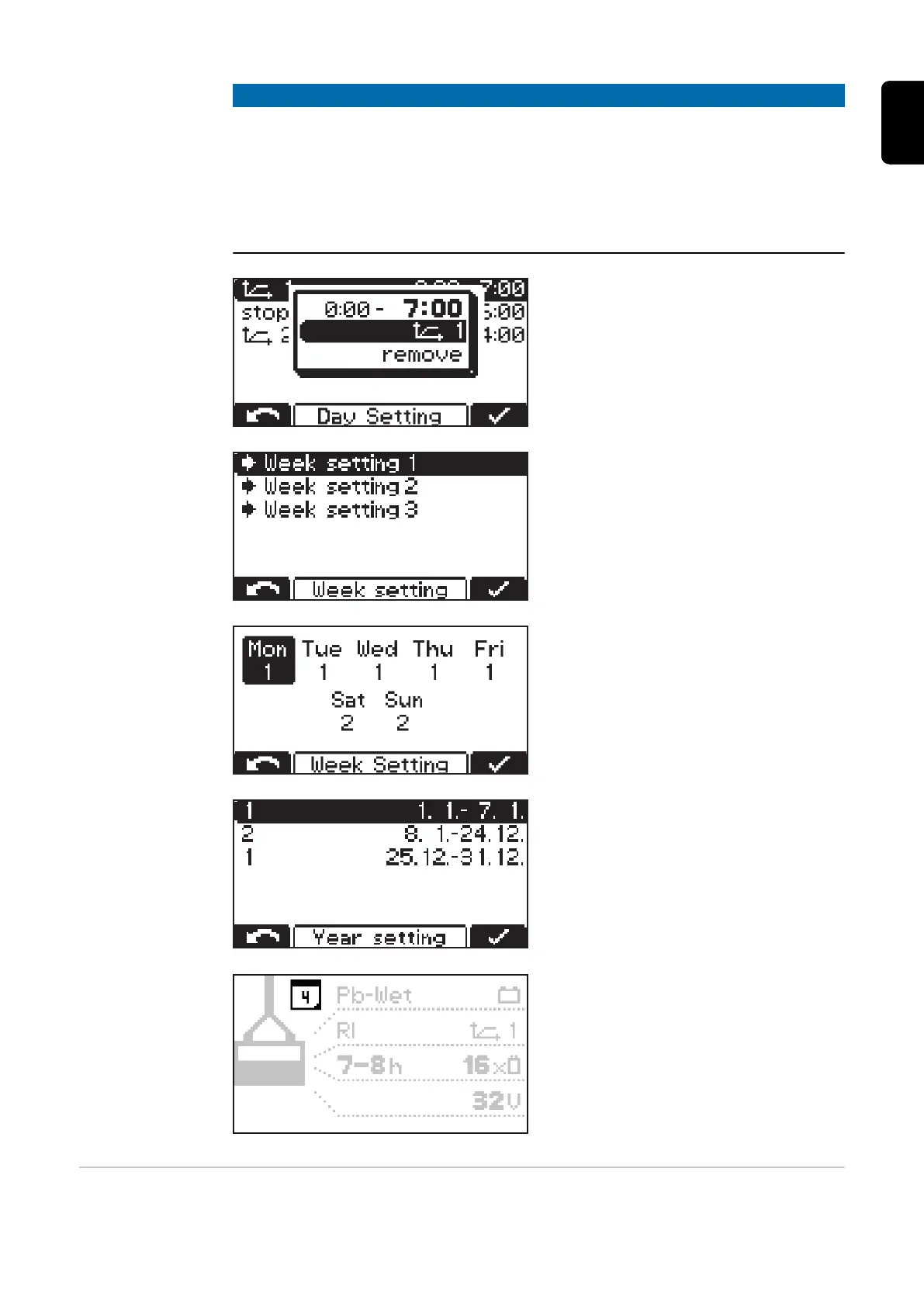
- Change the assigned curve:
curve symbol.
- Remove the curve in question:
"remove".
"Week setting":
- It is possible to configure 3 different
week settings.
Each day of the week can be assigned
one of the previously created day settings.
"Year setting":
- It is possible to assign a week setting
to several calendar periods (e.g. 1.1. -
7.1.).
When the calendar function is activated, a
calendar symbol (here with the number "4"
as the current date) appears in the display.
Special charges Special Charges
41
EN-US










 To Next Page