Video Panel
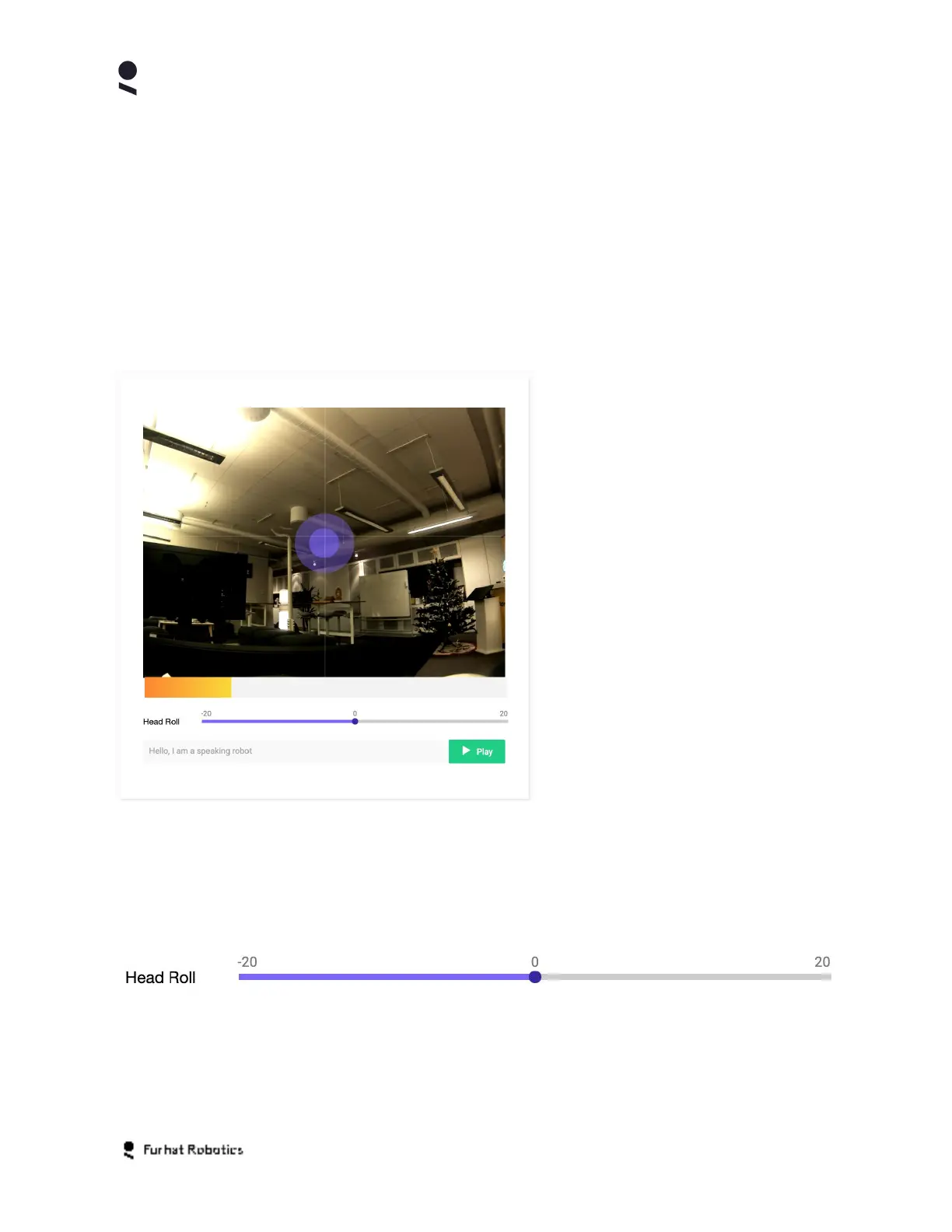
The Video Panel shows live video from the robots onboard camera. The video feed is overlaid
with marker boxes when the robot has identified the presence of users in the interaction space
of the robot.
Gaze Control
The Video Panel also enables you to remotely direct the gaze of the robot via motor movements
of the robots neck motion platform.
You can direct the gaze of your robot
using a mouse inside the video panel.
The targeting double circle visible in
the video panel indicates the current
gaze position of the robots head
Clicking on a position within the video
panel will result in the robot's head
moving to direct its gaze to that
position, in its field of view
Clicking and dragging your mouse
within the video panel will result in the
robots head following the drag
movements of your mouse.
Roll Control
Your robot’s neck motion platform supports 3DOF (3 degrees of freedom motion). The Roll
Control enables you to remotely direct the roll angle of the neck from the Web-Console.
Clicking on the roll control enables you to adjust the roll angle from -20 degrees of vertical to
+20 degrees of vertical.
Copyright Furhat Robotics AB © 2020 - Commercial In Confidence


 To Next Page