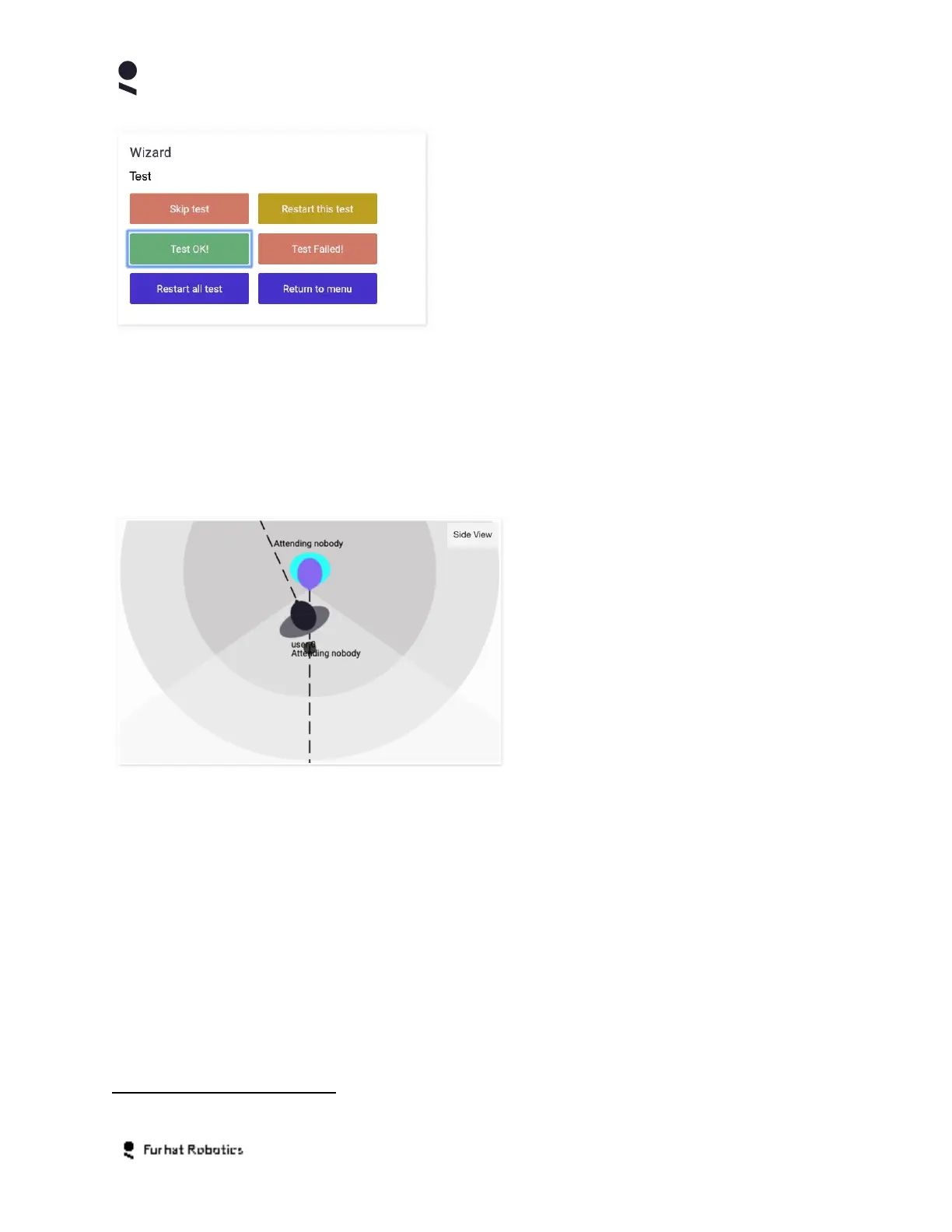
In this example, the Wizard Panel is populated by
the Furhat Robotics Test Skill, the skill provides a
number of buttons inside the Wizard Panel that
allow certain aspects of the Test Skill to be
controlled from within the Web-Console.
Attention Panel
Your robot can detect and track the presence of users within the robots interaction space using
4
it's onboard camera and the sensory perception features of FurhatOS. The Attention Panel
provides an abstract graphical representation of the robots attention model and supports
viewing the model from a top down (plan) and side (elevation) view point.
The Attention panel represents your
Robot using the blue/purple icon at the top
dead center of the representation.
Users that have been detected by the
robot are denoted using a gray/black icon
and given a sequential identity of the form
User-N. As the users move about the
interaction space the attention panel
updates their position dynamically.
In order to support interactive testing of skills, the Attention Panel enables you to add or remove
virtual users by double clicking within the interaction space, these users are given a sequential
identity of the form Virtual-User-N. To add a virtual user, simply double click inside the
interaction space, to remove the same virtual user simply double click the relevant virtual user
icon inside the interaction space.
If the running skill is attending to a particular user in the robots interaction space, the attention
panel will indicate this state with the label Attending User-N
4
Note that the interaction space can be defined and configured from within the skill
Copyright Furhat Robotics AB © 2020 - Commercial In Confidence


 To Next Page