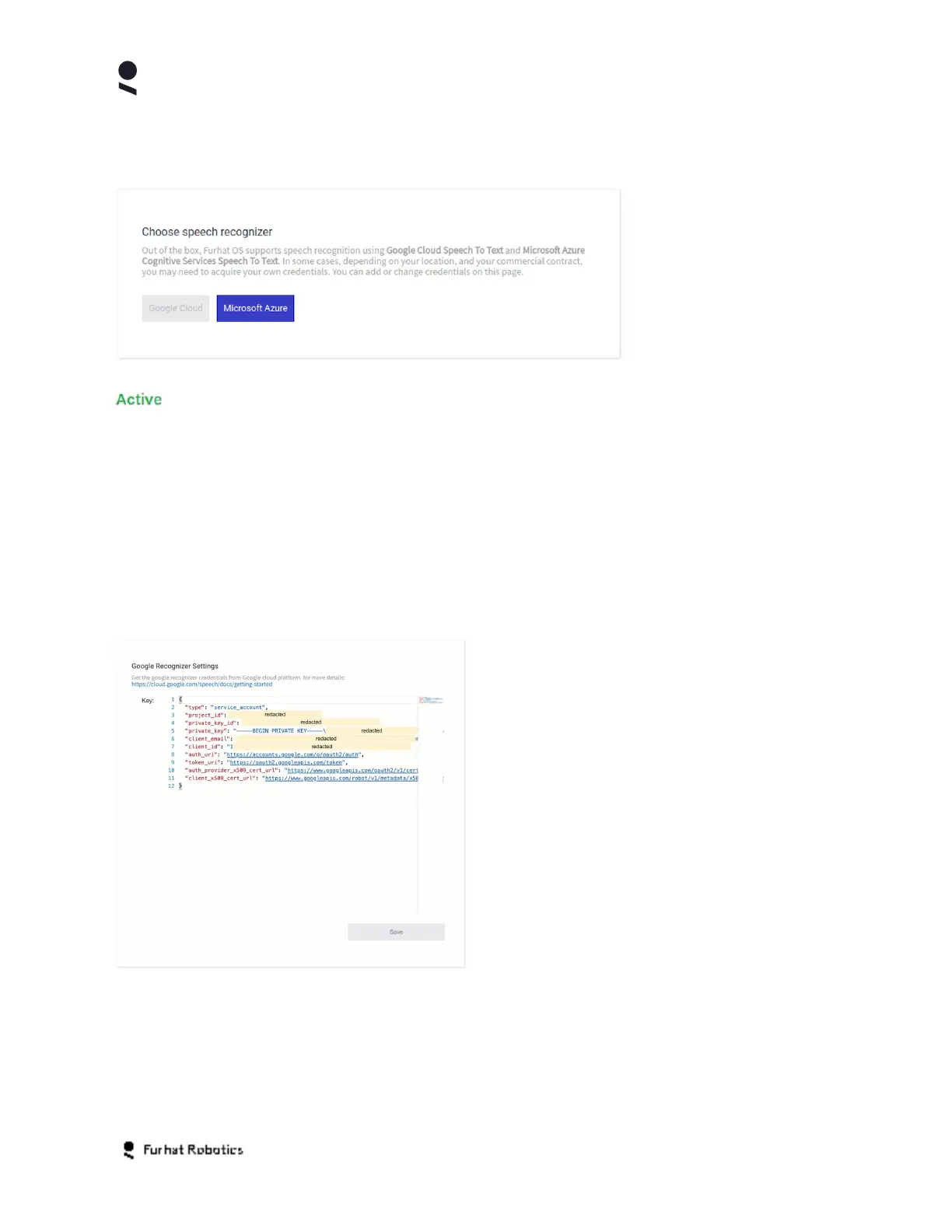
The system allows one recognizer service at a time to be active. The active recognizer is
selected using the appropriate button on the Choose Speech Recognizer panel.
Microsoft Azure support is
considered in beta status
from release 1.17.0.
Where possible, we
recommend use of the
Google recognizer and it
remains the default
system recognizer.
Once the recognizer
service has been selected, it will be denoted by an Active label on the respective
Recognizer Settings panel. You can test your settings using the Test the
speech recognizer function on the Home Tab.
The use of recognizer services requires appropriate Google
/Microsoft service specific accounts
and the related account keys/credentials. Depending on your contract, your robot may ship with
predefined credentials for one or both services. If you do not have predefined credentials, or you
wish to change to an account which you control and administer directly, then you can acquire
and configure your own account and substitute the appropriate account data into the service
specific recognizer settings panel.
If you are using the Google Recognizer you
supply the required key in the Google
Recognizer Settings panel. Selecting the
Save button saves the key data into the
system
If you are using the Microsoft Azure Recognizer you supply the required key in the Azure
Recognizer Settings panel. Selecting the Save button saves the key data into the system.
Copyright Furhat Robotics AB © 2020 - Commercial In Confidence


 To Next Page